Seedance AI Review: ByteDance's Video Generator With Multi-Shot Storytelling and Beat-Sync
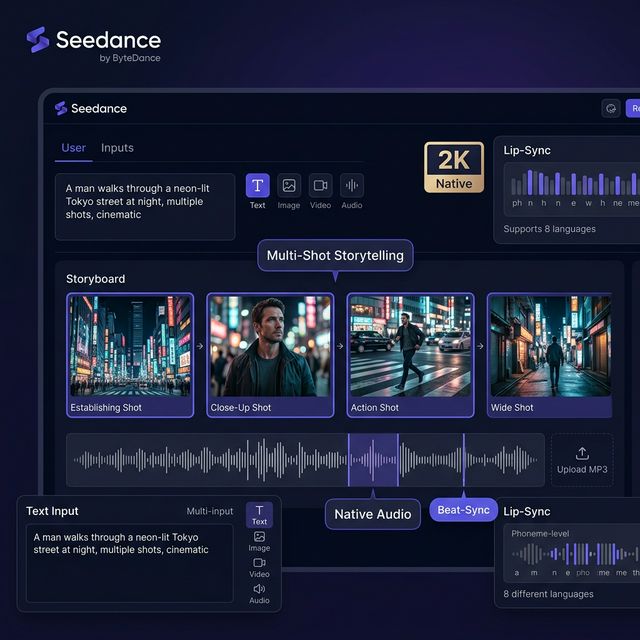
Seedance 2.0 from ByteDance has shaken the AI video world with coherent multi-shot narrative generation, native synchronized audio, 8-language phoneme-level lip-sync, and beat-sync to music tracks. Here's an honest look at what Seedance is genuinely good at and when it's the right tool.
Seedance AI 2.0: ByteDance's Video Generator That Shook Hollywood
Early 2026, a video went viral — a realistic-looking fight scene between two characters resembling Hollywood stars, realistic enough that many viewers thought it was real footage. That was output from Seedance 2.0 by ByteDance, and it rattled both the AI community and major film studios.
(Context: that realism is also why ByteDance had to pause the global rollout of Seedance 2.0 to address copyright concerns — but that's a separate conversation.)
For creators, the more useful question is: Is Seedance actually that capable, and which use cases is it genuinely built for?
Seedance 2.0 — Multi-Shot Storytelling, Beat-Sync, Native 2K, and Phoneme-Level Lip-Sync in one platform
📌 TL;DR: 3 Things to Know
- Seedance 2.0 is the most capable AI video generator for coherent multi-shot narrative — one prompt creates multiple connected shots that tell a story.
- Beat-sync to music — upload an MP3 and Seedance syncs motion and transitions to the rhythm and energy of your track.
- Limited global availability — primarily accessible through CapCut and third-party platforms right now.
Version History
| Version | Launch | Key capabilities |
|---|---|---|
| Seedance 1.0 | mid-2025 | 1080p, basic multi-shot |
| Seedance 1.5 Pro | Dec 2025 | Native audio, multilingual lip-sync |
| Seedance 2.0 | Feb 2026 | Native 2K, beat-sync, cinematic coherence |
Standout Features in Seedance 2.0
🎬 Multi-Shot Storytelling
This is Seedance's defining capability. Enter a prompt describing a concept or narrative, and Seedance automatically:
- Breaks it into multiple coherent shots
- Maintains character consistency, visual style, and atmosphere across scene transitions
- Creates smooth transitions between scenes
Result: video that looks editorially assembled, not a single AI clip.
🔊 Native Audio + Phoneme-Level Lip-Sync (8 Languages)
Unlike most tools that require separate audio integration, Seedance 2.0 generates audio and video simultaneously — dialogue, sound effects, ambient audio — with phoneme-level lip-sync accuracy across 8 languages.
🎵 Beat-Sync to Music
A genuinely unique feature: upload your MP3 file, and Seedance syncs motion, transitions, and visual beats to the rhythm and energy of your track. Invaluable for music videos.
📐 Native 2K Resolution
Seedance 2.0 generates native 2K (not upscaled). Generation speed: ~2 minutes for a 5–10 second clip, 30% faster than Seedance 1.0.
Multiple Input Modalities
Not just text-to-video: Text, Image, Video, and Audio inputs are all supported — giving comprehensive creative flexibility.
Best Use Cases
| Use case | Fit? |
|---|---|
| Music video creator | ✅ Excellent (beat-sync) |
| Short film pre-visualization | ✅ Strong (multi-shot) |
| Social media narrative content | ✅ Good |
| Multilingual brand video | ✅ Strong (lip-sync) |
| Simple single-clip generation | ⚠️ Overkill — use Kling instead |
| Custom audio mixing | ❌ Not suitable |
Limitations to Know
- Copyright: Seedance 2.0 global rollout paused March 2026 due to Hollywood studio concerns
- Availability: primarily via CapCut and Higgsfield AI; limited direct global access
- Max 15 seconds per clip for a single prompt
- Still produces artifacts in complex scenes (body distortion, hands)
- Custom post-production audio mixing is limited
How to Try Seedance Now
- CapCut → AI Features → AI Video (easiest path for global users)
- Higgsfield AI (Seedance 1.5 Pro integrated in their platform)
- getimg.ai / segmind.com (API access to Seedance)
Conclusion
Seedance 2.0 is the best AI video generator for narrative coherence and music synchronization. If you need video that tells a story across multiple shots, or a music video draft that syncs to your track — no other tool currently does this as well.
The main downside: global availability is still limited. CapCut remains the most accessible path for users outside China.
Read more:
- Generate images first then animate: Seedream AI
- Compare AI video tools: Kling AI
- Complete workflow: Freepik AI Flow