Kling AI 3.0 Review: The Best AI Video Generator for Filmmakers and Creators in 2026
Kling AI 3.0 by Kuaishou is being called 'Hollywood-level AI filmmaking.' Multi-shot sequencing, integrated native audio, multilingual lip-sync, 4K/60fps — here's an honest review of what Kling actually does well and which use cases it's genuinely built for.
Kling AI 3.0: The AI Video Generator That's Changing What's Possible
Kling AI — Kuaishou's AI video platform — has had an impressive trajectory. From Kling 1.0 through 2.0, and now Kling 3.0 (February 2026), this tool is increasingly being called the new benchmark for AI filmmaking.
The real question: is it actually that good, and should you use it?
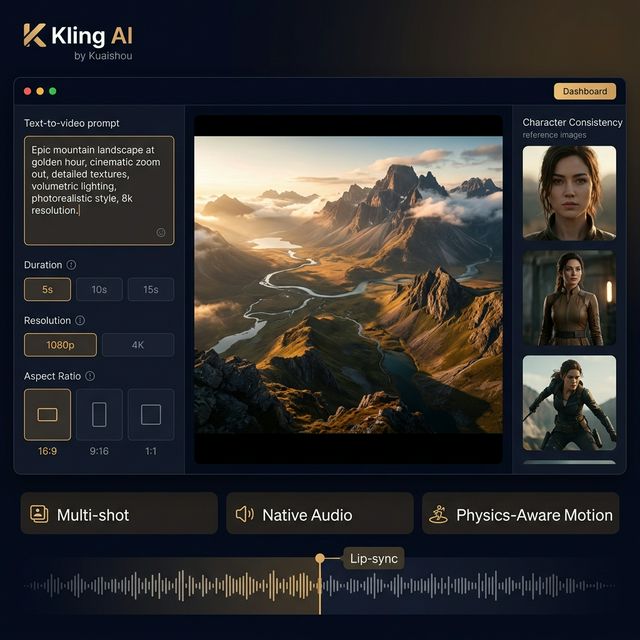
Kling AI 3.0 — Multi-shot, Native Audio, Physics-Aware Motion with a professional cinematic interface
📌 TL;DR: 3 Things to Know
- Kling 3.0 is the strongest AI video generator for visual quality and cinematic features — frequently compared to Sora on certain benchmarks.
- Multi-shot sequencing from a single prompt — generates multiple shots with different camera angles and consistent characters automatically.
- Integrated native audio engine — no separate audio integration needed; AI generates sound and lip-sync simultaneously.
What Is Kling AI?
Kling AI is the AI video platform from Kuaishou Technology — the company behind the Kuaishou (快手) short-form video app, one of TikTok's major competitors in China. Launched in 2024, Kling has rapidly become one of the most-used AI video tools globally.
Version history:
- Kling 1.0 (2024): foundational platform
- Kling 2.0 (2025): improved camera movement and cinematic styles
- Kling 3.0 (Feb 2026): multi-shot, native audio, 4K/60fps, lip-sync
Standout Features in Kling 3.0
🎬 Multi-Shot Sequencing
The most important feature in Kling 3.0. Instead of a single isolated clip, Kling 3.0 automatically generates coherent shot sequences with varied camera angles, smooth transitions, and consistent characters throughout — all from a single prompt describing the narrative.
🔊 Native Audio Engine + Lip-Sync
No separate audio pipeline needed. Kling 3.0 generates audio and video simultaneously — including AI-created sound effects, ambient audio, accurate lip-sync for dialogue, and multilingual support.
📐 4K/60fps
Kling 3.0 supports true 4K at 60fps on higher-tier plans — a meaningful jump from the previous 1080p/30fps standard.
🎭 Character Consistency via Reference Images
Upload a character reference image and Kling maintains facial features, clothing, and body proportions consistently across multiple shots.
⚡ Physics-Aware Motion
Kling actually understands physics: water flows correctly, hair moves in the right direction, cloth simulation is natural. This is where many AI video tools still produce uncanny results.
Pricing
| Plan | Price/mo | Credits | Standard videos | Best for |
|---|---|---|---|---|
| Free | $0 | Limited | ~3–5 tests | Testing only |
| Standard | ~$6.99–10 | 660 | ~33 | Casual creator |
| Pro | ~$25.99–37 | 3,000 | ~150 | Regular creator |
| Premier | ~$64.99–92 | 8,000 | ~400 | Heavy user, 4K |
| Ultra | ~$127.99–180 | 26,000 | ~1,300 | Studio/Agency |
A 10-second pro mode video ≈ 70 credits
Best Use Cases
✅ Short-Form Content (TikTok, Reels, Shorts)
Kling excels at 9:16 cinematic short clips. Physics-aware motion makes content look noticeably more real.
✅ Marketing & Advertising
Product demos, explainer clips, and short ads with consistent characters and visual quality sufficient for medium-budget campaigns.
✅ Filmmakers — Pre-viz and Storyboarding
Multi-shot sequencing lets filmmakers quickly visualize a full sequence without shooting individual scenes separately.
✅ Music Videos
Generate visuals synced to audio — you can even feed your own audio track for Kling to sync against.
✅ Education
Animate complex concepts and create explainer videos with consistent character narration.
Kling vs. Competitors
| Criteria | Kling 3.0 | Runway Gen-3 | Pika | Sora |
|---|---|---|---|---|
| Visual quality | ⭐⭐⭐⭐⭐ | ⭐⭐⭐⭐ | ⭐⭐⭐ | ⭐⭐⭐⭐⭐ |
| Native audio | ✅ Strong | ❌ | ⚠️ Limited | ❌ |
| Multi-shot | ✅ | ❌ | ❌ | ⚠️ |
| Character consistency | ✅ Strong | ⚠️ | ⚠️ | ⚠️ |
| Pricing | 💰💰 | 💰💰💰 | 💰 | 💰💰💰💰 |
| Accessibility | ⭐⭐⭐⭐ | ⭐⭐⭐ | ⭐⭐⭐⭐ | ⭐⭐ |
Limitations
- Max 15 seconds per clip in Kling 3.0 for a single prompt (extensions can increase this)
- Credits deplete quickly for high-quality long videos
- Complex visual elements (hands, dynamic water) still occasionally glitch
- Steep prompt engineering learning curve for multi-shot sequences
- Strict content moderation — some prompts get filtered
Getting Started
Step 1: Visit klingai.com, create a free account.
Step 2: Try Text-to-Video with a simple prompt:
A woman walks along a beach at sunset, golden hour lighting,
wide cinematic shot, smooth dolly forward
Step 3: Try Image-to-Video — upload a high-quality photo and describe the motion you want.
Step 4: Upgrade to Standard (~$6.99/month) for commercial use and more credits.
Conclusion
Kling AI 3.0 is the strongest AI video generator for creators who don't want to code — especially with multi-shot sequencing and native audio. If you need cinematic video with sound that doesn't require heavy post-production, Kling is a top-tier choice.
Competitive pricing versus Runway and Sora, with a more accessible interface than most alternatives.
Read more:
- Create images first then animate: Seedream AI
- Deeper multi-shot storytelling: Seedance AI
- Complete image + video workflow: Freepik AI Flow