Freepik AI Flow Review: The All-in-One AI Workflow Platform for Designers and Creators
Freepik AI Flow (Spaces) isn't just an image generator — it's a node-based AI workflow builder that integrates image generation, video creation, audio, and editing in one canvas. This review shares how to use Spaces to build automated AI pipelines, when to choose Freepik, and its real limitations.
Freepik AI Flow: When a Stock Photo Platform Becomes a Full AI Creative System
You know Freepik as a massive stock image library. But Freepik has been quietly building something much larger: AI Flow — an all-in-one AI creative platform with a node-based canvas called Spaces.
This isn't "one more AI image generator." It's Freepik's attempt to become the Canva AI equivalent for professional creators who need real control over their AI workflows.
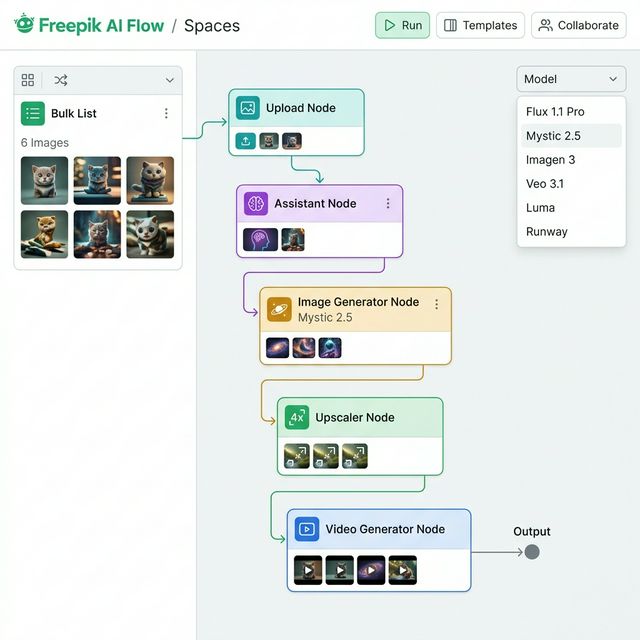
Freepik AI Flow / Spaces — Visual workflow: Upload → Assistant → Generate → Upscale → Video → Output
📌 TL;DR: 3 Things to Know
- Spaces is a node-based AI workflow builder — drag, drop, and connect nodes to create automated pipelines from prompt to finished output.
- Multiple top AI models in one platform — Mystic 2.5, Flux 1.1 Pro, Imagen 3, Veo 3.1, Luma, Runway.
- Bulk creation with the List node — generate multiple variations of the same concept in a single run.
What Is Freepik AI Flow?
Freepik AI is the suite of AI tools integrated into the Freepik platform, with Spaces as the centerpiece — a visual canvas where you build AI workflows by connecting different nodes.
Instead of using separate tools (generate image → upscale somewhere else → convert to video in a third tool), you build a continuous pipeline in one place.
The Main Nodes in Spaces
📤 Upload Node
Import images or video from your computer, Freepik's stock library, or previously generated assets.
💬 Assistant Node
An intelligent AI node that enhances prompts, converts image prompts into video prompts, generates text, and adapts instructions between workflow steps — essentially an "AI middleware" between your nodes.
🎨 Image Generator Node
Generate images from multiple available models:
- Mystic 2.5 (Freepik proprietary) — photorealistic, strong prompt adherence
- Flux 1.1 Pro — high quality, versatile
- Google Imagen 3 — realistic, strong detail
- Nano Banana Pro, Flux 1.0 Realism...
Controls: aspect ratio, seed (visual consistency), style, lighting, camera angle.
🔍 Upscaler Node (Magnific)
Upscale resolution using Magnific technology — two modes: Creative (adds detail) and Precision (preserves content, increases resolution only).
📋 List Node
Bulk creation: input multiple prompts or variations, run once, get multiple outputs. Example: 6 product images with different backgrounds in one click.
🎬 Video Generator Node
Animate images into video with:
- Google Veo 3.1, Luma, Runway, Cling
- Duration, aspect ratio controls
- Sound effects option
- Video extension (extend clip length)
How to Build a Basic Workflow
Workflow: Product Image → Social Media Video
Upload Node (product photo)
       ↓
Assistant Node (converts to video prompt)
       ↓
Video Generator Node (Veo 3.1, 9:16)
       ↓
Output (ready to post)
Workflow: Bulk Ad Variations
List Node (6 different prompts)
       ↓
Image Generator Node (Mystic 2.5)
       ↓
Upscaler Node (2x precision)
       ↓
Output (6 upscaled variations)
When to Use Freepik AI Flow
✅ Social Media Manager — Content at Scale
Create 5–10 variations of the same concept in one run. Change backgrounds, lighting, and crop ratios without re-prompting each one.
✅ Agency — Client Creative Production
Real-time collaboration with your team, templates reusable across clients. Clear visual workflows that are easy to onboard new team members into.
✅ Designers Wanting Multiple AI Models in One Subscription
Don't want to pay separately for Midjourney, Runway, and Magnific? Freepik bundles them all under one Premium subscription.
✅ E-commerce — Product Visual Automation
Pipeline: product image → background removal → lifestyle background → upscale → animate → output. All in one Spaces workflow.
✅ Beginners Who Want AI Tools Without Discord or CLI
Freepik's UI is more accessible than Midjourney's Discord interface and requires no technical setup.
Limitations to Know
- Video generation is credit-heavy — one 8-second video can consume a large portion of a monthly credit allowance
- Inpainting is inconsistent — results are "hit or miss"
- Text inside images remains a general weakness across most platform models
- Lip-sync is in beta — unreliable and prone to artifacts
- Some tools aren't as robust as their standalone versions would be
Pricing
Freepik AI features are bundled in Freepik Premium:
- Freepik Premium: ~$24.99/month (cheaper annually)
- Credits allocated for AI generation
- Full Freepik stock library included
Compared to paying separately for Midjourney ($10), Runway ($15), Magnific ($40)... Freepik Premium can be cost-effective if you genuinely need multiple tools.
Getting Started
Step 1: Go to freepik.com → login → open "AI Suite" from the left menu.
Step 2: Try the Image Generator first — select Mystic 2.5 model, write a prompt, generate.
Step 3: Once comfortable, open Spaces → New Space → add nodes and connect them.
Step 4: Use the built-in templates (social media content, product showcase) to understand how workflows are structured before building from scratch.
Conclusion
Freepik AI Flow is the best choice when you need:
- Multiple AI tools in one place with one subscription
- Visual workflow automation without writing code
- Bulk creation across multiple asset variations
- Team collaboration on shared AI workflows
If you only need one exceptional specialized tool — Midjourney for artistic work, Kling for video — the specialized tools still outperform. But for multi-step workflows and high content volume, Freepik AI Flow is a platform worth investing in.
Read more:
- For higher quality video: Kling AI
- Fastest image generation: Seedream AI
- Cinematic video control: Higgsfield AI