Antigravity AI by Google DeepMind: The Agent-First Coding Platform Redefining Developer Workflows
Antigravity isn't an AI autocomplete upgrade — it's an agentic coding platform where AI agents autonomously plan, execute, and verify complete features end-to-end: writing code, running tests, checking UI in a browser. This is everything you need to know about the tool that's redefining how developers work.
Antigravity AI: Google DeepMind's Answer to What AI Coding Was Always Supposed to Be
Imagine having a coding teammate who never sleeps, never gets tired, and can simultaneously refactor one component, write tests for another module, and verify the UI in a browser — while documenting every step for your review.
That's Antigravity — the new agentic coding platform from Google DeepMind, launched in public preview in November 2025.
This is not "advanced AI autocomplete." This is something categorically different.
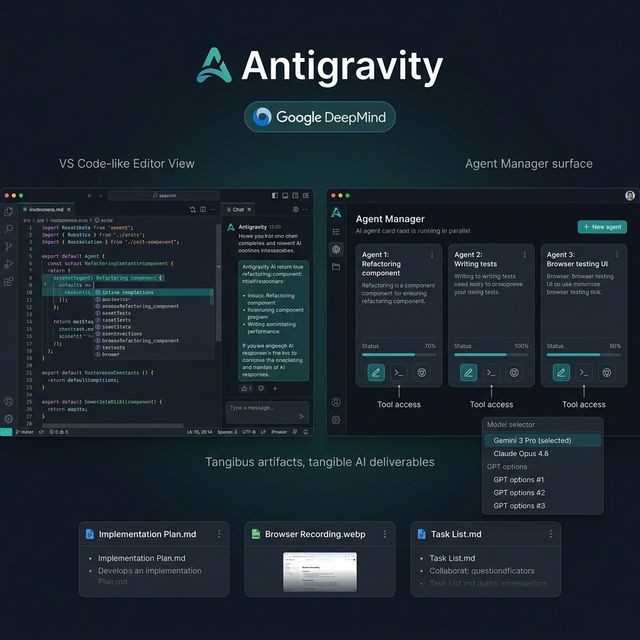
Antigravity AI — Editor View, Agent Manager with multi-agent parallel execution, and Artifacts as tangible deliverables
📌 TL;DR: 4 Things to Know
- Antigravity is an "agent-first" IDE — not "an AI plugin for your IDE." AI agents autonomously plan and execute complete tasks rather than just suggesting.
- Multi-agent parallel execution: run multiple agents simultaneously — one refactors, one writes tests, one tests the UI in a browser, all at the same time.
- Agent Manager is a separate orchestration interface — you manage agents at a mission level, not micro-managing every line.
- Tangible Artifacts: every agent task produces a Plan, Diff, Screenshot, and Browser Recording so you can review and give feedback without interrupting the agent.
What Is Antigravity AI?
Antigravity is an agentic software development platform built by the Advanced Agentic Coding team at Google DeepMind — the same organization behind some of the world's most advanced AI models.
The platform was born from a fundamental question: "If AI is actually capable enough, why does it still need you to approve every single line instead of completing an entire feature?"
Antigravity is designed to answer that question.
Timeline:
- November 2025: Public preview launch
- Early 2026: Multi-agent expansion, macOS/Windows/Linux support
- Now: Active development, incorporating community feedback
The Dual Interface Architecture — What Makes Antigravity Different
🖥️ Editor View — Familiar Surface, Supercharged
If you've used VS Code, Cursor, or any text editor, Antigravity's Editor View feels immediately familiar:
- Intelligent tab completions — not character-by-character suggestions, but whole logic blocks based on broader context
- Inline commands — invoke AI directly in the editor with
/commands - Real-time AI chat panel — ask about the codebase, request explanations, or request edits without leaving the editor
- Multi-file context — AI understands the full project structure, not just the open file
This is where you work synchronously with AI — you ask, it responds immediately.
🤖 Agent Manager — The New Surface for Agentic Coding
This is what's genuinely new. The Agent Manager is a separate interface — not an editor — where you:
- Create and assign missions to agents: "Refactor all components using class components to hooks", "Write unit tests for the auth module", "Check responsive UI on mobile viewport"
- Monitor multiple agents in parallel: watch each agent's progress as they work
- Review Artifacts: read Plans, view Diffs, watch Browser Recordings without interrupting agents
- Give feedback on artifacts: comment directly on deliverables to guide the next agent iteration
While Cursor and Claude Code still require you to be "active in the loop" for each step — Antigravity's Agent Manager lets you delegate and work on something else, then review when the agent delivers.
Key Features in Detail
🧠 Powered by Gemini 3 Pro — And More
Antigravity runs by default on Gemini 3 — Google's most capable model, optimized for:
- Enhanced reasoning across complex codebases
- Multimodality (reading images, UI, diagrams)
- Native agentic capabilities deeply integrated with the platform
But Antigravity isn't locked to one model. You can select:
- Gemini 3 Pro (default) — generous rate limits, free during preview
- Claude Sonnet 4.6 / Opus 4.6 (Anthropic)
- GPT models (OpenAI)
Same agent workflow, same interface — swap models based on the task.
🌐 Browser Actuation — Agents That Test Their Own UI
This is the feature that separates Antigravity from every other AI coding tool currently available:
Agents in Antigravity can control an integrated browser to:
- Open the actively-developed webpage
- Verify that UI renders correctly
- Click elements and test user flows
- Capture screenshots and record the full session
- Report found bugs back as part of the Artifact
No manually opening a browser after every change — the agent does it and sends back evidence. This is genuine end-to-end automation: write code → run → test in browser → report — all within a single agent task.
📦 Artifacts — Tangible Evidence for Every Task
One of the biggest challenges in agentic AI is trust: how do you know the agent did the right thing if you weren't watching every step?
Antigravity addresses this with Artifacts — concrete, reviewable deliverables after each task:
| Artifact | Contents |
|---|---|
| Task List | Every step the agent executed |
| Implementation Plan | The plan created before execution — reviewable upfront |
| Code Diff | Exact code changes, reviewable line by line |
| Screenshot | Visual UI result |
| Browser Recording | Full video of the agent's browser testing session |
| Walkthrough | Explanation of each decision the agent made |
You review Artifacts after the agent finishes — no need to watch in real-time, no need to approve micro-steps. Found something to adjust? Comment directly on the Artifact — the next agent iteration reads it and course-corrects.
⚡ Multi-Agent Orchestration
Instead of one agent working sequentially, Antigravity lets you run multiple agents simultaneously:
Agent A: "Refactor ProductCard component"       [running 70%]
Agent B: "Write unit tests for Cart module"     [done ✅]
Agent C: "Fix responsive layout on homepage"    [running 40%]
Agent B's results are ready while A and C are still running. This workflow fits perfectly for engineering teams that need parallel workstreams without adding headcount.
🧠 Self-Learning From Past Work
Agents in Antigravity are designed to learn from project history:
- Remembers code patterns you prefer
- Learns and maintains project naming conventions
- Saves useful snippets for future tasks
- Contributes to the knowledge base for subsequent agents to reuse
Over time, agents understand your project at a deeper level.
Antigravity vs Cursor vs Claude Code
| Criteria | Antigravity | Cursor | Claude Code |
|---|---|---|---|
| Philosophy | Agent-first: delegate missions | AI-powered IDE: assisted | Agentic CLI: terminal-first |
| Autonomy | ⭐⭐⭐⭐⭐ Highest | ⭐⭐⭐ Review each step | ⭐⭐⭐⭐ High with human loop |
| Multi-agent | ✅ Native parallel | ❌ Sequential | ⚠️ Background agents |
| Browser testing | ✅ Native integrated | ❌ | ❌ |
| Artifacts/Trust | ✅ Rich (plan, recording) | ⚠️ Diff only | ⚠️ Plan review |
| Model choice | Gemini 3, Claude, GPT | Claude, GPT, Gemini | Claude only |
| Base | VS Code fork | VS Code fork | CLI tool |
| Price | Free (preview) | $20/mo Pro | $100/mo Pro |
| Best for | Complex multi-task, teams | Real-time assist, solo dev | Terminal workflow, power user |
Quick verdict:
- Want to delegate and manage → Antigravity
- Want real-time pair programming → Cursor
- Power user who loves the terminal → Claude Code
Best Use Cases for Antigravity
✅ Engineering Teams — Parallel Feature Development
A team of 5 wanting to develop 5 features in parallel without adding headcount? Each developer orchestrates 2-3 agents — your effective output becomes the productivity of a team of 15.
✅ Large Codebase Refactoring
Need to migrate from class components to hooks, or REST to tRPC? This is an ideal Antigravity use case — agents can handle hundreds of files while you review each batch through Artifacts.
✅ Technical Debt Sprints
Dedicate a day to "releasing" multiple agents on a technical debt sprint: fix lint errors, add missing tests, improve error handling — all running simultaneously.
✅ Full-Stack Feature Development
Hand an agent the mission "Implement user notification system": the agent writes the backend API, frontend component, tests, and verifies the UI in a browser — delivering a plan and recording for your review.
✅ Solo Developer Wanting To Scale
If you're a solo founder or indie developer, Antigravity gives you the productivity of a small team without hiring.
Real Limitations to Know
Still in Preview:
- Some features are still under active development
- Rate limits may change as the product evolves
- Occasional beta bugs
Learning Curve:
- Requires a mental model shift from "pair programming" to "mission delegation"
- Writing effective agent missions/instructions takes practice
- Reviewing Artifacts efficiently takes time to develop
Not ideal for:
- Tasks requiring dense real-time back-and-forth → Cursor performs better
- Extremely complex codebases with deeply implicit domain knowledge → agents may miss critical context
- Environments requiring zero internet access
Trust is an ongoing process:
- Artifacts help build trust but warrant careful review initially
- Don't merge agent-produced code to production without review, especially for critical systems
Getting Started With Antigravity
Step 1: Visit antigravity.google → Request access or join the waitlist.
Step 2: Install the Antigravity IDE (available on macOS, Windows, Linux). It will import your existing VS Code extensions and settings.
Step 3: Start with Editor View — get comfortable with AI completions and inline commands. It feels closest to Cursor.
Step 4: Try the Agent Manager with a small, clearly-defined task first — for example: "Write unit tests for file X" or "Refactor function Y to handle error case Z." Review the Artifacts after the agent completes.
Step 5: Once you're comfortable with the Artifacts → Comment → Agent iteration feedback loop, start assigning larger missions and running multiple agents in parallel.
Antigravity and the Future of Software Development
Antigravity isn't about "helping developers code faster." It's a paradigm shift in what the developer role means:
Before: Developer = person who writes code
With Antigravity: Developer = person who orchestrates AI agents and reviews deliverables
This doesn't mean developers get replaced — quite the opposite. A developer with Antigravity can deliver what a small team used to. The critical skills are no longer "how fast can you type" but:
- Breaking down complex tasks into agent-executable missions
- Reviewing artifact quality and code correctness
- Architecture decisions at a higher level of abstraction
- System design and critical business logic
Google DeepMind is betting this is where the entire industry is heading. And at their current development velocity — they might be right.
Conclusion: Should You Try It?
Yes — if you are:
- A developer curious about experimenting with agentic coding as a daily workflow
- An engineering lead looking to multiply team productivity
- A solo developer or indie hacker who wants parallel workstreams
Wait and see — if you:
- Need a production-stable tool immediately (still in preview)
- Primarily use real-time pair programming → Cursor fits better right now
The bottom line: Antigravity is redefining what an "AI coding tool" can be. If Cursor impressed you, Antigravity will make you reconsider your entire mental model of developer workflow.
Read more:
- Compare AI dev tools 2026: Cursor vs Claude Code
- Build workflows with AI: AI Workflow Automation
- Build your first AI app: Your First AI App