How to Choose the Right AI Workflow Automation Tool for Technical Teams in 2026
Many teams already have AI in their stack but workflows are still messy. The problem isn't the model — it's where AI is plugged into the workflow. This guide helps you choose the right layer: n8n, Zapier, or Make, and when to use each one.
Many technical teams already have AI in their stack — scripts, bots, APIs. But workflows are still messy. Bottlenecks still appear at every handoff. The problem isn't the model you're using — it's where AI is actually plugged into your real workflow.
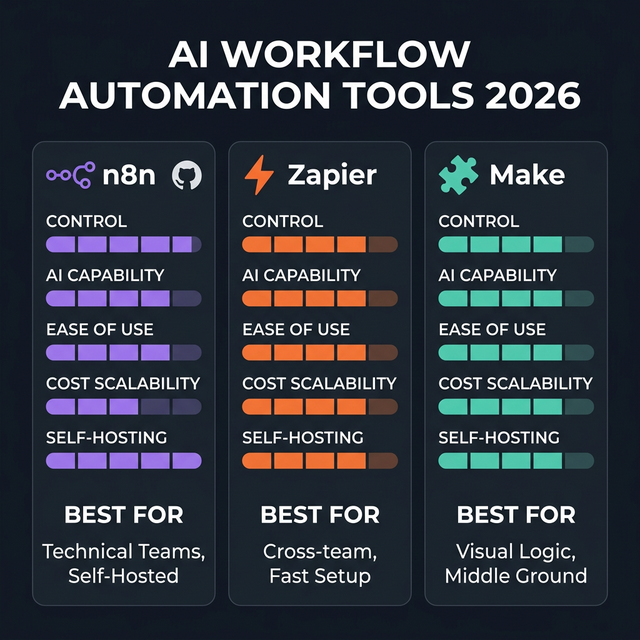
n8n · Zapier · Make — three AI workflow automation layers, three different use case clusters
Why Teams With AI Still Have Messy Workflows
AI has entered many corners of technical teams: LLM calls in scripts, bots that respond automatically, APIs returning AI results. But human workflow hasn't been optimized — people still copy-paste between tools, trigger things manually, aggregate outputs by hand.
This isn't a model problem. It's an orchestration problem: who connects the steps, who monitors them, who handles fallbacks.
3 Key AI Workflow Automation Layers in 2026
| Layer | Solves | Examples |
|---|---|---|
| Backend orchestration | Connecting apps, triggering, transforming data | n8n, Zapier, Make |
| Developer assistance | AI in IDE, terminal, code review | Cursor, Claude Code |
| In-app workflow automation | AI within a specific app's process | Notion AI, Linear AI |
This article focuses on layer 1 — backend orchestration — the layer with the broadest impact and the most confusion.
n8n — #1 Choice for Technical Teams
Open source | Self-hostable | Native AI Agent Orchestration
n8n is the strongest option for technical teams needing control and flexibility. Self-hostable (GDPR, HIPAA, SOC2 compliance), supports custom code in JavaScript or Python, connects to any REST API.
2026 standout feature: n8n has native AI Agent Tool Nodes and LangChain integration, supports self-hosted LLMs — meaning you can run AI agents entirely within your own infrastructure.
Cost: Priced by executions, not tasks — very cost-effective at scale.
Downside: Moderate-to-high learning curve. Self-hosting adds operational overhead around reliability and monitoring.
Zapier — Fast, Wide, Accessible
8,000+ integrations | Cloud-only | Accessible AI features
Zapier excels when you need to connect many SaaS tools quickly — no complex technical setup, non-technical team members can use it. Especially strong for prototyping automation MVPs fast.
AI features 2026: Summarize, classify, and generate content within workflows. Accessible but less flexible than n8n for custom AI logic.
Downside: Per-task pricing becomes expensive at high volume. Cloud-only — not suitable if you have data sovereignty requirements.
Make — Visual Logic, Middle Ground
2,000+ integrations | Visual flowchart | Agentic workflow support
Make sits between n8n and Zapier: a visual drag-and-drop interface for complex multi-branch logic, competitive pricing, supports agentic workflows.
Good for: teams that want visual clarity for complex logic, find n8n too complex for certain cases, but need more than Zapier for intricate scenarios.
Downside: Cloud-only. Native AI features more basic than n8n. Can be slow with heavy data.
How to Choose Based on Team Maturity
| Team level | Recommended tool |
|---|---|
| Solo operator, need speed | Zapier |
| Startup team, need flexibility | Make or n8n cloud |
| Technical ops team, need control | n8n self-hosted |
| Enterprise-like, data sovereignty | n8n self-hosted with governance layer |
Evaluation Criteria for AI Workflow Automation Tools
Evaluate in this priority order:
- Integration breadth — does it connect with your current stack?
- Control — can you customize logic and fallbacks?
- Observability — are there sufficient logs and monitoring?
- Maintenance cost — who keeps this workflow running reliably?
- AI step flexibility — can you plug in any LLM?
- Human-in-the-loop — can you trigger manual review when needed?
Common Mistakes When Choosing AI Workflow Automation Tools
- Choosing based on hype — Zapier being popular doesn't mean it fits your use case
- Over-automating too early — adding automation before the process is stable creates technical debt
- Insufficient monitoring — automation is useless if you don't know when it fails
- Confusing task automation with workflow transformation — automating isolated tasks ≠ transforming how your team works
A Practical Decision Framework
| Need | Choose |
|---|---|
| Speed, minimal setup | Zapier |
| Control + custom logic | n8n |
| Scale + cost-effective | n8n self-hosted |
| Visual design, hybrid human + AI | Make |
| Data sovereignty | n8n self-hosted |
How to start small: pick one repetitive weekly workflow (e.g., aggregating a report, forwarding an email to Notion), automate it for two weeks, measure time saved and error rate before expanding.