Top AI Dev Tools Worth Watching in March 2026 for Builders and Developers
The AI dev tool ecosystem is changing faster than ever. This guide helps you understand not just which tools are new, but which ones fit your actual workflow — Cursor, Claude Code, or Codex — and when to reach for each one.
The AI dev tool ecosystem has entered a new phase — shifting from code assistants to AI-native development workflows. The question is no longer "which tool is trending" but which tool fits your actual workflow.
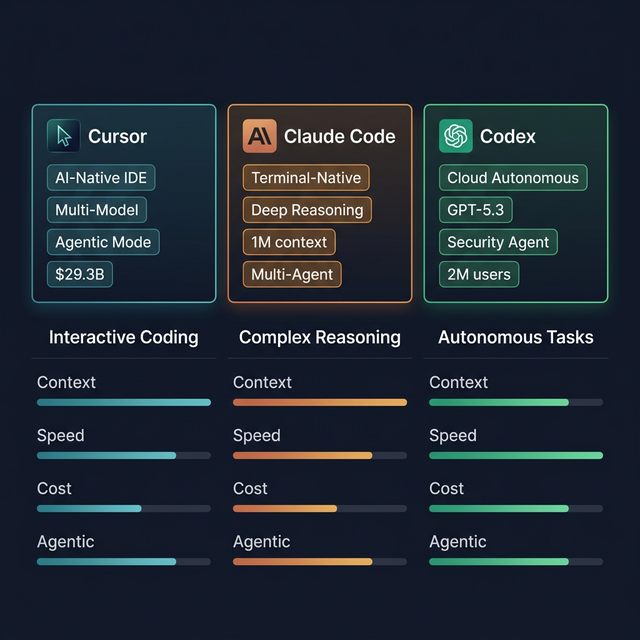
Cursor · Claude Code · Codex — three different AI dev tool layers, three different use cases
Why AI Dev Tools Are Entering a New Phase
Previously, AI dev tool = smarter autocomplete. Not anymore.
By early 2026, these tools have genuine agentic capabilities: reading your codebase, forming a plan, executing across multiple files, running tests, and committing changes. This isn't "code suggestions" — it's AI running part of your dev workflow.
The market has split along depth lines: tools built for interactive coding, tools built for deep reasoning, tools built for autonomous execution.
AI Models vs AI Development Tools: Don't Confuse the Two Layers
- AI Model = the underlying engine (Claude Opus 4.6, GPT-5.3, Gemini 3 Pro...)
- AI Dev Tool = the interface and workflow wrapper around that model
You need to evaluate both layers. A great tool on a weak model, or a great model in a poor UX tool, will both underperform.
The Three Standout AI Dev Tools Right Now
1. Cursor — AI-Native IDE for Interactive Coding
Valuation: $29.3B | Revenue: ~$1B ARR
Cursor is an AI-native code editor forked from VS Code. Its core strength: smart multi-model routing — automatically selecting Claude Opus 4.6 for architectural decisions, GPT-5.2 for CRUD routines, Gemini for research.
Agent Mode (late 2025): describe the outcome you want — "Build an interactive research dashboard" — and the Agent autonomously explores your codebase, searches docs, writes and tests code across multiple files, and produces a working demo.
Best for: daily interactive coding, visual multi-file editing, developers comfortable in an IDE environment.
2. Claude Code — Terminal Agent for Complex Reasoning
ARR: $2.5B (Feb 2026) | Context: 1M tokens
Claude Code runs in your terminal, understands entire repos, runs shell commands, makes multi-file edits, and commits via natural language. By March 2026, it has Agent Teams: a lead agent managing multiple specialized agents running in parallel.
Key advantage: higher token efficiency than Cursor for the same complex task — meaning the actual cost per task is competitive despite higher per-token pricing.
Best for: complex refactoring, architecture decisions, understanding unfamiliar codebases, long-horizon delegation workflows.
3. OpenAI Codex — Cloud Autonomous Agent
2M weekly active users | GPT-5.3-Codex + GPT-5.4
Codex is a cloud-based autonomous agent: it writes features, fixes bugs, and reviews code in a sandboxed cloud environment, creating branches and pull requests automatically. No IDE, no terminal needed from your end.
GPT-5.4 (March 2026) consolidates coding + reasoning + computer use into a single model with improved token efficiency. Codex Security identifies and fixes vulnerabilities across millions of commits.
Best for: autonomous projects, boilerplate generation, background test-writing, batch operations.
Tool Selection Criteria for Real Workflows
| Criteria | Cursor | Claude Code | Codex |
|---|---|---|---|
| Context | High (multi-model) | Very high (1M tokens) | High |
| Speed | Fast for simple tasks | Fast for complex | Batch async |
| Cost | Subscription | Token-efficient | Competitive |
| Agentic | Agent Mode | Agent Teams | Fully autonomous |
| Repo awareness | Good | Very good | Good |
Which Tool for Which Use Case?
| Use case | Recommended tool |
|---|---|
| Solo builder daily coding | Cursor (familiar IDE + AI) |
| Complex refactor of large codebase | Claude Code (deep reasoning) |
| Fast prototyping | Cursor Agent Mode |
| Autonomous background task | Codex (cloud, no monitoring needed) |
| Multi-agent orchestration | Claude Code Agent Teams |
| Security audit | Codex Security |
Key Lessons from March 2026 Power Rankings
Clearest trend: skilled developers are adopting a multi-tool stack — Cursor for interactive daily coding, Claude Code for complex reasoning in a terminal pane, Codex for autonomous tasks running in the background.
The shift from "AI assisting developers" to "developers orchestrating AI" is happening faster than anticipated. Understanding which tool does what best is now as important as knowing how to use the tools themselves.
How to Choose If You're Just Getting Started
Selection checklist:
- Do you work primarily in an IDE or terminal-first?
- Are your tasks interactive or batch/async?
- Do you need multi-file context or single-file completion?
- Is budget more important than speed for your workflow?
Test for one week: benchmark on the same real task (not vendor benchmarks). Measure: number of edit cycles, tokens used, time to satisfying result.
Three worth trying first:
- New to AI dev tools + IDE user → Cursor
- Terminal-comfortable + needs deep reasoning → Claude Code
- Want AI running autonomously → Codex