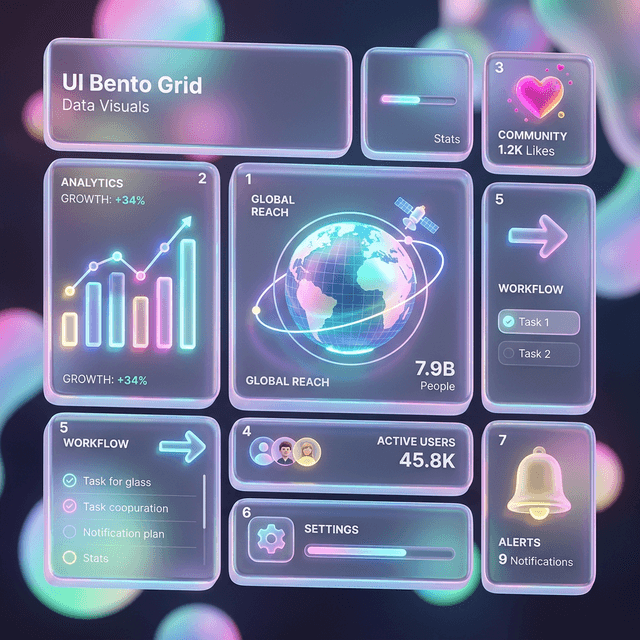
Midjourney Prompt Để Tạo Bento Grid UI — Từ Biết Gì Đến Kết Quả Đẹp
Bento grid đang là aesthetic phổ biến nhất trong UI design 2026. Bài này cung cấp prompt Midjourney đã được test để tạo Bento Grid UI đẹp — cùng framework hiểu để bạn tùy biến, không chỉ copy-paste.
Midjourney Prompt Để Tạo Bento Grid UI — Từ Biết Gì Đến Kết Quả Đẹp
Bento grid — layout chia block không đồng đều, được Apple popularize với website giới thiệu iPhone 14 — đã trở thành một trong những aesthetic đặc trưng nhất của UI design 2026. Kết hợp với glassmorphism và dark mode, nó tạo ra look premium mà designer và marketer đang cần nhiều.
Bài này cho bạn prompt đã được test để tạo ra results đẹp, và quan trọng hơn — framework để hiểu tại sao prompt hoạt động, để bạn có thể tùy biến thay vì chỉ copy.
📌 TL;DR
Prompt ngắn không tạo ra UI Bento grid đẹp. Cần chỉ định: layout structure + color palette + lighting style + quality reference + aspect ratio.
Prompt Cơ Bản: Dark Glassmorphism Dashboard
/imagine prompt: premium SaaS dashboard UI design, dark mode, bento grid layout with asymmetric card sizes, deep navy and midnight blue background, glass morphism cards with frosted glass effect, subtle neon blue accent gradients, clean sans-serif typography, data visualization charts, minimal icons, highly detailed, sharp 8k quality, Dribbble shot, Behance portfolio, --ar 16:9 --v 6.1 --style raw --q 2
Kết quả mong đợi: Dashboard với các card bento kích thước khác nhau, glass effect, màu xanh navy + blue gradient, charts và data visualization.
Prompt Variations: Theo Use Case
Marketing Landing Page Bento
/imagine prompt: modern marketing website concept, bento grid feature showcase section, light cream and soft white background, warm amber accent colors, rounded corners on all cards, subtle drop shadows, custom illustration style icons, contemporary sans-serif, clean whitespace, professional SaaS feel, Awwwards style, --ar 16:9 --v 6.1 --style raw
Portfolio Bento Grid
/imagine prompt: creative portfolio website layout, bento grid thumbnail grid, dark charcoal background, vivid coral and electric blue accents, oversized typography, image-forward cards with hover state implied, editorial magazine aesthetic, Figma community design, --ar 4:3 --v 6.1 --style raw --q 2
Analytics Dashboard Bento
/imagine prompt: enterprise analytics dashboard, dark mode, bento card layout, teal and purple data visualization, line charts, donut charts, metric cards, KPI badges, minimal clutter, information hierarchy clear, financial app aesthetic, deep background with subtle grid, --ar 16:9 --v 6.1 --style raw
Framework Hiểu Prompt — Để Tùy Biến
Mỗi prompt Midjourney tốt cho UI có 5 thành phần:
1. Layout intent: "bento grid layout", "asymmetric card sizes", "12-column grid"
2. Color palette: Cụ thể hơn là tốt hơn. "Navy and teal" → tốt. "Blue" → quá chung.
3. Aesthetic style: "glassmorphism", "neumorphism", "flat design", "brutalist"
4. Quality anchors: "Dribbble", "Behance", "Awwwards", "Mobbin design" — Midjourney học phong cách từ những nơi này.
5. Technical: --ar (aspect ratio), --v 6.1 (version), --style raw (ít art style injection), --q 2 (quality cao hơn)
Cách Đổi Brand Color
Thay thế phần màu trong prompt với brand palette của bạn:
# Original:
"neon blue accent gradients against deep navy background"

# Thay theo brand:
"vibrant coral accent gradients against deep charcoal background"  # brand đỏ cam
"warm amber gradients against cream white background"              # brand ấm
"emerald green accents against dark forest background"             # brand xanh lá
3 Sai Lầm Phổ Biến
1. Prompt quá ngắn. "/imagine prompt: bento grid UI" cho ra kết quả ngẫu nhiên, thường không phải UI. Cần chỉ định mục đích.
2. Không specify aspect ratio. Mặc định của Midjourney là 1:1 (square). UI thường cần 16:9 hoặc 4:3.
3. Không dùng --style raw. Không dùng raw → Midjourney add artistic style không phù hợp với UI design realistic.
Từ Concept Midjourney Đến Code
Sau khi có UI concept từ Midjourney, workflow tiếp theo:
- Screenshot phần thiết kế bạn muốn implement
- Mô tả cho v0.dev: "Tạo bento grid dashboard giống ảnh này, dark mode, 4 card sizes khác nhau"
- v0.dev generate React + Tailwind code
- Customize và refine trong Cursor
Đọc thêm:
- Tìm hiểu Midjourney đầy đủ: Midjourney v6 Mastery
- Chuyển concept thành code: v0.dev — Tạo UI Từ Prompt
- Tạo hình ảnh đa dạng cho design: Leonardo AI — Review
- Prompt cho UI bằng Claude: UI Design với Claude 3.5 Sonnet
- Hướng dẫn prompt tổng quát: Prompt Template Guide