Synthesia AI - The Era of Digital Avatars & Cloning (Replacing Rephrase.ai)
1. Introduction to Synthesia (The Successor to Rephrase.ai)
In previous years, discussions regarding AI-generated presenting avatars often highlighted Rephrase.ai. However, following its acquisition and absorption by software giant Adobe in late 2023, the throne for AI Spokesperson Video solutions was decisively claimed by Synthesia.
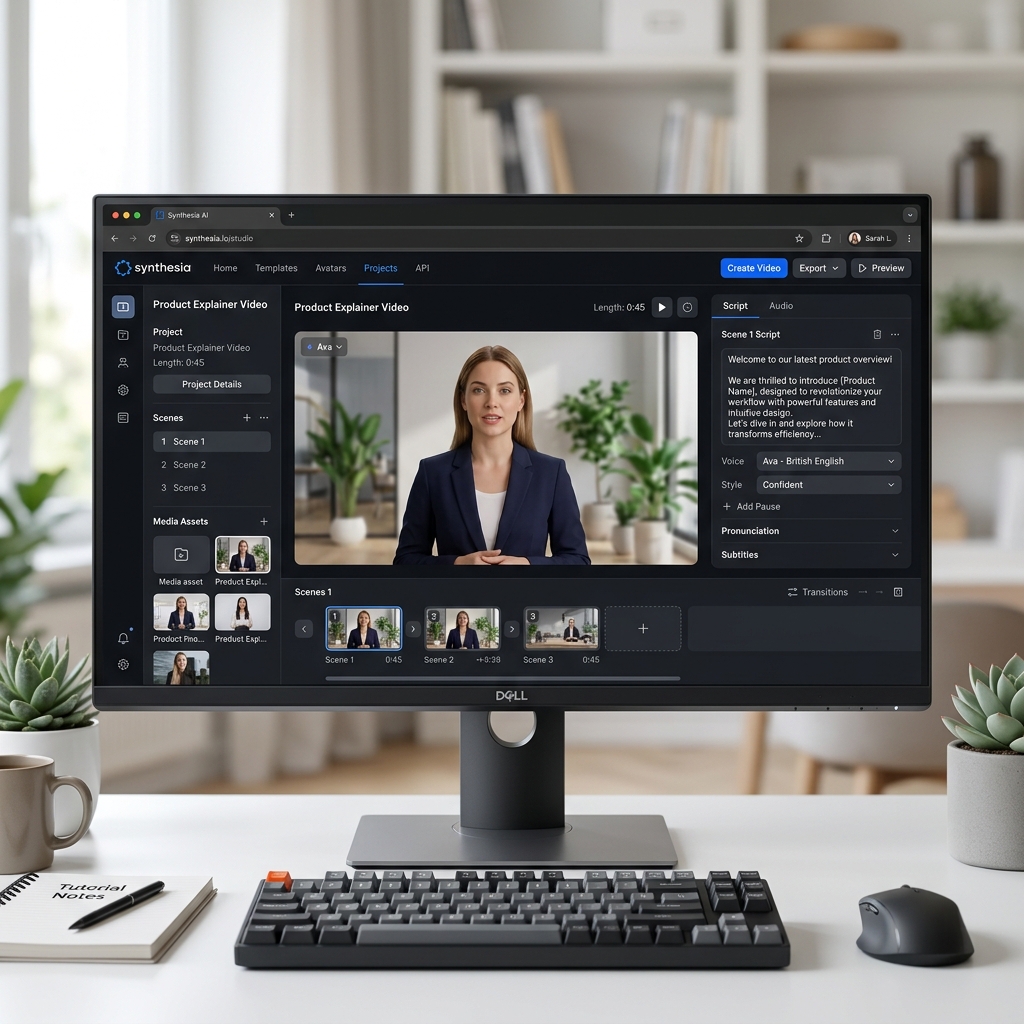
Synthesia doesn't just provide robotic text-to-speech audio over a static image. It boasts incredibly sharp "Digital Human Reproduction" capabilities: near-perfect lip-syncing micro-movements, organic eye blinks, and subtle facial expressions that mimic a professional news anchor in a studio.
Core Strengths (USP):
- Diverse Avatars & Languages: Access to over 160+ ultra-high-definition human avatars representing global demographics. Supports 130+ languages, including distinct localized voice accents.
- An All-In-One Studio: You don't need to download a raw greenscreen video and jump into Premiere. You can add slide background graphics, text animations, and transitions directly inside Synthesia's web-based canvas.
- Voice / Avatar Cloning: For an additional premium, you can create a permanent "Digital Clone" of yourself—allowing the AI to read future scripts using your exact physical likeness and cloned vocal tone forever.
2. Core Features and Practical Use Cases
Synthesia is aggressively slashing budgets for actors, cameras, and lighting setups across major Corporate Communications departments.
- HR Training (L&D and Onboarding): Rather than forcing new hires to read text-heavy PDF slides, an engaging "Virtual Executive" reads the compliance and soft-skills training material out loud on screen.
- Personalized Sales Outreach: Record a base template video, and let the AI automatically tweak the audio to say "Hello [Client Name], from [Company X]" for 100 different recipients. The hyper-personalization dramatically increases email open rates.
- Faceless YouTube Networks: Creators build psychology, history, or education channels without ever showing their real face or using their own insecure voice narration.
- Rapid Localization: Swapping out a 5-minute software tutorial video's lip-syncing track from English to perfect localized Vietnamese takes under a minute, avoiding expensive voice-over studio rentals.
3. Basic Usage Guide
Using the "Studio" flows much like building a presentation:
- Access: Log into synthesia.io.
- Select a Template & Avatar: Pick a digital actor that fits your brand tone: A formal executive in a suit, or a casual presenter in a t-shirt?
- Input the Script: Paste your written text into the bottom/side script box. The UI automatically slices the text into manageable "scenes" and maps the spoken audio to the avatar.
- Micro-Tweaks (Diction): If the AI mispronounces a niche industry acronym or a specific localized proper noun, you can utilize the "Diction" tool to spell it out phonetically (e.g., spelling out "Nyoo-yen" for "Nguyen"). You can also insert manual breathing pauses (,).
- Publish: Hit generate. The cloud servers render the high-fidelity video within a few minutes, outputting a highly shareable MP4 or embed link.
4. Best Practices
- Write for Speech, Not for Print: A legal document sounds terrible when read aloud unedited. Shorten your sentences. Actively write in a conversational, enthusiastic tone so the Avatar’s facial mapping AI stretches and triggers "smile" micro-expressions more naturally.
- Utilize Micro-Gestures: V2.0+ of the platform supports specific timeline gestures. Manually insert a "nod" or "eyebrow raise" command directly into the script between sentences to break up the static standing posture.
- Check Your Framing: While 2026 AI models have largely bypassed the "Uncanny Valley" (the eerie feeling of human-replica dolls), you should still avoid framing the Avatar so it occupies 80% of a tight close-up shot. Apply the Rule of Thirds: frame them as a Medium Shot on the side, and place rich, distracting presentation slide data in the remaining empty space to keep the video visually balanced.
5. Pricing and Tiers
Because rendering photorealistic 3D human faces requires immense server compute, Synthesia is a premium product, but the ROI for replacing a live film crew is undeniable.
| Plan | Estimated Cost | Key Features & Quotas |
|---|---|---|
| Starter | ~ $22 / mo (Billed Annually) | Yields 120 minutes of generated video per year (avg. 10 mins/month). Great entry-level tier for occasional use. Framed within strict avatar bounding boxes. |
| Creator | ~ $67 / mo (Billed Annually) | Expands the quota to 360 minutes/year. Crucially, it unlocks the ability to upload Custom Audio tracks, download high-res files, and utilize dynamic custom background integrations. |
| Enterprise | Custom Pricing | Unlocks exclusive API access for Mass Video Personalization engines and allows organizations to build and host Custom Brand Avatars (cloning their actual CEO, for example). |
6. Conclusion
Synthesia has come a long way from the slightly "stiff, robotic-looking" models of 2022 to establishing the absolute gold standard for AI voice-to-face broadcasting quality in 2026. Anyone currently burning tens of thousands of dollars on live video production for internal corporate comms should test the platform immediately.
- Pros: The lip-sync mapping is monstrously accurate across 100+ languages. The integrated Video Designer studio offers a UX flow just as smooth as Canva or PowerPoint. Excellent enterprise-grade customer support.
- Cons: The minute-generation limits on the entry tiers are quite restrictive if you make a lot of mistakes and need to re-render. Some niche minority localized accents can occasionally sound slightly "flat" when expressing extreme emotions (anger/despair) compared to the flagship English voices.
Experience the Avatars: Synthesia.io