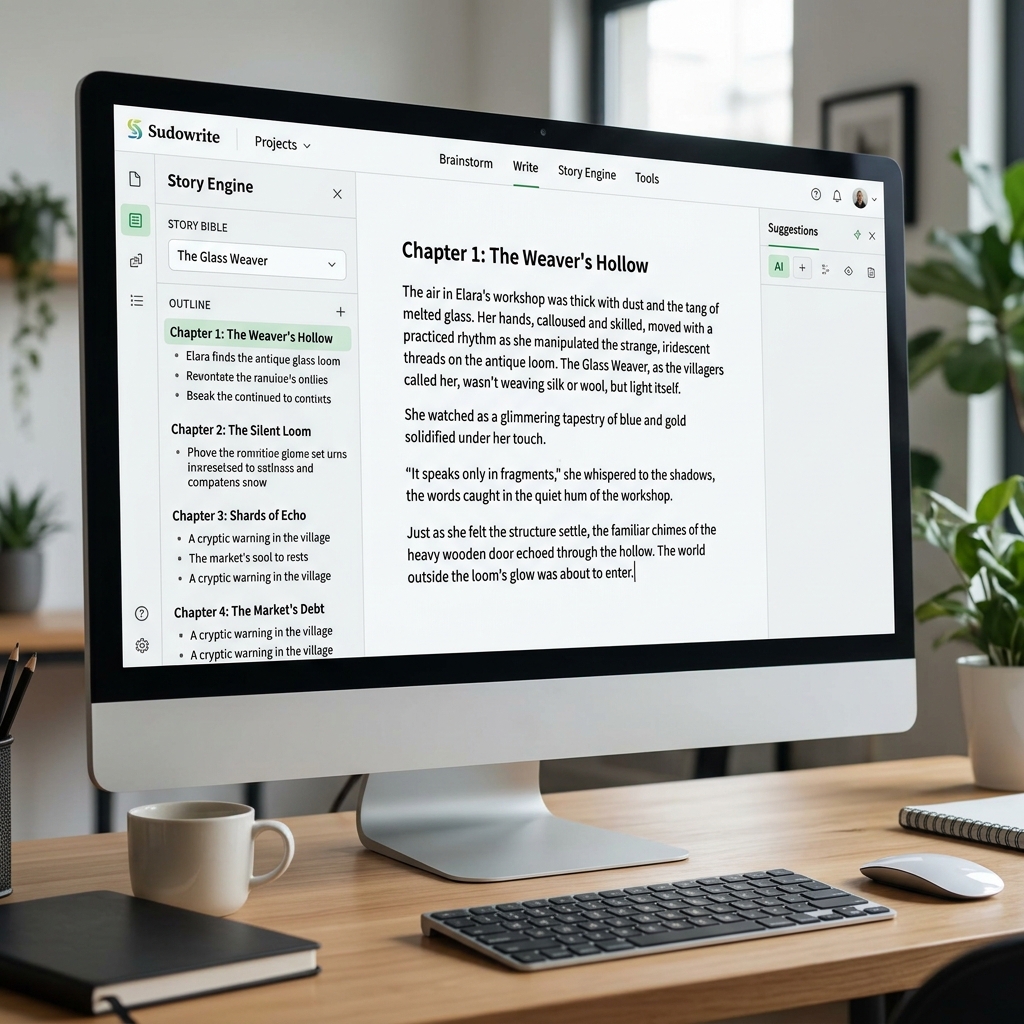
Sudowrite - The AI Assistant Built Exclusively for Novelists
1. Introduction to Sudowrite
If ChatGPT is a generalist office assistant that knows a little about everything, Sudowrite is an obsessive, incredibly talented literary editor. It is currently the market-leading AI platform designed strictly for writing Fiction (Novels, Screenplays, and Short Stories).
Built by published fiction authors, Sudowrite's greatest asset isn’t just "pressing a button to vomit out a generic book." Instead, it provides a "Co-writing" environment. The human author retains the role of the visionary directing the plot, while the AI acts as an accelerator—suggesting ideas, expanding scenes, and smashing through Writer's Block.
Core Strengths (USP):
- The "Muse" Models: The AI models running under the hood are uniquely fine-tuned on millions of pages of classic and contemporary literature. The resulting prose leans heavily into the "show, don't tell" philosophy, offering rich sensory details rather than robotic summaries.
- The Story Bible: A centralized database that forces the AI to memorize your character's backstory, their physical appearance, worldbuilding rules, and narrative tone, ensuring 100% consistency across a 100,000-word manuscript.
- Micro-Editing Tools: Highlight a bland sentence and hit
Describe. The AI will instantly generate 5 different variations focusing on Smell, Taste, Sound, Sight, and Touch to make the scene exponentially more immersive.
2. Core Features and Practical Use Cases
- Serial Web Novelists: Incredibly useful for authors who publish massive, ongoing daily chapters on platforms like Wattpad or Royal Road.
- Brainstorming Plot Twists: Are your characters stuck in a locked room and you have zero ideas on how they escape? Open the Brainstorm tab. Sudowrite will generate 10 highly logical, unexpected loopholes for them to exploit.
- Character Development: Provide basic traits (e.g., "Male, 18, orphan, fire magic"), and the system generates a deep 2-page psychological profile including hidden fears, motivations, and behavioral quirks for you to save into the Story Bible.
3. Basic Usage Guide (The Story Engine Workflow)
The vast majority of authors flock to Sudowrite for its immensely powerful Story Engine:
- Log into sudowrite.com (they offer a free trial of around 10,000 words).
- Open the
Story Enginetab on the left. - Level 1 Input (Genre & Style): Define your book ("Cyberpunk Detective Thriller") and the prose style ("Dark, gritty, fast-paced like Dan Brown").
- Level 2 Input (Synopsis & Characters): Paste your overarching story summary and character list into the Story Bible.
- Generate the Outline: Ask the AI to build a structural Chapter-by-Chapter outline. Manually tweak this outline until you are satisfied.
- Write the Beats: Choose a chapter. The AI will break it down into 5 specific narrative actions (Beats).
- Generate Chapter: Click the button and watch the magic happen. Pulling from the 5 simple beats and remembering the character personalities from the Story Bible, Sudowrite automatically prose-generates a full 2,000-word chapter featuring logical dialogue and internal monologues.
4. Best Practices
- Do Not Autopilot 100%: No matter how good Sudowrite is, letting the machine write 10 pages continuously without human intervention will cause the characters to lose their "soul." The golden rule of AI co-writing is: Let the AI write 500 words -> Stop, read, edit 100 words, redirect the plot -> Let the AI write the next 500.
- Abuse the 'Describe' Button: If you've written an action sequence but it feels dry ("He swung his sword at me"), highlight it. Hit
Describe. Sudowrite might suggest: "The cold steel tore through the night air, the blade shrieking past my ear carrying the metallic scent of sudden death." Pluck the best sentences and drop them into your draft. - Monitor Your "Credits": The platform charges based on the number of words generated. Clicking
Generaterecklessly will burn through your monthly subscription package very quickly.
5. Pricing and Tiers (2026)
Pricing is strictly volumetric, based on an author’s expected monthly output:
| Plan | Estimated Monthly Cost | Volume (Credits / Words) | Best For |
|---|---|---|---|
| Hobby & Student | ~ $19 | ~ 225,000 credits | Hobbyists writing short stories or novellas on the weekends. Plenty of headroom for casual use. |
| Professional | ~ $29 | ~ 1,000,000 credits | Part-time authors actively working to finish and publish a full-length Novel (>80k words). |
| Max | ~ $59 | ~ 2,000,000 credits | Prolific Ghostwriters and serial authors publishing daily chapters. Crucially, this tier often allows unused credits to roll over to the next month. |
6. Conclusion
Ignore those who claim AI makes writers "lazy." Sudowrite proves that AI acts as a phenomenal springboard, allowing authors to maximize their imaginative output and shrinking the time it takes to finish a messy first draft from 1 year down to 2 months.
- Pros: The interface is phenomenally tailored specifically for fiction writers, stripping away useless generalist chatbot clutter. The Story Bible is a technological marvel for maintaining narrative consistency.
- Cons: You still need a deep understanding of structural writing terminology (Beats, Synopsis, Show-Don't-Tell) to squeeze brilliant prose out of the machine. The AI can still occasionally hallucinate or break character if the data you feed into the Story Bible is contradictory.
Start Writing Your Novel: Sudowrite