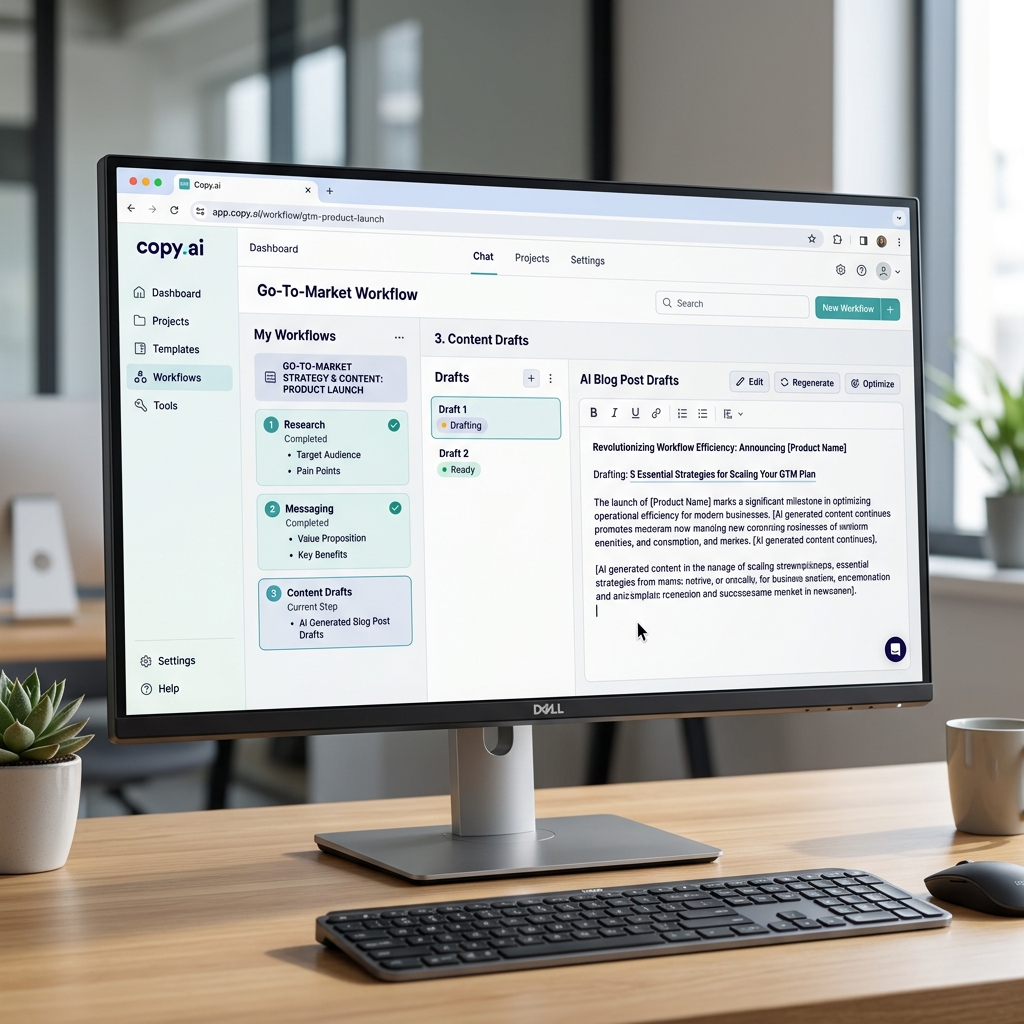
Copy.ai - Automating Corporate Go-To-Market Workflows
1. Introduction to Copy.ai
The most interesting aspect of Copy.ai is its evolution. If a few years ago it was simply known as software where you "Type a prompt -> Get a Facebook post" (a basic AI Writer), by 2026, Copy.ai has drastically repositioned itself as a GTM AI Platform (Go-To-Market AI).
Instead of just generating text in a vacuum, the system focuses heavily on building and executing Workflows. Copy.ai allows Sales and Marketing teams to daisy-chain dozens of micro-tasks together—from scraping a competitor's LinkedIn, summarizing reports into a Slack channel, generating user personas, all the way to automatically drafting and publishing an SEO-optimized blog to WordPress, all via a single click.
Core Strengths (USP):
- Brand Voice Integration: Train the AI on your company's old PDFs and successful blogs. It learns to "speak" with your exact brand tone and vocabulary, eliminating the robotic AI sound.
- Automated Workflows: This is where the magic happens. You can build visual logic chains to generate dozens of hyper-personalized emails or articles running on automation logic.
- LLM Agnostic: Copy.ai routes your tasks dynamically through the best available models behind the scenes (GPT, Claude, etc.), rather than locking you into one.
2. Core Features and Practical Use Cases
Today's product caters heavily to B2b (Business-to-Business) enterprise departments:
- Massive Cold Email Personalization: Feed the AI an Excel sheet with 500 potential client URLs. The workflow visits each URL, researchers the company, and writes 500 hyper-personalized outbound sales emails reflecting each target's current business scenario.
- Scaling Content SEO: Take one keyword and let a workflow spin it into an Outline, a Draft, and an automatically formatting CMS post, fueling massive satellite web networks.
- Competitive Intelligence Alerts: Schedule a weekly workflow that scrapes competitors' news feeds or blogs, summarizes competitive shifts, and automatically sends a memo to your team's internal network.
- Bulk Product Descriptions: Perfect for e-commerce platforms like Shopify; generate 2,000 uniquely engaging product descriptions simultaneously based on raw catalog spreadsheet data.
3. How to Access and Setup
Getting into the ecosystem is straightforward:
- Visit Copy.ai.
- Sign up using a Google Account or work email.
- You are immediately placed into a Workspace dashboard. Unlike ChatGPT's single chat interface, you are presented with a robust sidebar menu featuring Projects, Workflows, Brand Voice, and InfoBase.
4. Basic Usage Guide (Building a Workflow)
Here is a practical example of how the workflow mindset operates differently from standard chat interfaces:
- Step 1: On the sidebar, click
Workflows-> Create New. - Step 2 (Input): Define the starting data -> Paste the URL of a YouTube video your Marketing team just published.
- Step 3 (Action 1): Add an AI action: "Transcribe the contents of this YouTube video."
- Step 4 (Action 2): Add the next node: "From that transcript, generate 3 professional LinkedIn posts and 1 one-minute TikTok script."
- Step 5 (Action 3): Apply your
Brand Voice. Tell the workflow: "Proofread those 4 pieces of content using our strict corporate Brand Voice." - Step 6: Hit
Run. Instead of manually chatting back and forth 6 times with a bot, Copy.ai runs the assembly line and spits out the finalized marketing assets. Next week, you just paste a new video link into the exact same workflow template.
5. Best Practices
- Invest time in your 'Brand Voice': Do not skip this step. Upload at least 10 of your best blogs, 5 high-converting emails, and your PDF Brand Guidelines. The more high-quality context the AI reads, the less it sounds like a machine.
- Use the InfoBase: If your company has a big upcoming event (Dates, Speaker Names, Ticket Prices), save that info in the InfoBase under a tag like
#EventBeta. When drafting content, just type#EventBetaand the AI pulls all the factual data seamlessly, preventing it from hallucinating fake details. - Integrate heavily with Zapier/Make: To get true enterprise ROI, use Webhooks to trigger Copy.ai workflows directly from your CRM (like HubSpot), and funnel the written output directly back out without human copy-pasting.
6. Pricing and Tiers (2026)
Copy.ai's pricing heavily reflects its B2B Workflow positioning:
| Plan | Cost (US$) | Features Included |
|---|---|---|
| Free | $0 | Essentially a trial. Offers incredibly strict word limits (around 2,000 words/month) and locks out deep Workflow chaining. |
| Pro | Starts at ~$49 / mo | The entry point for serious use. Covers 40,000+ words, provides 3-5 team seats, and unlocks full Workflow capabilities with top-tier LLMs. Scales up in price ($99 - $279/mo) based on exact word volume needs. |
| Enterprise | Custom Pricing | Dedicated for massive API volume, custom security audits, SLA server guarantees, and direct support from Copy.ai's GTM engineers. |
7. Conclusion
While it started as a simple copywriting tool, Copy.ai has climbed significantly higher up the tech-value ladder.
- Pros: The "AI Workflow" concept phenomenally reduces the repetitive loop drudgery of Sales and Marketing reps. By hard-coding Brand Voice and InfoBase facts into the process, output quality is highly stable compared to manually prompting chatbots.
- Cons: Slightly overwhelming for individuals. If you are a solo freelancer who just wants a snappy Instagram caption occasionally, this platform contains far too many Enterprise features that will clutter your experience compared to a simple ChatGPT window.
Start Automating: Copy.ai