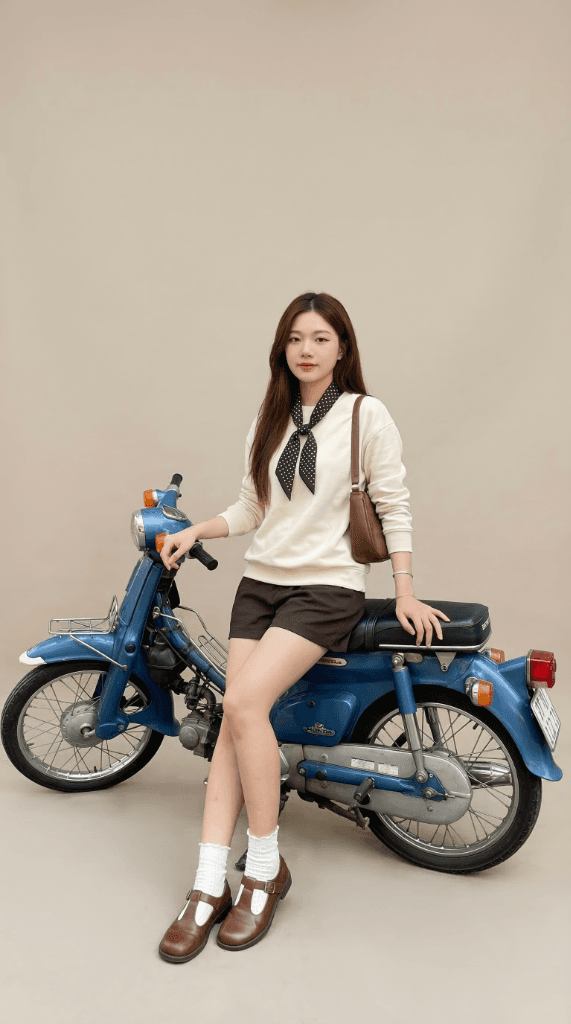
The 3-Reference Prompt: Maintain Identity, Swap Outfit, Copy Pose
The most advanced technique in AI fashion photography: using 3 independent reference images for 3 completely separate roles — identity, outfit, and posture. Each image does only one specific job.
If you've mastered Virtual Try-On (swapping an outfit from one model to another), this is the next level up: The 3-Reference Image Prompt.
Instead of just exchanging clothes between two photos of real people, this technique allows you to:
- Image 1 → Extract ONLY the identity (face, body shape, skin tone, hair)
- Image 2 → Extract ONLY the outfit & accessories (from a flatlay or product shot)
- Image 3 → Extract ONLY the pose, posture, and necessary physical support
Three roles. Three images. Zero overlap. This is one of the hardest challenges for an image generation AI, as it must understand the context of each image without allowing the visual information to "bleed" into the wrong categories.
Visualizing the 3-Reference Workflow
Let's look at the dataset: 3 source images + 1 output result:
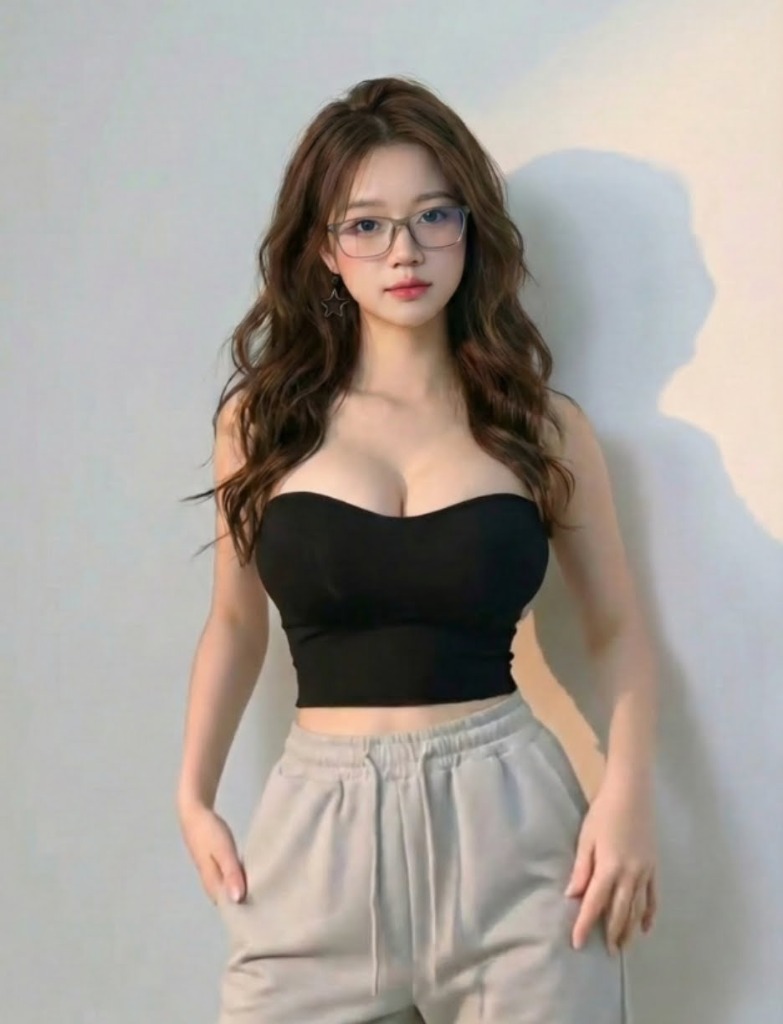
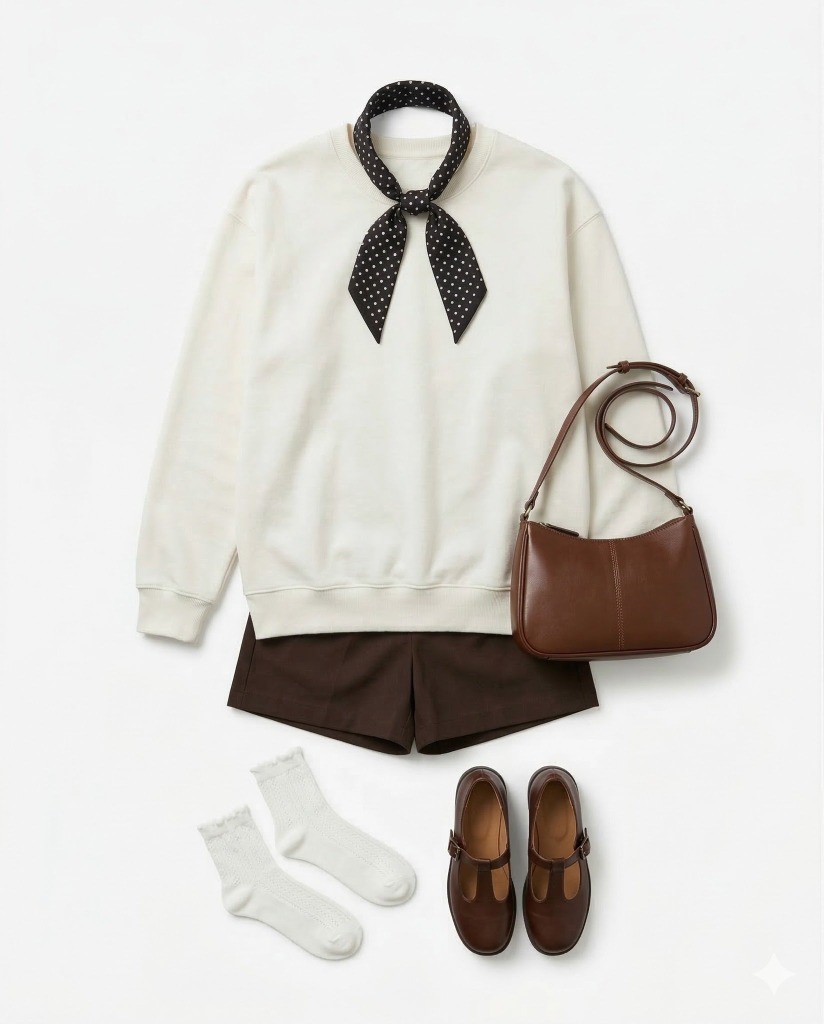
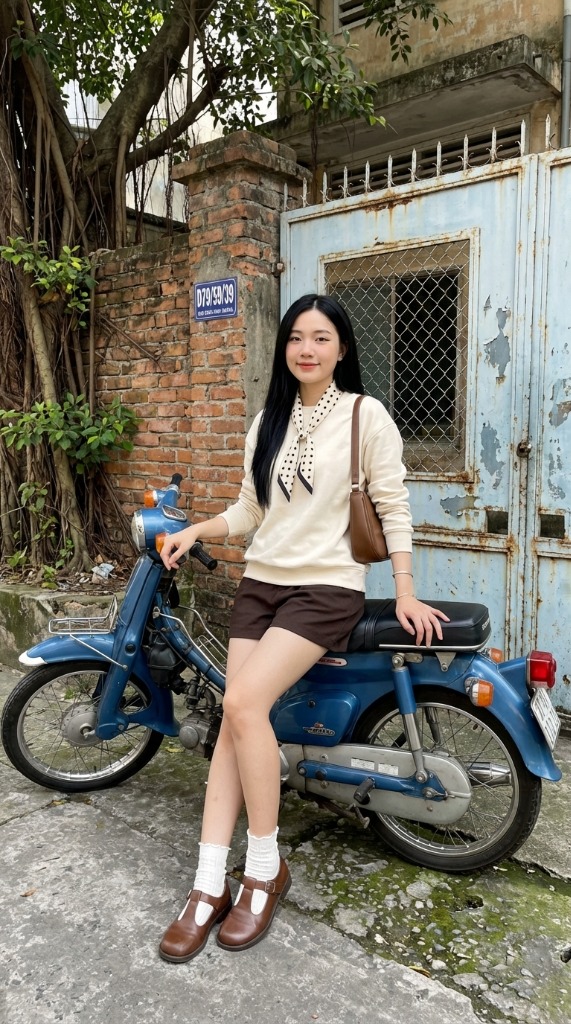
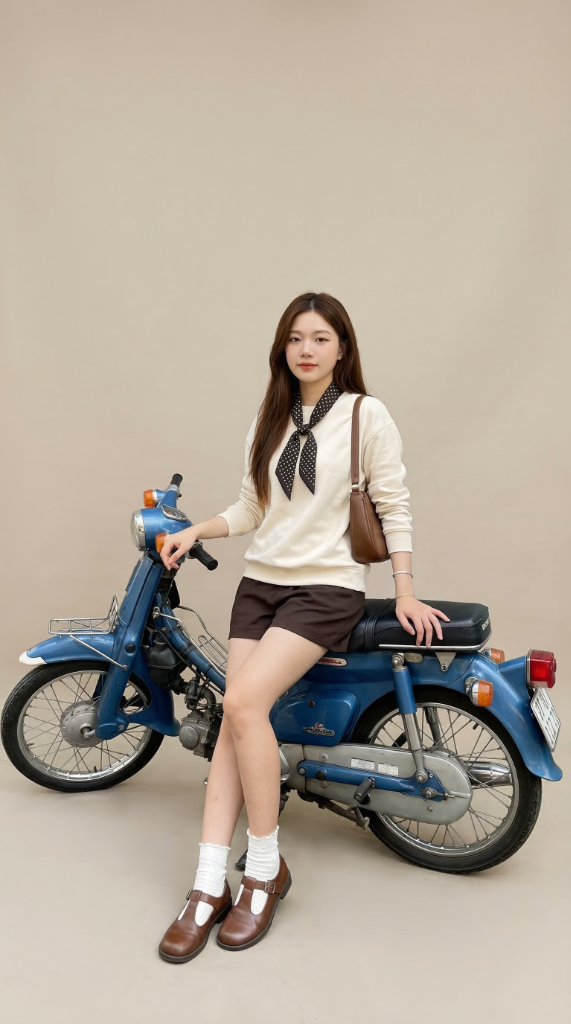
Look closely at the result: the face perfectly matches Image 1, the entire outfit (white sweater, brown shorts, polka-dot scarf, brown leather bag, white socks, brown Mary Jane shoes) has been successfully applied from a 2D flatlay onto a 3D body, and the sitting pose on the vintage motorcycle is accurately copied from Image 3. A neutral studio background replaces the original street setting.
The Full Prompt (Copy and Use Now)
Reference mapping:
- Image 1: identity reference
- Image 2: outfit and accessories reference
- Image 3: pose reference

Strict reference usage:
- Use Image 1 only for the subject's identity, face, body shape, proportions, skin tone, hair color, hairstyle, and overall likeness.
- Use Image 2 only for the outfit and accessories.
- Use Image 3 only for the body pose, posture, limb placement, balance, weight distribution, and any required physical support objects that are necessary for the pose to make sense realistically.
- Do not mix these roles between references.

Priority order:
1. Identity fidelity from Image 1
2. Outfit and accessory accuracy from Image 2
3. Pose accuracy from Image 3
4. Physical support consistency required by the pose from Image 3

Create a hyper-realistic full-body studio fashion photograph of the woman from Image 1, preserving her identity with maximum fidelity. Maintain the same facial structure, bone structure, apparent age, ethnicity, skin tone, hair color, hairstyle, body shape, natural proportions, and overall likeness from Image 1. Do not alter the subject's identity or physique.

Match the pose from Image 3 as precisely as possible, including posture, limb placement, balance, weight distribution, and body mechanics, with no unnecessary interpretation or stylistic modification.

If the pose in Image 3 physically depends on a support object such as a chair, stool, bench, step, wall, railing, or other prop, include the minimum necessary support object required to preserve the realism and physical logic of the pose. The support object must match the functional placement implied by Image 3 and should only serve to support the pose naturally. Do not omit required support objects when doing so would make the pose physically implausible.

Support object rules:
- Include only the support object(s) strictly necessary for the pose to work realistically.
- Keep the support object visually simple, neutral, and studio-appropriate unless a specific support object is clearly required by Image 3.
- Do not let the support object become the main subject of the image.
- Do not add decorative props or unrelated furniture.
- Do not replace a necessary support object with a different object that changes the pose logic.
- The support object should remain secondary to the model and outfit.

She must wear the exact same outfit and accessories from Image 2. Preserve the original design, colors, materials, texture, construction, stitching, fit, layering, and realistic fabric drape. Do not redesign, restyle, simplify, or reinterpret the clothing or accessories.

Expression should be calm and confident, with a subtle natural smile, eyes open and looking forward. Preserve natural skin texture, pores, and realistic facial detail. No beauty retouching and no skin smoothing.

Background:
A clean professional studio with a soft neutral beige backdrop, evenly lit, with a minimal natural gradient and no distractions.

Style:
High-end editorial fashion photography, ultra-realistic, true-to-life color, fully photographic, no CGI, no stylization, no artificial plastic skin.

Lighting:
Soft diffused studio lighting, frontal key light slightly above eye level, gentle fill, natural contrast, and subtle shadow definition.

Camera and framing:
Full-body, straight-on composition, 85mm portrait lens feel, medium aperture look similar to f/5.6 to f/8, sharp detail across the entire body, with the face as the primary visual focus, ultra-high resolution.

Strict rules:
- Keep the person from Image 1.
- Use the outfit and accessories only from Image 2.
- Use the pose only from Image 3.
- Include any support object only if it is physically required by the pose in Image 3.
- Do not use Image 2 or Image 3 to change the subject's identity.
- Do not use Image 1 to override the outfit from Image 2.
- Do not use Image 2 to influence pose.
- Do not use Image 3 to influence clothing design.
- Do not alter the background specification except for the minimum necessary pose support object.

Negative prompt:
identity drift, face alteration, changed person, beautification, skin smoothing, CGI, plastic skin, anatomy distortion, incorrect proportions, extra or missing fingers, deformed hands, closed eyes, exaggerated smile, artificial posing, clothing redesign, missing accessories, unrealistic fabric behavior, unnecessary props, decorative furniture, physically impossible pose, harsh lighting, dramatic color grading, blur, low resolution, noise, artifacts, text, watermark, logo
Deconstructing the 3-Reference Prompt Architecture
This prompt is built in 5 distinct layers, each solving a specific technical problem. This is the most complex output an AI has to handle because it needs to understand the context of each image WITHOUT letting the information "leak" into another role.
Layer 1 — Reference Mapping (Declaring Roles)
- Image 1: identity reference
- Image 2: outfit and accessories reference
- Image 3: pose reference
This is the first and most crucial step — naming and assigning roles to each image before doing anything else. The AI won't automatically know which image is for what purpose if you just upload three images without explanation.
Next, the Strict reference usage command repeats the roles but adds a negative constraint: "Do not mix these roles between references." This acts as a cross-lock, preventing the AI from arbitrarily using pose data from Image 1 or a face from Image 3.
Layer 2 — Priority Order (Conflict Resolution)
1. Identity fidelity from Image 1
2. Outfit and accessory accuracy from Image 2
3. Pose accuracy from Image 3
4. Physical support consistency required by the pose from Image 3
When the AI has to "sacrifice" something (for example: if the pose in Image 3 obscures part of the outfit in Image 2), it needs to know what is allowed to yield. This list is the "law of priority" — identity is paramount and never compromised, even for the sake of the pose or the outfit.
Layer 3 — Support Object Logic
This is the most unique and intelligent part of the prompt:
If the pose in Image 3 physically depends on a support object...
include the minimum necessary support object required to preserve
the realism and physical logic of the pose.
In our example, Image 3 features a person perched on a motorcycle. Without the motorcycle, the sitting pose becomes physically impossible — no one hovers the air. Therefore, the motorcycle must manifest in the generation as "the minimum necessary support prop."
But the prompt also includes 5 conditional constraints to prevent over-generation:
- Include ONLY the minimum necessary support object
- It must sit behind the model, never becoming the main subject
- No added decorative furniture
- Do not swap it for a different object that alters the pose logic
Result: The motorcycle is present to make the pose work, but it completely yields visual priority to the model and the outfit.
Layer 4 — Photography Specification
The prompt uses technical photography language to force the AI into the correct render style:
85mm portrait lens feel→ the perspective compression typical in fashion photographyf/5.6 to f/8→ a medium aperture so the whole body remains sharp, not just the faceFrontal key light slightly above eye level→ specific lighting placementFull-body, straight-on composition→ framing constraints
Each parameter directly influences render quality — from how light falls the fabric to how the background gradients are handled.
Layer 5 — Strict Rules + Negative Prompt (The Double Guardrails)
The prompt concludes with two sequential defense layers:
Strict rules — Recapping the primary restraints as short bullets so the AI "recalls" them right before generation:
- "Do not use Image 2 to influence pose" → the outfit reference cannot dictate posture
- "Do not use Image 3 to influence clothing design" → the pose reference cannot alter the garment design
Negative prompt — A hit-list of elements that are absolutely forbidden. This is vital because AI models naturally tend to "beautify" faces, airbrush skin, or hallucinate unnecessary props. Every single word in the negative prompt is a counter-measure to a specific failure mode observed in real testing.
Why the 3-Reference Technique is Superior
| Technique | Ref Count | Capabilities |
|---|---|---|
| Single Prompt | 0 | Text-only generation, zero control over identity |
| Virtual Try-On | 2 | Keep real person + swap clothes from another photo |
| 3-Reference | 3 | Keep real person + clothes from flatlay + custom pose |
The core advantage: this technique allows you to use a product flatlay image (with no one wearing it) as the clothing source, rather than needing an image of a model wearing the garment. This is a massively valuable practical application for e-commerce — you just need a white-background product shot and a model image to generate a complete catalog lookbook.
Core Template for Customization
Want to change the setting? Just modify the Background and Camera sections:
Studio in-door:
A clean professional studio with a soft neutral beige backdrop, evenly lit.
Outdoor editorial:
An urban street setting with natural daylight, shallow depth of field, editorial photography feel.
Lookbook minimal:
Pure white seamless backdrop, high-key lighting, minimalist fashion lookbook style.
Leave the rest of the prompt (Reference mapping, Priority order, Strict rules) untouched — they are the structural "backbone" that must remain regardless of the environment you place the model in.