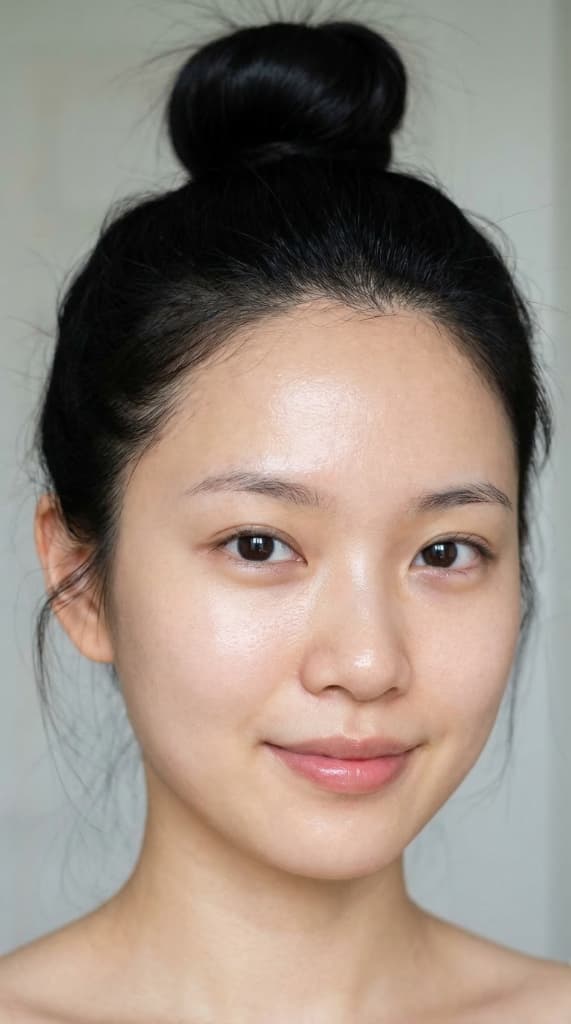
Decoding the Formula for Ultra-Photorealistic AI Models
Every word in a great prompt exists for a reason. Let's dissect the structure of a portrait prompt so compelling it fools the eye down to individual pores — and understand exactly why it beats 99% of prompts out there.
Have you ever seen an AI portrait that looked genuinely human — real skin pores, eyes with depth, naturally falling light — and wondered why your own prompts keep producing faces as smooth as a plastic mask?
The answer lies in the architecture of the prompt. Not a handful of random buzzwords, but a layered technical specification — from skin texture down to individual eyebrow hairs.
This article will break down every component of an elite portrait prompt, explain why each phrase is there, and show you the real output it produces. This isn't theory — it's a hands-on, field-tested workflow.
The Real Output
This is the image generated by the exact prompt we're about to dissect:
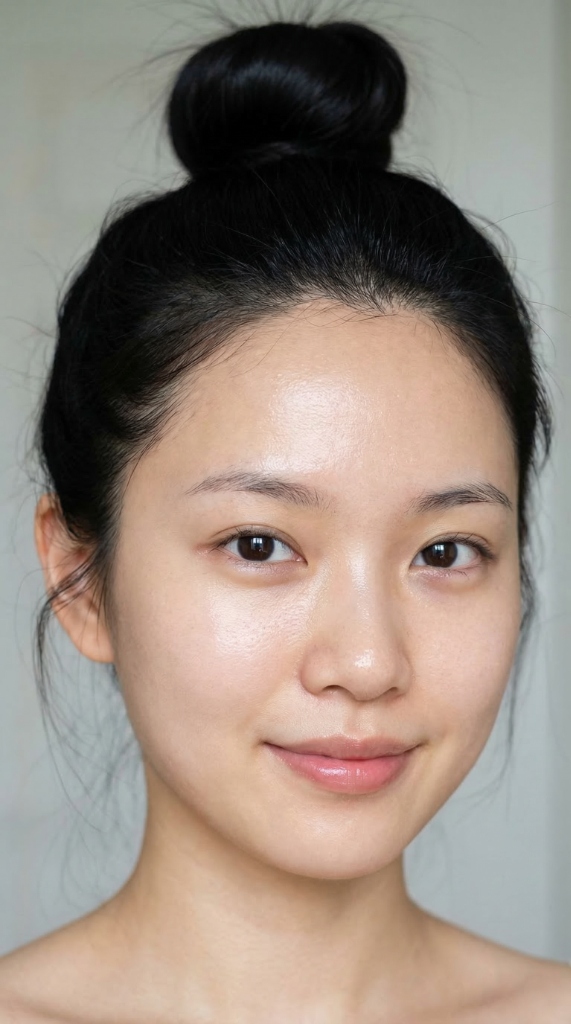
AI-generated · Prompt analyzed below · No Photoshop retouching
Look closely: the fine pores on the cheek, the flyaway baby hairs at the temples, the dewy catch-light on the cheekbone, and the depth sitting behind those warm brown eyes. These are the exact details that a short, casual prompt will never produce.
The Full Prompt (Copy and Use Now)
Ultra-photorealistic close-up portrait of a young East Asian woman with clear, luminous skin and a natural dewy glow, showing realistic fine pores and subtle skin texture. She has a soft oval face, youthful natural cheek fullness, and a delicate jawline. Her eyes are dark brown and almond-shaped, with a warm calm expression, natural symmetrical aegyosal, and fine realistic lower lashes. Her nose is slender with a defined bridge and a softly rounded tip. Her lips are naturally rosy, hydrated, softly plump, with a subtle cupid's bow and a light clear-gloss finish. Her jet-black hair is styled in a neat high top-knot bun, with delicate wispy strands naturally framing her face. Shot as a high-resolution beauty close-up with soft diffused natural light, crisp focus on the eyes and lips, realistic skin detail, raw editorial photography style, natural color, no blur, highly detailed, lifelike and photographic.
Dissecting Each Layer — In Chronological Order
This prompt isn't an unstructured wall of text — it contains 7 distinct information layers, each controlling a different aspect of the final image. Read them in order, from what the AI processes first to last:
Layer 1 — Shot Declaration (Global Style Anchor)
"Ultra-photorealistic close-up portrait..."
This is the hook — the "headline" that orients the entire neural network before it processes anything else. Ultra-photorealistic activates texture-priority mode, while close-up portrait instructs the AI to allocate its render budget to the face, not a full-body frame.
Why not just "realistic portrait"? Without close-up, AI may default to a mid-shot or full-body, losing all fine facial detail. Without ultra, the AI only tries to look "decent" rather than "indistinguishable from reality."
Layer 2 — Face Architecture (The Structural Blueprint)
"...a soft oval face, youthful natural cheek fullness, and a delicate jawline."
These three phrases define the bone-deep architecture of the face before any surface detail is applied:
Soft oval face→ explicitly rules out square, round, and sharp-pointed ovalYouthful natural cheek fullness→ soft cheeks, not angular or gauntDelicate jawline→ fine, not heavy or masculine
Golden rule: Always define SHAPE before you define SURFACE. The AI needs the skeleton before it can add skin.
Layer 3 — The Skin Layer (The Most Critical Layer)
"...clear, luminous skin and a natural dewy glow, showing realistic fine pores and subtle skin texture."
This is the single biggest differentiator between "AI image" and "photograph":
Clear, luminous skin→ healthy and light-reflectiveNatural dewy glow→ moisture-like finish (not metallic, not matte)Realistic fine pores— the magic phrase that forces microscopic skin detailSubtle skin texture→ not plastic-smooth, not rough or pockmarked
If you only write beautiful skin or flawless skin, the AI will render skin as smooth as porcelain. Realistic fine pores is a direct instruction to render at a dermatological level of detail.
Layer 4 — Feature Detail (Top to Bottom)
The prompt flows top to bottom, in the exact order the viewer's eye naturally travels:
Eyes:
"dark brown and almond-shaped, with a warm calm expression, natural symmetrical aegyosal, and fine realistic lower lashes."
Aegyosal(from Korean) — the thin pad of flesh beneath the eye that creates a cute, youthful look. Using specific technical vocabulary makes the AI respond with specific anatomical accuracy.Fine realistic lower lashes→ lower lashes rendered individually, not solid black bands
Nose:
"slender with a defined bridge and a softly rounded tip."
Two focal points — bridge and tip — give the AI enough constraint without over-specifying proportions.
Lips:
"naturally rosy, hydrated, softly plump, with a subtle cupid's bow and a light clear-gloss finish."
Hydrated→ no cracked or dry textureSubtle cupid's bow→ gentle natural arch, not artificially exaggeratedLight clear-gloss finish→ tinted balm, not bold lipstick
Layer 5 — Hair Framing
"jet-black hair is styled in a neat high top-knot bun, with delicate wispy strands naturally framing her face."
Neat high top-knot bun→ clean, structured placementDelicate wispy strands→ small escaped hairs — this introduces controlled natural chaos that makes the face feel alive
Without wispy strands, AI typically renders a geometrically perfect bun that reads as a 3D graphic. Those small flyaway hairs are the "sign of life" — the AI won't add them without being asked.
Layer 6 — Camera Angle & Lighting Setup
"Shot as a high-resolution beauty close-up with soft diffused natural light..."
Beauty close-up→ a specific photography genre (flat lighting, face-forward framing)Soft diffused natural light→ window light, not harsh studio flash- Result: light that flatters skin texture without casting hard shadows
Layer 7 — Quality Locks (The Final Guardrails)
"...crisp focus on the eyes and lips, realistic skin detail, raw editorial photography style, natural color, no blur, highly detailed, lifelike and photographic."
These are your last line of defense against common AI failure modes:
Raw editorial photography style→ unfiltered magazine-style, no digital sweetnessNatural color→ no oversaturation or color gradingNo blur→ prevents AI from hiding skin detail behind simulated shallow DoFCrisp focus on the eyes and lips→ explicitly defines the focal hierarchy
Your Customizable Template
Want to create different faces? Swap out the bracketed [ ] sections:
Ultra-photorealistic close-up portrait of a young [South Asian / Southeast Asian / East Asian / Eurasian] woman with [golden-warm / fair porcelain / warm honey] skin and a natural [dewy / matte satin / lit-from-within] glow, showing realistic fine pores and subtle skin texture. She has a [round / oval / heart-shaped] face, [youthful / defined / mature] features, and a [strong / delicate / soft] jawline. Her [hazel / dark brown / green] eyes are [wide / almond-shaped / hooded], with a [playful / calm / intense] expression. Her [chestnut / platinum blonde / jet-black] hair is styled in a [messy beach waves / sleek low bun / curtain bangs], with delicate wispy strands naturally framing her face. Shot as a high-resolution beauty close-up with [golden hour / soft window / cool diffused] natural light, crisp focus on the eyes and lips, realistic skin detail, raw editorial photography style, natural color, no blur, highly detailed, lifelike and photographic.
Quick Checklist Before You Generate
Before you hit generate, verify your prompt covers all 7 layers:
- ✅ Layer 1 — Shot Declaration — Photorealism level + close-up + portrait
- ✅ Layer 2 — Face Architecture — Overall face shape and structure
- ✅ Layer 3 — Skin Layer — Pores, glow type, hydration level
- ✅ Layer 4 — Feature Detail — Eyes → Nose → Lips, top to bottom order
- ✅ Layer 5 — Hair Framing — Style + natural wispy strands
- ✅ Layer 6 — Camera + Lighting — Specific photography style + light type
- ✅ Layer 7 — Quality Locks —
no blur,natural color,raw editorial,crisp focus
Remove any one of these 7 layers, and your result will be hollow at exactly that point. That's why your AI portraits haven't reached "photographic" yet — not because the model is weak, but because the instruction is incomplete.