Extracting Clothing from Real Images: An E-Commerce Photography Prompt Analysis
Isolate clothing items from a model's photo and perfectly reconstruct them into standalone e-commerce product shots on a pure white background. Let's dissect this powerful prompt structure.
You have a stunning photo of a model wearing a gorgeous outfit outdoors (or in a studio), and you want to... "undress" them? Or, more accurately, you want to separate that top, pair of pants, or handbag into individual standalone Product Shots on a pristine white background to sell on an e-commerce platform?
The prompt below acts as a "magic wand" in the modern fashion and e-commerce industry. By forcing the AI to think like an expert photo retoucher and a professional studio photographer, it can recreate realism down to the very last stitch.
Let's dissect exactly why this prompt works so brilliantly!
Real-World Experience (Before & After)
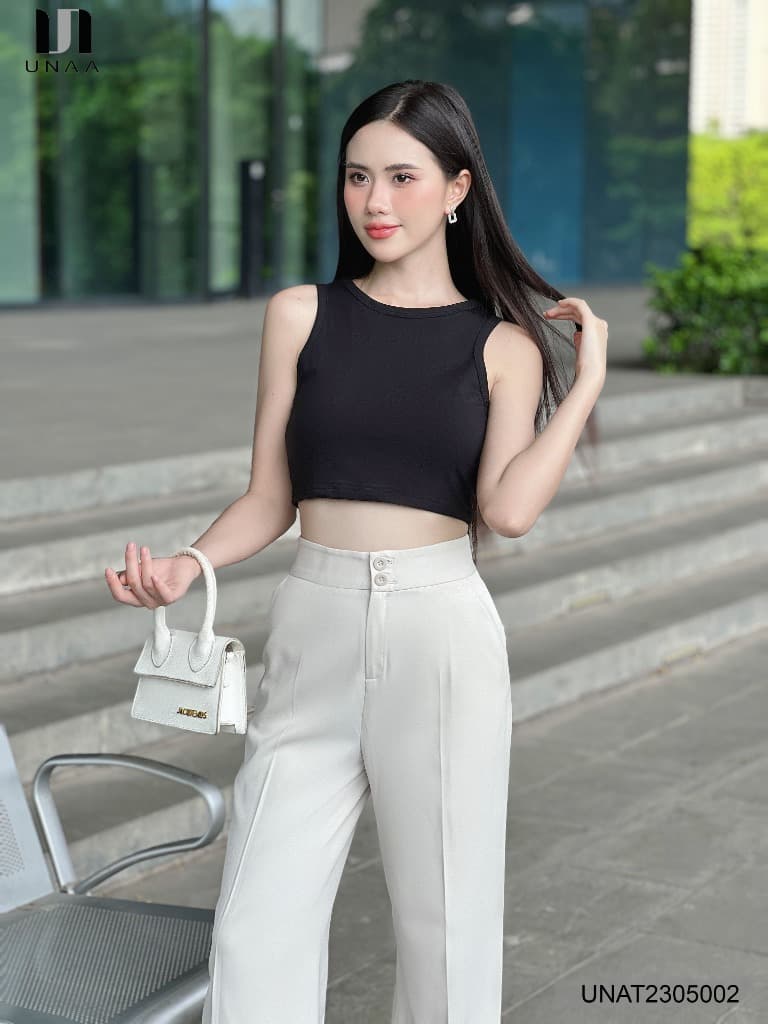
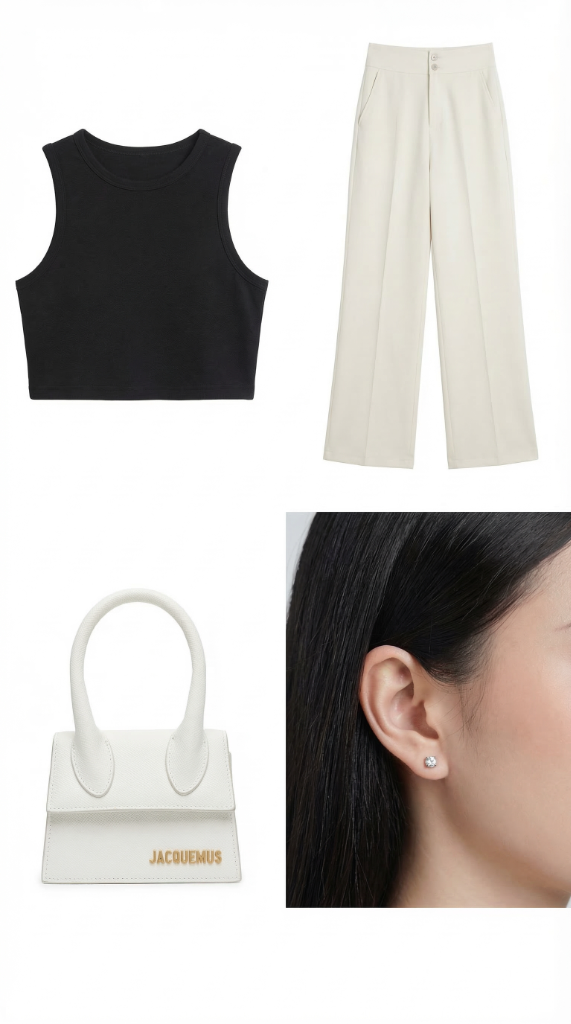
Here is the magical result of combining extraction techniques (Image-to-Image / ControlNet) with the prompt we are about to analyze.
Input Reference Image
Extracted Outputs
The Complete Prompt (Copy and Use Immediately)
Analyze the attached image in extreme detail and detect every visible clothing item and accessory worn or present on the subject.

For each detected item, generate a separate standalone product image.

Goal:
Convert each visible item into an isolated, photorealistic e-commerce style product shot while preserving the original item's appearance as faithfully as possible.

For each item:
- Isolate the item completely from the person, body parts, hair, and original background.
- Preserve all visible details exactly: color, fabric texture, stitching, seams, folds, logos, trims, hardware, thickness, proportions, and garment construction.
- Do not redesign, stylize, simplify, or reinterpret the item.
- Keep the item's structure and scale accurate.
- If part of the item is hidden or occluded, reconstruct only the missing areas necessary to present the product cleanly and naturally, using minimal inference strictly based on visible evidence.
- Do not invent extra details, patterns, materials, or construction features.

Item separation rules:
- Output each clothing item and accessory as a completely separate object.
- Do not merge multiple items into one image.
- Detect and separate garments, bags, shoes, belts, scarves, hats, eyewear, watches, jewelry, and other visible wearable accessories individually.

Presentation rules:
- Each item must be fully visible in frame.
- Garments should appear naturally laid flat or neatly arranged.
- Structured accessories (such as bags, shoes, hats, watches, or jewelry) should be presented in a clean product-photo position that preserves their natural shape.
- No distortion, warping, missing edges, or deformed proportions.

Image style:
- Photorealistic
- High resolution
- Studio-quality product photography
- True-to-life materials
- Accurate color reproduction
- No CGI look
- No illustration or stylization
- No texture smoothing

Background:
- Pure solid white background (#FFFFFF)
- No reflections
- No gradients
- No environmental elements
- Optional very soft natural grounding shadow directly beneath the item only

Lighting:
- Soft studio lighting
- Even exposure
- No dramatic shadows
- Clean catalog-style illumination
- Accurate material rendering

Strict exclusions:
- Do not include the model
- Do not include skin, hands, feet, hair, or body parts
- Do not include surrounding objects unless they are part of the item itself
- Do not crop off any part of the item
- Do not stylize or beautify the product

Negative prompt:
blurry, distorted shape, warped fabric, incorrect color, missing details, artificial shine, over-smoothing, CGI, illustration, cartoon, rendering artifacts, merged objects, incomplete garment, cut-off edges, hallucinated details, deformed proportions
Dissecting the "Anatomy" of This Top-Tier Prompt
Why does the output of this prompt avoid looking "plastic" or deviating from the original details? It's because the writer specifically targeted the core weaknesses of Generative AI and "plugged" those holes.
1. Clear Core Goal Statement
Right from the first lines, it defines the mission rather than letting the model's imagination run wild:
- "Convert each visible item into an isolated, photorealistic e-commerce style product shot..." This forces the AI into "E-commerce Photography" mode (flat lighting, tidy arrangement, white background) instead of painting a dreamy picture.
2. Aggressive Detail Locking (Preservation over Creation)
Image generation AI loves to hallucinate and "invent" things. If the original pants are plain, the AI might add distressed knees, cargo pockets, or strange wrinkles. This prompt uses a barrage of powerful Veto Commands:
- "Preserve all visible details exactly: color, fabric texture, stitching..."
- "Do not redesign, stylize, simplify, or reinterpret the item."
- "Do not invent extra details, patterns, materials..."
It handles occlusions brilliantly: The model's arm often covers a corner of the skirt or shirt. The prompt issues a strict command: "reconstruct only the missing areas necessary... using minimal inference strictly based on visible evidence." This tells the AI to deduce the hidden part as sparingly as possible, preventing it from wildly "weaving" non-existent floral patterns.
3. Strict Item Separation Rules
Models tend to merge overlapping items—like fusing pants, belt loops, and a belt into one solid block. This section forces the AI brain to cleanly cut out every accessory, isolating shirts, bags, and even earrings into independent visual clones on a white canvas.
4. Presentation Rules
E-commerce products live and die by their presentation.
- Garments: "naturally laid flat" (like a flatlay photo, not floating magically inflated in mid-air).
- Bags / rigid items: "clean product-photo position that preserves their natural shape" (must maintain structural 3D form).
5. Absolute Catalog Lighting and Texture
To achieve a Catalog E-commerce vibe rather than a moody cinematic shot, lighting must be rigorously specified:
- "Soft studio lighting, even exposure, no dramatic shadows."
Commercial product photos need to illuminate all details; dramatic, heavy contrast lighting will crush shadow details. The constraint
"No texture smoothing"preserves the raw weave of the fabric, preventing the AI from applying a plastic-like beauty filter.
6. Negative Prompt Strict Exclusions
100% erasure of the human model.
- "Do not include skin, hands, feet, hair..." This avoids the dreaded scenario of successfully extracting a shirt, only to find a ghostly wisp of hair remaining on the collar, or a phantom finger clinging to a handbag handle.
In short, this is an incredibly sharp Prompt designed specifically for Production work, heavily prioritizing "Accurate Reconstruction" over "Emotional Creativity".