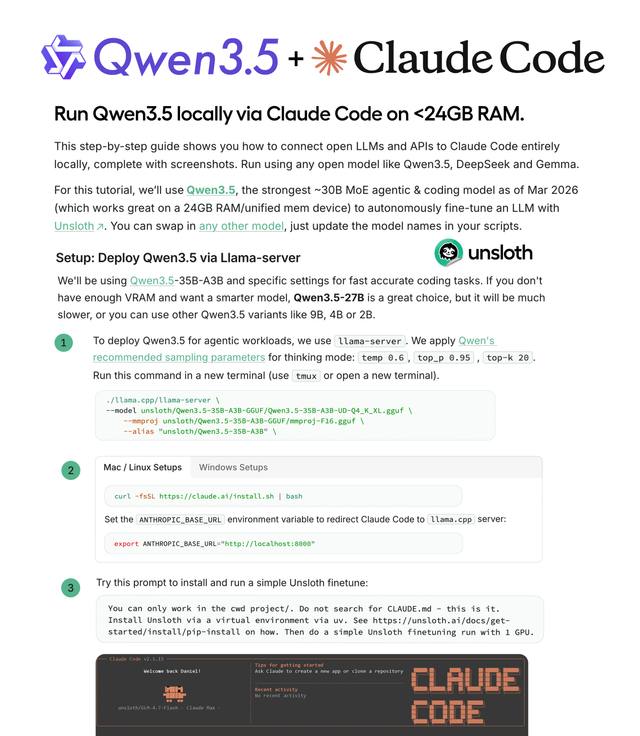
How to Run Local LLMs with Claude Code – Installing Qwen3.5 and llama.cpp
Complete guide from Unsloth: install llama.cpp, download Qwen3.5-35B-A3B, start llama-server, and connect it to Claude Code for a fully offline, free AI coding agent.
You can use Claude Code — Anthropic's AI coding agent — with a model running entirely on your local machine, no API account required, no cloud costs. This guide is based directly on Unsloth AI's official documentation and walks through every step from installation to running your first task.
The model used in this guide: Qwen3.5-35B-A3B — a Mixture-of-Experts (MoE) model that is compact, fast, and well-suited for coding agents.
Architecture: llama-server (local) → OpenAI-compatible endpoint → Claude Code agent
Architecture Overview
The entire setup works through this flow:
- llama.cpp — an open-source framework for running LLMs on personal computers (Mac, Linux, Windows)
- llama-server — serves the model via HTTP, exposing an OpenAI-compatible API endpoint on port 8001
- Claude Code — redirect the
ANTHROPIC_BASE_URLenvironment variable to your local server instead of Anthropic's cloud
Result: Claude Code works exactly as normal, but is actually calling Qwen3.5 running on your machine.
Step 1: Choose the Right Model
Unsloth recommends several Qwen3.5 variants depending on your VRAM:
| Model | VRAM needed | Speed | Notes |
|---|---|---|---|
| Qwen3.5-35B-A3B | ~24GB | Fastest | Recommended for RTX 4090 |
| Qwen3.5-27B | Less | ~2x slower | If not enough VRAM for 35B |
| Qwen3.5-9B / 4B / 2B | Very little | Fast | For lower-spec machines |
💡 Qwen3-Coder-Next is also an excellent choice for coding tasks if you have sufficient VRAM.
Step 2: Install llama.cpp
apt-get update
apt-get install pciutils build-essential cmake curl libcurl4-openssl-dev git-all -y

git clone https://github.com/ggml-org/llama.cpp

cmake llama.cpp -B llama.cpp/build \
  -DBUILD_SHARED_LIBS=OFF \
  -DGGML_CUDA=ON   # Change to OFF if no GPU

cmake --build llama.cpp/build --config Release -j --clean-first \
  --target llama-cli llama-mtmd-cli llama-server llama-gguf-split

cp llama.cpp/build/bin/llama-* llama.cpp
macOS (Apple Silicon): Use
-DGGML_CUDA=OFF— Metal support is enabled automatically, no additional flags needed.
Step 3: Download the Qwen3.5 Model
pip install huggingface_hub hf_transfer

hf download unsloth/Qwen3.5-35B-A3B-GGUF \
  --local-dir unsloth/Qwen3.5-35B-A3B-GGUF \
  --include "*UD-Q4_K_XL*"
  # Use "*UD-Q2_K_XL*" for Dynamic 2-bit if you need to save VRAM
Unsloth uses UD-Q4_K_XL quantization — the best balance between file size and accuracy.
Step 4: Start llama-server
Run this in a separate terminal (use tmux or open a new window):
./llama.cpp/llama-server \
  --model unsloth/Qwen3.5-35B-A3B-GGUF/Qwen3.5-35B-A3B-UD-Q4_K_XL.gguf \
  --alias "unsloth/Qwen3.5-35B-A3B" \
  --temp 0.6 \
  --top-p 0.95 \
  --top-k 20 \
  --min-p 0.00 \
  --port 8001 \
  --kv-unified \
  --cache-type-k q8_0 --cache-type-v q8_0 \
  --flash-attn on --fit on \
  --ctx-size 131072
Key parameters:
--temp 0.6 --top-p 0.95 --top-k 20— Qwen's recommended sampling parameters for thinking mode--cache-type-k q8_0 --cache-type-v q8_0— KV cache quantization for reduced VRAM usage. Do not use f16 — Qwen3.5 loses accuracy with f16 KV cache--fit on— auto-offload when exceeding VRAM--ctx-size 131072— 128K token context window
To disable thinking mode (can improve speed for coding):
--chat-template-kwargs "{\"enable_thinking\": false}"
Step 5: Connect Claude Code
Install Claude Code
npm install -g @anthropic-ai/claude-code
Configure (Linux / Mac)
export ANTHROPIC_BASE_URL="http://localhost:8001"
export ANTHROPIC_API_KEY="sk-no-key-required"
To persist across new terminals, add these lines to ~/.bashrc or ~/.zshrc.
Configure (Windows PowerShell)
$env:ANTHROPIC_BASE_URL="http://localhost:8001"
$env:CLAUDE_CODE_ATTRIBUTION_HEADER=0
Skip the Login Screen
If Claude Code still prompts you to sign in on first run, add this to ~/.claude.json:
{
  "hasCompletedOnboarding": true,
  "primaryApiKey": "sk-dummy-key"
}
Run Claude Code
cd your-project-folder
claude
To run without approval prompts for every command (use with caution):
claude --dangerously-skip-permissions
⚠️ Critical Fix: Claude Code Running 90% Slower
This is the most important issue flagged in Unsloth's documentation. Claude Code recently started prepending an Attribution Header to every request, which invalidates the KV Cache — causing inference speed to drop by up to 90%.
Fix: Edit ~/.claude/settings.json:
cat > ~/.claude/settings.json
Paste the following, then press Enter and Ctrl+D to save:
{
  "env": {
    "CLAUDE_CODE_ATTRIBUTION_HEADER": "0"
  }
}
⚠️ Important: Using
export CLAUDE_CODE_ATTRIBUTION_HEADER=0in the terminal does NOT work. The fix must be applied throughsettings.json.
VS Code / Cursor Extension
Claude Code can also run directly inside your editor:
- Install the Claude Code extension from VS Code Marketplace (
Ctrl+Shift+X→ search "Claude Code") - Add
"claudeCode.disableLoginPrompt": truetosettings.jsonto skip the login screen - Ensure
ANTHROPIC_BASE_URLis set in your environment before opening VS Code
Practical Usage Tips
When to use Thinking Mode?
- Thinking mode excels at complex multi-step reasoning tasks (architecture decisions, difficult debugging)
- Disable thinking (
enable_thinking: false) for routine coding tasks to increase speed
Not enough VRAM?
- Reduce
--ctx-sizeto 32768 or 65536 - Use a lighter quantization:
*UD-Q2_K_XL*instead of*UD-Q4_K_XL* - Switch to Qwen3.5-9B or 4B
Verify the server is running:
curl http://localhost:8001/v1/models
Conclusion
With llama.cpp + Qwen3.5 + Claude Code, you have a fully local AI coding agent — no internet required, no API fees, and stable enough for real production projects.
Key points to remember:
- Use
--cache-type-k q8_0 --cache-type-v q8_0, never f16 KV cache with Qwen3.5 - Fix the Attribution Header via
~/.claude/settings.json, not viaexport - Start with Qwen3.5-35B-A3B on an RTX 4090; fall back to 27B or smaller if VRAM is limited
Full reference: Unsloth AI Documentation