What Is OpenClaw? Full Install & Usage Guide (2026)
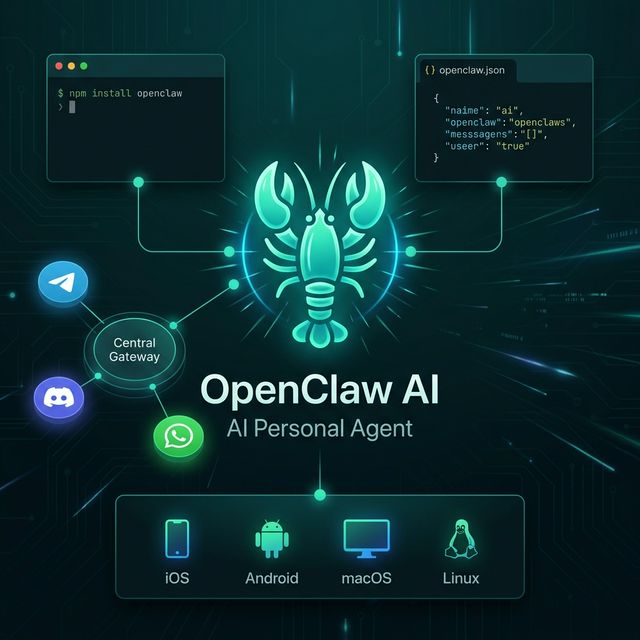
OpenClaw 🦞 is an open-source, local-first AI personal agent — install with one npm command, connect Telegram/WhatsApp/Discord, run the Gateway directly on your machine. Accurate guide from the official docs.
OpenClaw 🦞 is an open-source AI personal agent (MIT license), local-first — the entire Gateway runs on your machine, connecting to 20+ messaging platforms so you can command AI from Telegram, WhatsApp, Discord, or anywhere.
OpenClaw 🦞 — Local-first AI agent: one npm install, connects Telegram/WhatsApp/Discord/iMessage and more
Summary:
- ✅ Self-hosted — runs on your hardware, your rules
- ✅ Multi-channel — one Gateway serves WhatsApp, Telegram, Discord simultaneously
- ✅ Agent-native — tool use, sessions, memory, multi-agent routing
- ✅ Open source — MIT licensed, community-driven
Core Concepts
| Concept | Explanation |
|---|---|
| Gateway | Central control plane — runs locally at ws://127.0.0.1:18789, managing all channels, tools, and events |
| Session | A conversation session — stores context, history, and agent state |
| Channel | Communication interface (Telegram, Discord, CLI terminal, WebChat...) |
| Skill | Extension plugin at ~/.openclaw/workspace/skills/<skill>/SKILL.md |
| Node | Hardware extension component (iOS, Android, camera, voice wake...) |
| Dashboard | Local web UI at http://127.0.0.1:18789/ |
Architecture overview:
Telegram / Discord / WhatsApp / Signal / iMessage...
                        │
                        ▼
            ┌─────────────────────┐
            │      Gateway        │  ← runs locally on your machine
            │  127.0.0.1:18789    │
            └──────────┬──────────┘
                       │
          ├─ AI Agent (RPC)
          ├─ CLI (openclaw ...)
          ├─ WebChat UI / Dashboard
          └─ macOS app / iOS / Android nodes
Quick Start
System Requirements
- Node.js ≥ 22.16 (required — per official docs)
- npm or pnpm
Step 1 — Install OpenClaw
npm install -g openclaw@latest
Step 2 — Run Onboarding (installs daemon automatically)
openclaw onboard --install-daemon
This installs the Gateway as a background service — auto-starts with your OS (launchd on macOS, systemd on Linux). This is the simplest setup path.
If you just want onboarding without installing the daemon:
openclaw onboard
Step 3 — Pair a Channel and Start the Gateway
# Pair WhatsApp (or another channel), then start the Gateway:
openclaw channels login
openclaw gateway --port 18789
Check Status
openclaw doctor
The doctor command checks your configuration, connections, and surfaces security risks.
Local Dashboard
Once the Gateway is running, open:
http://127.0.0.1:18789/
Install From Source (Developer)
git clone https://github.com/openclaw/openclaw.git
cd openclaw
pnpm install
pnpm ui:build        # build UI (auto-installs deps on first run)
pnpm build           # produces dist/

# Run onboarding:
pnpm openclaw onboard --install-daemon

# Dev loop (auto-reload on source/config changes):
pnpm gateway:watch
Basic Configuration
Main config file: ~/.openclaw/openclaw.json
If you don't create a config file, OpenClaw uses the bundled Pi binary in RPC mode with per-sender sessions.
Minimal config (just the AI model):
{
  "agent": {
    "model": "anthropic/claude-opus-4-6"
  }
}
With Telegram:
{
  "agent": {
    "model": "openai/gpt-4o"
  },
  "channels": {
    "telegram": {
      "token": "YOUR_BOT_TOKEN",
      "allowFrom": ["YOUR_TELEGRAM_USER_ID"]
    }
  }
}
With WhatsApp (group lockdown):
{
  "channels": {
    "whatsapp": {
      "allowFrom": ["+15555550123"],
      "groups": {
        "*": { "requireMention": true }
      }
    }
  },
  "messages": {
    "groupChat": {
      "mentionPatterns": ["@openclaw"]
    }
  }
}
With Ollama (fully offline local model):
{
  "agent": {
    "model": "ollama/qwen3.5:latest"
  }
}
Full configuration reference for all keys: docs.openclaw.ai/gateway/configuration
Supported Channels
OpenClaw supports 20+ platforms — one Gateway serves all simultaneously:
| Category | Platforms |
|---|---|
| Messaging | WhatsApp, Telegram, Signal, iMessage, BlueBubbles |
| Work | Slack, Discord, Microsoft Teams, Google Chat |
| Social | Twitch, Nostr, LINE, Zalo, Feishu |
| Self-hosted | Matrix, Mattermost, Nextcloud Talk, Synology Chat |
| Web | WebChat (built-in browser UI at 127.0.0.1:18789) |
Basic Usage
After installation, interact via Telegram or the CLI:
# Send a message to the agent via CLI:
openclaw message send --to +1234567890 --message "Hello"

# Run the agent with a specific task:
openclaw agent --message "Ship checklist" --thinking high

# Approve a pairing request from a new user:
openclaw pairing approve telegram <code>
Common Chat Commands
# Find files
Find all PDFs in the Downloads folder created this week

# Summarize a document
Summarize /Documents/report.pdf

# Web search
Find the latest news about GPT-5 and summarize it

# Execute code
Run backup.sh and report the result
Real-World Use Cases
1. Personal File Management
"Find all Excel files named 'budget' on the Desktop,
 copy them to /Archive/2025/"
2. Browser Automation
"Open Chrome, go to gmail.com, read my 5 latest unread emails and summarize"
3. Research Agent
"Research the Astro.js framework, compare with Next.js,
 write a 300-word summary and save to ~/research/astro.md"
4. Voice Wake (macOS/iOS)
Set up the wake word "Hey Claw" → speak commands directly without opening any app.
5. Scheduled Task (Cron)
"Every morning at 8am: get weather + summarize tech news,
 send to my Telegram"
Skills System
Skills are extension plugins at ~/.openclaw/workspace/skills/<skill>/SKILL.md:
- ClawHub — community skills marketplace
- Skills inject context into the agent via
AGENTS.md,SOUL.md,TOOLS.md - Custom skill: create a folder +
SKILL.mdwithnameanddescriptionfrontmatter
Remote Access
Want to access the Gateway from outside your local network? Two options:
- Web surfaces: docs.openclaw.ai/web
- Tailscale: docs.openclaw.ai/gateway/tailscale
Security Model — Read Before You Deploy
⚠️ OpenClaw connects to real messaging surfaces. Treat all inbound DMs as untrusted input.
DM Pairing (default behavior):
{
  "channels": {
    "telegram": {
      "dmPolicy": "pairing"  // unknown senders must verify a pairing code first
    }
  }
}
Approve a new user:
openclaw pairing approve telegram <code>
Sandbox for groups/channels (recommended):
{
  "agents": {
    "defaults": {
      "sandbox": {
        "mode": "non-main"  // non-main sessions run inside dedicated Docker containers
      }
    }
  }
}
Safe update channels:
openclaw update --channel stable    # tagged stable releases
# or:
openclaw update --channel beta      # prerelease builds
Summary
OpenClaw is the right choice if you want:
- ✅ Local-first AI agent — data never leaves your machine
- ✅ Connect 20+ platforms (Telegram, WhatsApp, Discord...) with one Gateway
- ✅ Simple install via one npm command
- ✅ Web dashboard at localhost:18789
- ✅ Deep customization via Skills and
openclaw.json - ✅ MIT license, fully open source
Official resources:
- 🐙 GitHub: github.com/openclaw/openclaw
- 📚 Docs: docs.openclaw.ai
- 🌐 Website: openclaw.ai
- 🚀 Quick Start: docs.openclaw.ai/start/quickstart