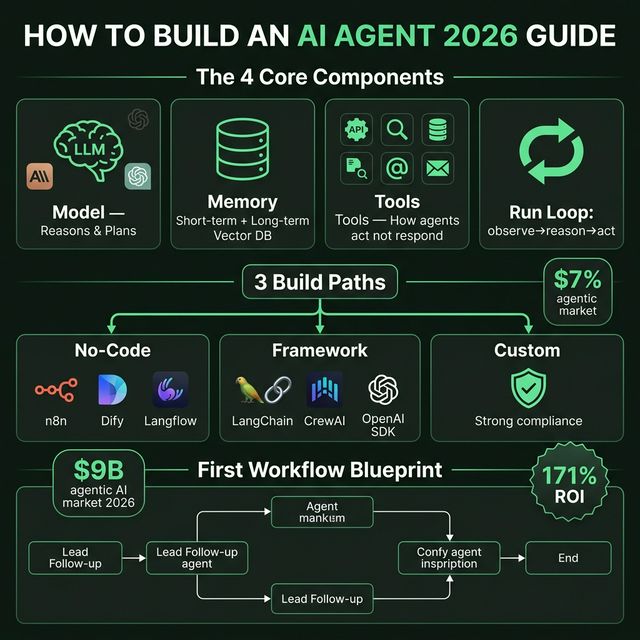
How to Build an AI Agent in 2026: 4 Components, 3 Build Paths, and the First Workflow to Ship
The agentic AI market surpassed $9B in 2026 with an average 171% ROI. But most people building agents get it wrong — automating the wrong things, too complex, too soon. Practical guide: 4 components of every agent, 3 build paths (no-code/framework/custom), and a blueprint first workflow to ship in 7 days.
Everyone Is Talking About AI Agents. Most People Have No Idea How to Build One.
The 2026 numbers are hard to ignore:
- Agentic AI market surpassed $9 billion
- Gartner projects 40% of enterprise applications will embed AI agents by end of 2026 (up from under 5% in 2025)
- Average ROI: 171% — US enterprises are seeing 192%
- Three times higher than traditional automation ROI (Deloitte 2026 State of AI in Enterprise)
But this isn't a guide about why agents. This is about how — with 4 specific decisions you need to make before writing a single line of code.
How 2026 Is Different From 2024
In 2024, "AI agent" usually meant: a chatbot connected to a few tools, running in Streamlit, restarting when it fails.
In 2026:
- Runtimes have durability (Dapr Agents v1.0 GA, released March 23, 2026)
- MCP standardizes tool interfaces — agents can talk to tools from different vendors
- Model routing is standard — cheap model for simple tasks, expensive model for complex reasoning
- Agent Teams (Claude Code) and parallel agents (Windsurf Wave 13) are production-ready
What this means: the barrier to build has dropped, but the barrier to build well has risen. More options, more trade-offs to navigate.
The 4 Components of Every AI Agent
Every agent, every use case — has these 4 things.
1. Model (The Brain)
The LLM that does reasoning, planning, and decides what happens next. In 2026: Claude Sonnet 4.6, GPT-5.x mini, Gemini 2.5 Flash are top production choices. Model choice affects:
- Reasoning quality
- Latency
- Cost per token
- Context window size
2. Memory
What the agent knows and remembers. Two types:
- Short-term (in-context): Conversation history in the current session
- Long-term (external): Vector database or SQL store that persists across sessions
An agent with no long-term memory starts from zero every time. For workflows needing personalization or learning over time, long-term memory is required.
3. Tools
This is what turns a chatbot into an agent. APIs, web search, databases, file systems, email, Slack, calendar — any external system the agent can call.
Without tools → the agent can only generate text, it can't act. Tools are the source of both value and risk.
4. Run Loop (The Logic Engine)
The execution engine. Runs until the goal is reached or a stop condition fires:
while not done and steps < limit:
    observe → reason → act → check
That loop is the whole game. Everything else is configuration. Stop conditions and step limits matter as much as model choice — without them, an agent can run indefinitely and burn through your budget.
The Most Important Thing Nobody Tells You
If a task takes five minutes and you do it once a week — you don't need an agent. It's a waste of effort and unnecessary risk exposure.
The rule: Build agents for high-frequency, repeatable, and measurable workflows.
The highest-value first agents are:
- Tasks you do manually every day
- Slightly boring, completely repetitive
- Taking longer than they should
Not: Complex one-off analysis. Creative tasks requiring judgment. High-stakes decisions that need human accountability.
3 Build Paths: Pick Your Starting Point
Path 1: No-Code
Tools: n8n, Dify, Langflow, Make
When to choose:
- You're not a developer
- You need to prototype fast to validate a use case
- The workflow is simple (linear, predictable)
- Your team has business process skills, not code skills
Trade-offs:
- ✅ Fastest to start
- ✅ Visual, collaborative
- ❌ Limited flexibility for complex logic
- ❌ Harder to debug edge cases
- ❌ Potential vendor lock-in
Estimate: 1-3 days to a working prototype
Path 2: Framework
Tools: LangChain, CrewAI, OpenAI Agents SDK, LlamaIndex
When to choose:
- Developer background, comfortable with Python
- Need custom logic not available in no-code tools
- Multi-agent workflows (research + synthesize + publish)
- Plan to scale to production (frameworks have better testing tools)
Trade-offs:
- ✅ Flexible, testable
- ✅ Large community and documentation
- ❌ More setup time vs no-code
- ❌ Learning curve for framework-specific patterns
Estimate: 1-2 weeks for a working production pilot
Path 3: Custom
When to choose:
- Compliance/security requirements don't allow third-party orchestration
- Existing infrastructure doesn't support public frameworks
- Team has strong engineering bandwidth
- Need complete control over every layer
Trade-offs:
- ✅ Maximum control
- ✅ No external dependencies
- ❌ Highest time investment
- ❌ Re-inventing solved problems
Estimate: Weeks to months
Blueprint: The First Workflow
The "First Workflow" rule: Pick a task where, if the agent gets it wrong, the consequences are manageable — not catastrophic.
Example: Lead Follow-Up Agent
Trigger: New lead submits form on website

Step 1 — Enrich (Tool: Clearbit/Apollo API)
  Input: email
  Output: company, role, company_size, tech_stack

Step 2 — Qualify (Model reasoning)
  Input: enriched data
  Output: score (hot/warm/cold) + reasoning

Step 3 — Draft outreach (Model)
  Input: enriched data + score + template
  Output: personalized email draft

Step 4 — Human review gate
  → PAUSE: send draft to sales rep for approval
  → Human approves/edits/rejects

Step 5 — Send (Tool: email API)
  Output: sent confirmation + CRM log
Why this is a good first workflow:
- High-frequency (multiple leads/day)
- Measurable (reply rate, meeting booked)
- Human-in-the-loop at the high-risk step (send)
- Reversible (draft review before send)
- Clear success metric from day one
Guardrails You Can't Skip
Human-in-the-Loop Points
Not every step needs human review — but every workflow needs at least 1 human checkpoint before a high-stakes action (send email, post publicly, make payment, delete data).
Stop Conditions
# Mandatory stop conditions
MAX_STEPS = 50          # Prevent infinite loops
MAX_COST_USD = 2.00     # Budget cap per run
TIMEOUT_MINUTES = 10    # Wall clock limit
Missing stop conditions → agent runs indefinitely → surprise bill.
Quality Checks
After each major step, check output quality:
- Is output format correct?
- Are required fields present?
- Does content pass basic sanity checks?
Cheap heuristic checks prevent bad output from propagating to downstream steps.
Cost & Reliability Checklist
- Token usage per run measured — know the cost before running in production
- Retry logic for external API calls (3x with exponential backoff)
- Budget cap per workflow run
- Quality check after each major step
- Human gate before irreversible actions
- Logging for each step (inputs, outputs, latency, cost)
- Failure alerting — who gets notified when the agent fails?
- Tested with intentional failures before going live
Scale-Up Playbook (After Your First Workflow)
After your first workflow is running reliably (1-2 weeks):
1. Add memory If the agent needs personalization or context from previous runs → add a vector DB (Pinecone, Weaviate, Chroma). Start with the simplest integration first.
2. Add tools Identify bottlenecks where the agent has to "guess" due to missing data → add a tool (API, DB query, web search) to supply that data.
3. Add monitoring
- Dashboard showing: runs/day, success rate, avg cost, avg latency
- Alerting when success rate drops below threshold
- Weekly review of failed runs to identify patterns
4. Expand scope Once your first workflow is reliable → identify the next highest-value workflow in the same domain. Reuse the components you've already built.
Takeaway
An AI agent isn't magic. It's a run loop + model + tools + memory — and you need to decide each one deliberately.
9 in 10 teams build agents wrong because they start with complexity — multi-agent, custom runtimes, complex orchestration. The right approach: start with 1 simple workflow, measure results, scale from evidence.
CTA: Pick one daily task you currently do manually. Build a minimal agent in 7 days — no-code if you're non-technical, framework if you're a developer. Measure: time saved + failure rate + cost. Then decide whether to continue from there.
Sources: How to Build an AI Agent: Complete Guide 2026 — The AI Corner; Gartner & Deloitte 2026 AI enterprise reports