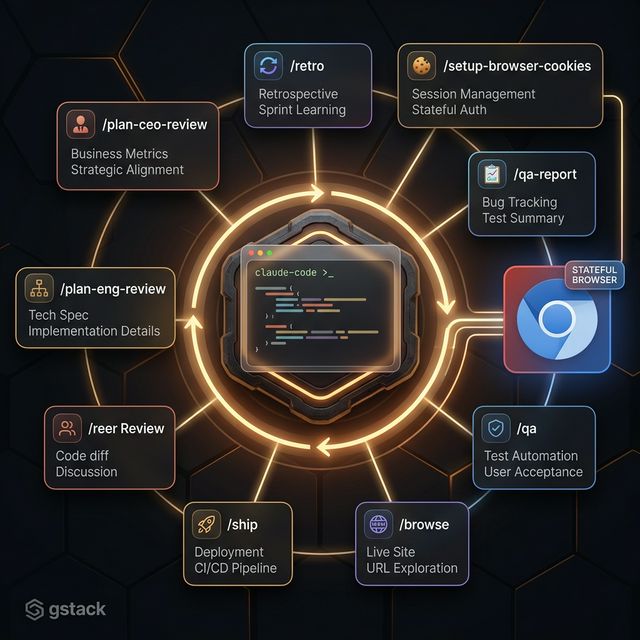
gstack: The Claude Code Workflow Skill Pack That Turns One AI Into a Virtual Dev Team
gstack is an open-source skill pack created by Garry Tan (CEO of Y Combinator) — 9 slash commands that give Claude Code specialist roles for planning, code review, QA, and one-command shipping.
TL;DR
gstack is an open-source skill pack for Claude Code, created by Garry Tan (CEO of Y Combinator) — reaching 16,000+ GitHub stars within weeks of release. Instead of letting Claude Code handle everything generically, gstack defines 9 specialist roles with dedicated slash commands: from product review and architecture to automated QA and shipping.
One of the most common mistakes with AI coding agents: asking Claude Code to plan, code, review, and test everything in a single context dump. The result is output that's passable at every stage but deep at none.
gstack solves this not with a new model, but with specialization: each development phase has its own skill with its own cognitive mode.
Garry Tan's framing is direct: "AI should have explicit roles, not handle everything in a mushy mode."
What is gstack?
From gstacks.org:
"gstack is an opinionated skill pack for Claude Code that transforms a single AI assistant into a virtual software development team."
gstack is not a new framework or model. It's a set of 9 workflow skills installed into Claude Code, activated via slash commands. Each skill represents a team member with a defined role.
gstack 9 specialist roles — from product vision to deployed code
The 9 gstack Skills Explained
/plan-ceo-review — Product Vision
View the feature request from the user's perspective. Find the 10-star product hiding inside the request rather than implementing the literal ask. The core question: What is this product actually for?
/plan-eng-review — Architecture Design
Lock in architecture, data flow, state transitions, edge cases, failure modes, and test coverage. Produces diagrams — sequence, state, component, data-flow — because diagrams force hidden assumptions into the open.
/review — Production-grade Code Review
Find bugs that pass CI but blow up in production: N+1 queries, race conditions, trust boundary violations, missing indexes, broken retry logic, stale reads. Integrates Greptile for automatic code review comment triage.
/ship — One-Command Shipping
Sync main, run tests, resolve Greptile issues, push branch, open a PR. Handles all release hygiene — not for deciding what to build, but for landing a ready branch without losing momentum.
/browse — Stateful Browser
Gives the agent eyes. Logs in, clicks through your app, takes screenshots, reads console errors. Runs on a persistent Chromium daemon — not a fresh headless browser each time. Cookies, tabs, and localStorage persist between calls.
/qa — Automated QA with Find-Fix-Verify
Analyzes your git diff → identifies affected pages → tests → fixes bugs with atomic commits → re-verifies. Four modes: diff-aware (default), full exploration, quick smoke test, regression baseline comparison. Output: health score 0-100.
/qa-report — Report-only QA
Same methodology as /qa but never touches code. Produces a clean bug report for team handoff without the agent modifying anything.
/setup-browser-cookies — Authenticated Testing
Imports cookies from your real browser (Chrome, Arc, Brave, Edge, Comet) into the headless session. Test authenticated pages without manual login. Cookie values are never displayed.
/retro — Engineering Retrospective
Analyzes commit history, coding sessions, shipping velocity, test ratios, PR sizes. Generates per-contributor insights — praise and growth opportunities. Saves JSON snapshots for cross-week trend tracking.
Technical Architecture: Persistent Chromium Daemon
The key technical differentiator: /browse and /qa don't use standard headless browsers.
They run on a compiled Bun binary connected to a persistent Chromium daemon:
- Sub-second command latency (no browser restart between calls)
- State retained between calls — cookies, tabs, localStorage persist
- Ref-based interaction — stable element refs instead of brittle CSS selectors
- Security: cookie values are never exposed, only domain metadata
Real Workflow: Idea to Ship
A complete feature development cycle with gstack:
1. /plan-ceo-review
   → Pressure-test the idea from the product perspective
   → "Why does the user actually need this?"

2. /plan-eng-review
   → Architecture + test strategy
   → Sequence diagrams, edge cases

3. Implement
   → Write code against the approved plan

4. /review
   → Find production bugs before merge
   → Greptile triage

5. /browse + /setup-browser-cookies
   → Login with real cookies
   → Verify UI flows visually

6. /qa
   → Diff-aware testing on affected pages
   → Fix + re-verify in one cycle

7. /ship
   → Sync, test, push, PR
   → Done
Garry Tan's reported metrics using gstack over 50 days: average 10,000 lines of code and 100 pull requests per week.
Installation: 2 Steps
Step 1: Install on your machine
Open Claude Code and paste the install command (see the full install guide). Claude handles the rest — skills install to ~/.claude/skills/gstack/.
Step 2 (Optional): Add to your repo
Share gstack with your team. Real files get committed into .claude/ in your repo — teammates just run setup once.
Requirements:
- Claude Code subscription (required — skills run inside Claude Code sessions)
- Bun v1.0+ (for the persistent browser binary)
- Git
Updating: Skills self-update — no manual reinstall needed.
Conductor: 10 Parallel Sessions
gstack integrates with Conductor — runs 10 Claude Code sessions in parallel using Git worktrees. Each session can run a different skill, letting you run /qa on one branch while /plan-eng-review runs on another.
When gstack Fits (and When It Doesn't)
Good fit:
- Teams already using Claude Code who want more structured workflows
- Solo developers wanting consistent coverage across every SDLC phase
- Engineering leads who want reliable AI code review
Less useful if:
- You need a fully custom agent framework
- Your team doesn't use Claude Code
The Bigger Picture
gstack and Superpowers (released the same week) mark a clear trend: AI coding tools are specializing. Instead of one agent doing everything, the emerging pattern is a team of agents with defined roles, coordinated through structured workflows.
FAQ
Is gstack free? Yes — MIT license, open source. A Claude Code subscription is required to run the skills.
Does the persistent browser work with Safari? Cookie import supports Chrome, Arc, Brave, Edge, and Comet. Safari is not listed as supported.
How does gstack compare to GitHub Copilot? Copilot is IDE autocomplete + chat. gstack is a workflow layer — not a model or IDE plugin, but a set of specialist roles for the full SDLC.
How is the /qa health score calculated? gstack generates a 0-100 score based on pages tested, bugs found, bugs fixed, and diff coverage. Full methodology at gstacks.org.