Google Opal's Agent Step: When Workflow Builders Become Adaptive AI Systems
Google just updated Opal with a new agent step — turning static workflows into AI systems that can remember context, route dynamically, ask follow-up questions, and select their own tools. This isn't just a feature update. It's a signal that visual workflow tools are becoming agent platforms.
On February 24, 2026, Google Labs updated Opal with something that sounds like a small feature but signals something much bigger: the agent step.
The real story isn't "Google shipped a feature." The real story is: visual workflow builders are becoming adaptive agent systems — and Opal is the clearest current example.
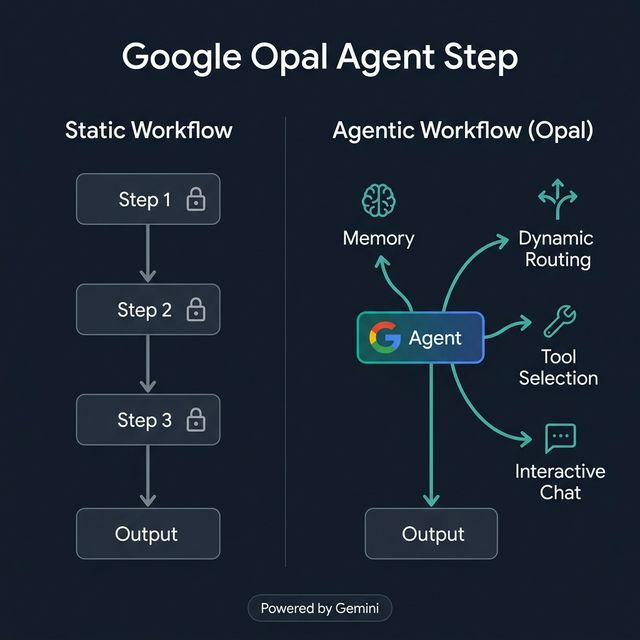
Static workflow (rigid, predefined steps) vs Agentic Workflow in Opal (agent determines its own path)
What Google Actually Launched
Previously, Opal was a no-code AI app builder where you defined every step explicitly: Step 1 does X, Step 2 does Y, output goes to Z. Everything static and predefined.
With the new agent step (powered by Gemini 3 Flash): you define a goal. The agent autonomously determines the best path to achieve it, selects the tools and models it needs, and asks follow-up questions when input is incomplete.
This is the fundamental difference between automation and agent.
Static Workflow vs Agentic Workflow
| Static Workflow | Agentic Workflow (Opal) | |
|---|---|---|
| Structure | Predefined | Agent-determined |
| Exception handling | Break or error | Auto-route |
| Missing input | Fail or default | Ask follow-up |
| Tools used | Predefined | Agent selects as needed |
| Memory | None | Persistent across sessions |
| Predictability | High | Lower |
| Adaptability | Low | High |
The key tradeoff: predictability vs adaptability. Builders often want both — and Opal is moving toward a system that can blend the two in a single workflow.
3 Capabilities Builders Should Pay Attention To
A. Memory — Context Persists Across Sessions
Opal agents now have persistent memory: they remember user preferences, brand voice, project context, names, and style — without requiring a new prompt every session.
Use cases:
- Creative brief intake agent that recalls brand guidelines from previous sessions
- Content workflow that remembers approved tone and doesn't need repeated reminders
- Research assistant that tracks project context and avoids duplicate findings
B. Dynamic Routing — Conditional Branching Without Manual Code
Instead of writing explicit routing logic for every branch, the agent transitions to the appropriate step based on criteria you define in natural language.
Use cases:
- Lead triage routing to different salespeople based on company size
- Customer support routing to escalation or self-serve based on issue type
- Research brief generator choosing web search vs internal knowledge base depending on the question
C. Interactive Chat — Ask Before Acting
The agent can initiate a dialogue to gather missing information before executing. No more poor-quality outputs caused by incomplete input.
Use cases:
- Creative brief agent asking for target audience and key message before writing
- Campaign planning agent clarifying budget and timeline upfront
- Internal knowledge workflow asking for specificity when a question is too broad
5 Workflow Ideas You Can Build Now
- AI content brief generator — agent asks about topic, audience, goal → generates a complete brief
- Sales research assistant — routes between web research and internal notes based on query type
- Creative concept generator — remembers brand preferences, no need to re-prompt each time
- Client onboarding workflow — adapts depth and format based on business type
- Executive briefing workflow — tailors for new vs existing clients automatically
Where Opal Fits in the AI Workflow Stack
| Tool type | When to use |
|---|---|
| Classic automation (Zapier, Make) | Connecting apps, fixed triggers, predictable |
| Opal / visual agent builder | Prototype agentic workflows fast, no-code |
| Agent framework (LangChain, n8n) | Complex custom logic, code-first |
| Coding agents (Claude Code, Codex) | Dev workflow, codebase-aware automation |
Opal fits best for builders who need to prototype agentic workflows quickly without writing code — especially when the workflow needs memory, conditional routing, or interactive intake.
Limitations and Caution Points
- Less deterministic than fully static workflows — harder to predict exact behavior per run
- Higher latency — agents need additional reasoning steps
- Harder to debug — agent decisions aren't as transparent as explicit conditional logic
- Need governance around memory and tool access, especially with sensitive data
Who Should Try This First
- Solo builders prototyping agentic workflows quickly without an agent framework
- Growth/ops teams needing interactive workflow intake to gather user-provided inputs
- Product teams validating agent UX before investing in custom code
The Bigger Picture
Opal's update is a clear signal of a larger trend: visual workflow tools are becoming agent platforms. Builders should start designing workflows around goals, memory, and intervention points — not just a fixed list of steps.
Try this: Take one of your current rigid automations and map it as an agentic version. Identify where memory, dynamic routing, or follow-up questions would meaningfully improve the output.