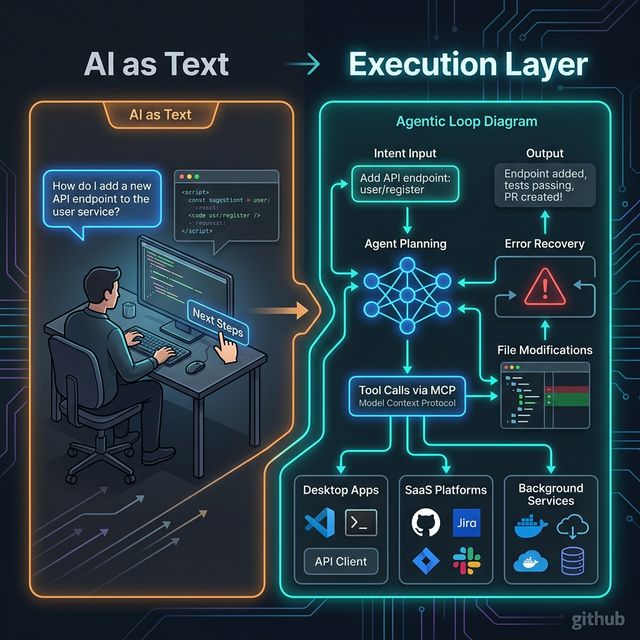
GitHub Copilot SDK: The Era of 'AI as Text' Is Over — Execution Is the New Interface
The GitHub Copilot SDK lets you embed Copilot's planning and execution layer directly into your applications — not through a chat box, but as agentic execution loops running as infrastructure. This is the most important AI app architecture shift of 2026.
TL;DR
The GitHub Copilot SDK (2026) isn't a new chatbot — it exposes the planning and execution layer behind Copilot CLI for developers to embed directly into applications. This means AI is no longer a text box alongside your product — it becomes execution infrastructure running inside it.
Let's be honest: the most familiar AI pattern today is — user types a question, AI returns text, human reads it and manually decides the next step.
This works fine for simple queries. But when you want AI to actually do work — explore a codebase, plan required steps, modify files, run commands, recover from failures — a text response isn't enough.
GitHub calls this shift: "The era of 'AI as text' is over. Execution is the new interface."
What is the GitHub Copilot SDK?
From the GitHub Blog:
"The GitHub Copilot SDK makes those execution capabilities accessible as a programmable layer. Teams can focus on defining what their software should accomplish, rather than rebuilding how orchestration works every time they introduce AI."
The SDK exposes the planning/execution layer behind Copilot CLI — letting developers embed these capabilities into any application. Not just an IDE, not just a CLI — any surface that can trigger logic.
From AI-as-text (human manually decides) to execution layer (agent plans, acts, recovers)
3 Architectural Patterns Worth Studying
Pattern 1: Delegate Multi-Step Work to Agents
Scripts and glue code are the default for automation — but they're brittle. When a workflow depends on context, changes shape mid-run, or needs error recovery, scripts require hard-coding edge cases or building a homegrown orchestration layer.
With the Copilot SDK, you delegate intent rather than encode fixed steps:
Example: Your app exposes an action like "Prepare this repository for release."
Instead of defining every step manually, you pass intent and constraints. The agent:
- Explores the repository
- Plans required steps
- Modifies files
- Runs commands
- Adapts if something fails — it doesn't crash, it recovers
All while operating within defined boundaries you control.
Why this matters: As systems scale, fixed workflows break down. Agentic execution allows software to adapt while remaining constrained and observable — without rebuilding orchestration from scratch each time you add AI.
Pattern 2: Ground Execution in Structured Runtime Context
Many teams attempt to push more behavior into prompts. But encoding system logic in text makes workflows harder to test, reason about, and evolve. Over time, prompts become brittle substitutes for structured system integration.
With the Copilot SDK, context becomes structured and composable:
Instead of:
"System context: We use microservices. Auth service owns /api/auth.
 Payments service owns /api/payments. Historical decision: PostgreSQL
 not MongoDB because..." [500 words stuffed into a prompt]

Replace with:
agent.addTool("get_service_ownership", queryServiceRegistry)
agent.addTool("get_historical_decisions", queryDecisionLog)
agent.addTool("get_dependency_graph", queryDependencyDB)
The agent retrieves structured context at runtime rather than receiving an unstructured text dump. Define domain-specific tools or agent skills, expose them via Model Context Protocol (MCP), and let the execution engine pull context when needed.
Example: an internal agent that:
- Queries service ownership
- Pulls historical decision records
- Checks dependency graphs
- References internal APIs
- Acts under defined safety constraints
Why this matters: Reliable AI workflows depend on structured, permissioned context. MCP provides the plumbing that keeps agentic execution grounded in real tools and real data — not guesswork embedded in prompts.
Pattern 3: Embed Execution Outside the IDE
Most AI tooling today assumes meaningful work happens inside an IDE. But modern software ecosystems extend far beyond an editor.
With the Copilot SDK, execution becomes an application-layer capability:
Teams want agentic capabilities inside:
- Desktop applications — off-screen background processing
- Internal operational tools — support ticket triage, incident resolution
- Background services — scheduled automation, event-driven workflows
- SaaS platforms — built-in AI for end users
- Event-driven systems — trigger on file change, deployment, user action
Your system listens for an event — a file change, deployment trigger, or user action — and invokes Copilot programmatically. The planning and execution loop runs inside your product, not in a separate interface or developer tool.
When execution is embedded: AI stops being a helper in a side window. It becomes infrastructure — available wherever your software runs.
Why "AI as Text" Is No Longer Enough
| Dimension | AI as Text | Execution Layer |
|---|---|---|
| Output | Text response | Actual changes (files, PRs, configs) |
| Multi-step | Human manually chains | Agent plans and executes |
| Error handling | User re-prompts | Agent adapts and recovers |
| Context | Stuffed in prompt | Retrieved from real systems via tools |
| Integration | Copy-paste output | Native integration with systems |
| Embedding | Chat box alongside app | Infrastructure inside app |
5 Things Builders Should Copy Even If You Never Use Copilot SDK
- Intent-based orchestration: Define what you want achieved, not how every step should work — let the execution engine handle context
- Runtime tool access over prompt stuffing: Build specific tools for context retrieval rather than jamming everything into the system prompt
- Structured context and schemas: Domain rules, API schemas, ownership data — expose via structured interfaces, not text blobs
- Constraint-driven execution: Boundaries and permissions define the trust domain — not prompt instructions
- Event-triggered workflows: Anything that can trigger logic in your app can trigger agentic execution
Build vs Buy: Key Questions
Use a hosted orchestration engine when:
- No internal infra to host the execution loop
- Want trust domain and audit logging out-of-the-box
- Team is new to agentic architecture
Use an embedded execution SDK (like Copilot SDK) when:
- Need deep integration with existing application architecture
- Want full control over tools, memory, retries, logging, permissions
- Execution is a core product feature, not an add-on
Use a framework (LangGraph/CrewAI/n8n) when:
- Need complex multi-agent coordination
- Want a visual workflow builder
- Team prefers Python/JavaScript ecosystem over SDK integration
Real-World Use Cases
- AI-native release automation: From "prepare for release" to PRs, changelogs, notifications — not a script, but intent delegation
- Support ticket triage + action chains: Classify → lookup → draft response → escalate if needed — no human required at each step
- Content ops with human review gates: Generate → review gate → publish — agent handles generation, human approves at checkpoints
- Devtool automation inside products: Events in your SaaS trigger agentic workflows from within the product experience itself
Takeaway
"If your application can trigger logic, it can trigger agentic execution."
"Execution is the new interface" is not just branding — it's a product architecture shift. The winners will be teams designing AI systems around tools, context, constraints, and outcomes — not around chat boxes and text responses.
Audit one existing AI feature right now: Should it stay as chat, or should it become an executable workflow?