Gemini Code Assist 2026: Agent Mode, Auto Approve, Inline Diff, and Checkpoints Explained
Google has turned Gemini Code Assist into a complete workflow stack — from planning and multi-file execution to inline review and checkpoint rollback. A full breakdown of the March 2026 updates.
TL;DR
Google's March 2026 Gemini Code Assist update ships Agent Mode + Auto Approve, Inline Diff Views, Revert to Checkpoint, and Multi-part Chat Suggestions. The clear direction: AI coding tools are no longer autocomplete — they're becoming complete workflow layers from planning to rollback.
If you're tracking the AI developer tools market, March 2026 has been a notably busy month. Google pushed a wave of updates to Gemini Code Assist, and the interesting part isn't any single feature — it's the pattern they all form together.
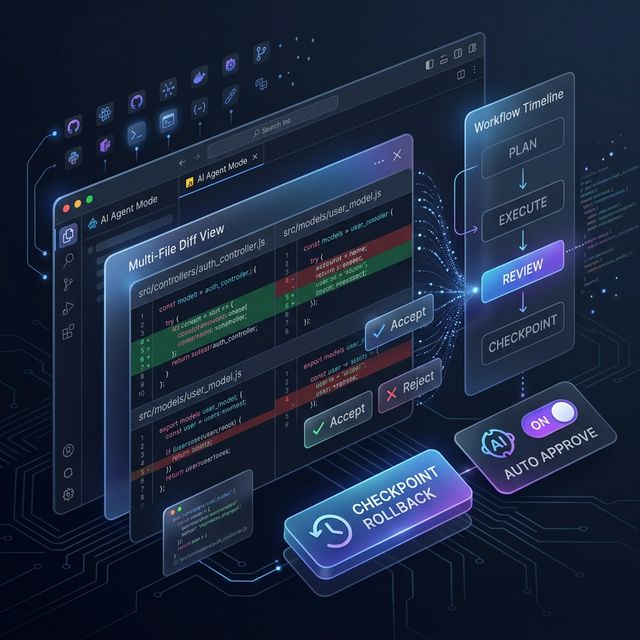
AI coding tools are converging on a model: Plan → Execute → Review → Checkpoint. Gemini Code Assist's March release is one of the clearest case studies of this trend in action.
All the March 2026 Features
According to the Google Developers Blog, highlighted features include:
- Agent Mode with Auto Approve
- Inline Diff Views
- Revert to Checkpoint
- Multi-part Chat Code Suggestions
- Chat Code Suggestion Preview
- Manage Files/Folders in the Context Drawer
- Custom Commands
- Add Code Snippets / Terminal Output to Context
- Configurable Codebase Awareness (
.aiignore)
This article focuses on the 4 biggest workflow changes.
1. Agent Mode with Auto Approve: The Biggest Workflow Shift
This is the highest-impact feature in the update. Agent Mode turns Gemini Code Assist into an intelligent collaborator that understands your entire codebase:
How it works:
- You describe a task — for example: "Add a new API endpoint for user authentication across all the required files"
- The agent analyzes the request and proposes a multi-step plan for your approval
- After approval, the agent executes the full plan
- With Auto Approve Mode enabled: the agent acts on its plan without manual checks at each step
With Auto Approve, multi-file changes that previously took hours can be completed with a single automated command.
Note: Auto Approve is powerful but should be used carefully — especially for large-scope changes. Get comfortable with Agent Mode before enabling Auto Approve.
2. Inline Diff Views: Making Review the Real Product
The ability to generate accurate code is only half the problem. The other half: how does the developer review that code?
Inline Diff Views answer that question:
- AI-generated changes are displayed directly in code context
- You can accept, reject, or edit individual lines right inside the diff view
- No tab switching, no pasting code blocks into chat
Why this matters: Trust in AI tools rises when review is faster and more granular. When developers can inspect each change in context, they accept code less blindly — and make fewer mistakes.
3. Revert to Checkpoint: Experiment Without Fear
Revert to Checkpoint is the safety net that enables bolder experimentation:
- Accept a series of suggestions from non-agentic chat → things don't work out
- No need to manually undo changes across multiple files
- One click → rolls back all affected files to their state before the prompt
New pattern: Instead of being careful at every step, developers can try bold refactoring, knowing that worst case is a single click back to a known good state.
This is especially valuable for:
- Large refactors spanning multiple modules
- Experimenting with architectural changes
- Onboarding into an unfamiliar codebase
4. Multi-part Suggestions and Chat Preview: Reducing Cognitive Load
Two smaller features that compound well:
Multi-part Chat Code Suggestions:
- When AI suggests changes across multiple files or code blocks, you get more granular control
- Accept a specific code block, or apply all suggestions — not all-or-nothing
- Code suggestions are displayed in collapsible preview blocks
- Default shows a snippet; expand when you need full detail
- Cleaner chat history in long sessions — easier to scroll back and find previous context
How Daily Workflow Changes
| Before | After (with new features) |
|---|---|
| Paste large code blocks into chat | Attach snippets/terminal output directly |
| Review changes in a separate tab | Inline Diff in the editor |
| Manually undo across multiple files | Revert to Checkpoint with one click |
| Approve each small step | Auto Approve for routine tasks |
| Cluttered chat history | Collapsible suggestion blocks |
Context Drawer and .aiignore: You Control What AI Sees
Two less-discussed but important features for production use:
Context Drawer: New UI that lets you temporarily limit context to only relevant files. When debugging an issue in just 3 files of a 1000-file project, you can restrict Gemini to only those 3 — answers become more precise and relevant.
Configurable Codebase Awareness (.aiignore): Like .gitignore, you can permanently exclude build artifacts, node_modules, or files with sensitive keys from Gemini's codebase awareness. This improves suggestion relevance and enhances security.
What AI Coding Tools Are Becoming
Looking at the full picture, the March 2026 pattern is clear:
AI coding tools are no longer autocomplete engines. They're evolving into end-to-end workflow layers:
Plan (Agent mode + clarifying questions)
  ↓
Execute (multi-file, automated)
  ↓
Review (Inline Diff, granular control)
  ↓
Checkpoint (rollback if needed)
Gemini Code Assist's March update is a concrete case study for how major players are building this out.
According to LogRocket's March 2026 rankings, Windsurf still leads in agentic workflow experience. But at this pace of updates, the gap is closing fast.
Limitations to Keep in Mind
- Auto Approve is powerful but not for everything — large-scale changes still need human verification
- Broad codebase changes still need validation even when the agent is confident
- Feature quality depends on model reliability and developer review discipline
FAQ
Is Agent Mode with Auto Approve free? Gemini Code Assist has a free tier for individual developers. Agent Mode and Auto Approve are available on paid plans — see cloud.google.com/gemini/docs/codeassist for current pricing.
Does Revert to Checkpoint work for files outside the workspace? No, Checkpoint only rolls back files in the current workspace/project tracked by the Gemini Code Assist session.
Does Inline Diff work with JetBrains? According to the Google Developers Blog, these features are available for both VS Code and JetBrains extensions.
How do I enable Auto Approve? In Agent Mode, there's an "Auto Approve Mode" toggle in settings. Start with regular Agent Mode before enabling Auto Approve.
How is .aiignore different from .gitignore?
.gitignore controls what Git tracks. .aiignore controls what Gemini Code Assist is allowed to read — the two files operate independently.