Cursor Automations: When Coding Agents Stop Waiting for You to Prompt Them
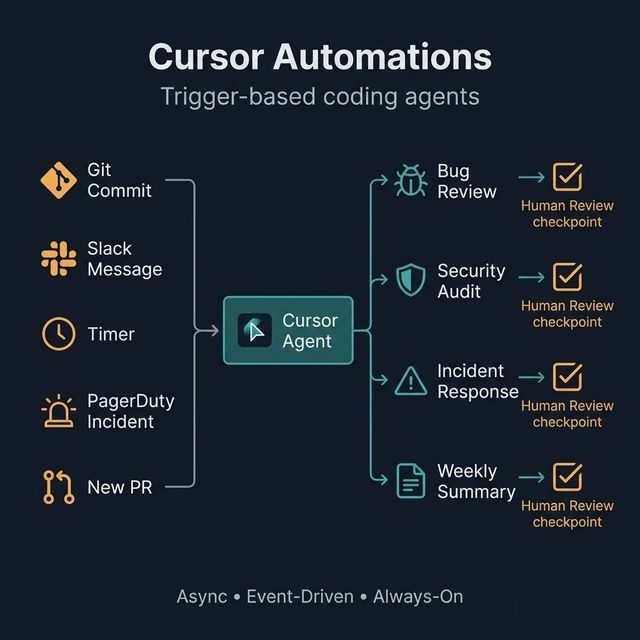
Cursor just launched Automations — a system that triggers AI coding agents based on events: git commits, Slack messages, PagerDuty incidents, or timers. This is the shift from reactive AI assistance to proactive, event-driven coding workflows.
The problem with agentic coding in 2026 isn't whether the AI is good enough. The problem is one human having to supervise too many agents at once.
Cursor just launched Automations — a direct answer to that coordination problem: AI coding agents that can launch themselves based on events, without requiring human initiation for everything.
Cursor Automations — Async • Event-Driven • Always-On: coding agents that activate when needed
Why Prompt-and-Monitor Is Breaking Down
The old model: user prompts → agent works → user reviews → user prompts again.
The problem: when you're running multiple agents in parallel or need continuous coverage of a codebase, human attention becomes the bottleneck. You can't manually initiate everything.
Cursor Automations addresses this by shifting to event-driven: agents wake up when triggered, work asynchronously, and report results — you review only when it matters.
What Cursor Automations Does
Agents can now launch automatically from triggers:
| Trigger | Example |
|---|---|
| Git commit/PR | Every time new code is pushed |
| Slack message | When someone asks about the codebase |
| Timer | Every Monday morning, every hour, daily |
| PagerDuty incident | When a production alert fires |
| Merged PR | After a PR is approved and merged |
Humans are still in the loop — but no longer have to initiate everything manually.
Why This Is a Meaningful Shift
The move from synchronous prompting to asynchronous event-driven workflows matters because:
- Teams can operationalize AI for continuous maintenance — not just one-off tasks
- AI coding value no longer depends on a developer remembering to prompt at the right moment
- Human attention goes to the decisions that matter, not routine tasks
4 Concrete Use Cases from the Launch
A. Automated Bug Review
On every new code addition, an agent automatically reviews for bugs, issues, and code quality regressions. Bugbot was the predecessor — Automations extends this much deeper.
B. Security Audits
Agent automatically inspects each new diff: policy violations, exposed secrets, risky patterns, dependency issues. Runs continuously instead of only at release time.
C. Incident Response
When PagerDuty creates an alert, agent automatically:
- Connects via MCP to query logs
- Surfaces relevant findings for engineers
- Drafts an initial diagnosis
Not to replace humans — to help them start from information, not a blank slate.
D. Weekly Engineering Summaries
Agent automatically generates a changelog and codebase summary every week, posts to Slack. Useful for team handoffs and visibility across a fast-moving codebase.
A Framework for Trigger-Based Coding Agents
A strong automation needs 5 components:
Trigger → Agent Task → Tool Access → Human Review → Output Destination
Example for security audit:
New PR (trigger)
→ Review diff for secrets & risky patterns (agent task)
→ Code access + secrets detection tool (tool access)
→ Flag high severity issues for human review (human checkpoint)
→ Post comment on PR (output)
Three design principles:
- Clear boundaries — agent knows its scope, doesn't expand unexpectedly
- Escalation points — defined moments when a human must decide
- Auditability — log everything so you can trace when something goes wrong
A Practical Framework for Teams Adopting This
- Start with low-risk, repetitive tasks — code review, changelog, summary
- Add clear success criteria — how do you know when the agent did it right?
- Keep human approval on changes that matter — production deploys, security fixes
- Log outputs and failure cases — to improve routing over time
- Expand gradually: review → response → coordination workflows
Risks and Limitations
- Automation spam — too many agent runs generates noise instead of signal
- False positives — overly eager code review leads to alert fatigue
- Cost creep — background agent activity burns tokens; needs monitoring
- Security — agents with codebase tool access need explicit governance
- Ownership — when agents act on incidents, who's accountable if something goes wrong?
What This Means for the Future of Dev Teams
Cursor Automations signals a larger shift:
Engineers will manage systems of agents, not just a single coding assistant.
AI coding value no longer comes from raw model benchmark performance — it comes from workflow design quality: how well you define triggers, boundaries, escalation points, and output destinations.
The next differentiator is orchestration discipline, not model choice.
Try this: Audit one repetitive engineering workflow this week — code review, changelog generation, incident triage, or weekly reporting — and redesign it as a trigger-based agent flow.