The Ultimate Guide: Setting Up Your Claude Code Workflow for Real-world Projects
A comprehensive guide on managing project memory with CLAUDE.md and establishing an efficient daily workflow using Claude Code for AI Engineers.
Working with Claude Code isn't just about opening a terminal window and typing a few prompt lines. To ensure consistency, scalability, and time efficiency in real-world projects, you need a systematic workflow. The secret lies in properly utilizing CLAUDE.md and mastering the AI context organization ecosystem.
This article summarizes the entire operational workflow of Claude Code for a project setting, helping any "AI Engineer" or "Vibecoder" optimize their work performance.
Excellent context organization is the key to working effectively with Claude Code
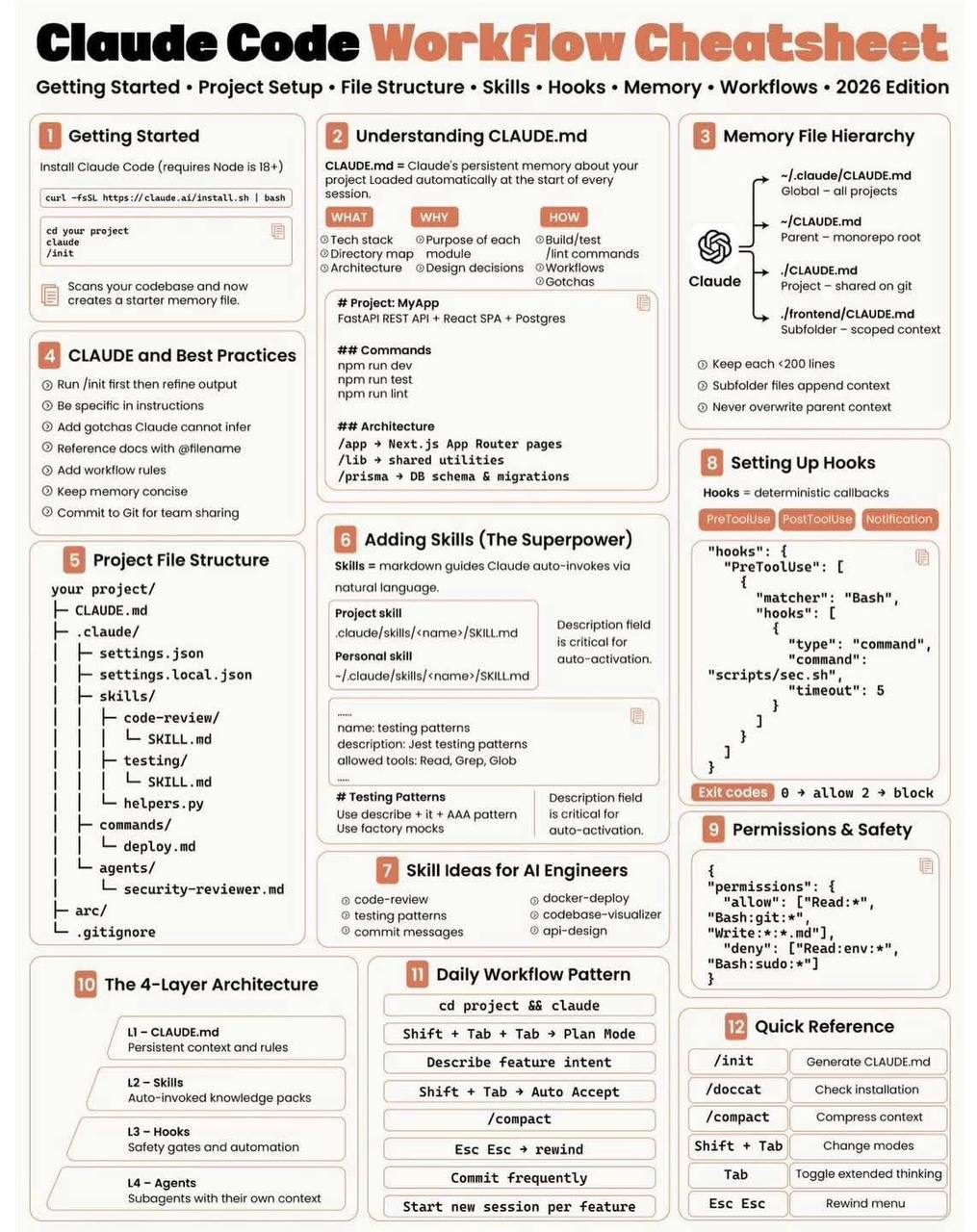
1. Understanding the Role of CLAUDE.md: The Project's "Memory"
When you open a new session, the AI typically does not immediately know what tech stack you are using or your coding conventions. Constantly repeating rules is a massive waste of both time and context tokens.
That is where CLAUDE.md comes in. It serves as the "project memory" and acts as the Source of Truth that Claude automatically loads whenever a new session begins.
A standard CLAUDE.md file should include the following concise information:
- Tech Stack: The core framework tools you use (Next.js, Tailwind, Postgres, etc.).
- Directory Structure: A brief explanation of the major folders' roles.
- Commands: Commands for building, testing, linting, and running the project (e.g.,
npm run dev,pytest). - Architecture & Conventions: The team's exclusive notes and coding standards (e.g., use Arrow Functions, always utilize type-check for TypeScript, strictly no 'any').
- Common "Gotchas": Stereotypical errors that AI struggles to infer independently (e.g., "Do not import module X, please use the rewritten module Y located at
utils/y.js").
Note: Everything within CLAUDE.md must be extremely concise, clear, and act as strictly enforced directives for the project.
2. Layer-Based Project Organization
Instead of cramming everything into a single overly long CLAUDE.md file, you should break the project into multiple layers for intellectual context management:
- CLAUDE.md (Global Context): Declares core configurations, located at the project root (or alternatively under global configs, parent folders, or sub-folders depending on complexity). Be cautious not to let heavily localized
CLAUDE.mdfiles severely override and corrupt parent contexts. - Skills: Specialized instructions or scripts capable of self-triggering upon detecting a relevant context (Example: A skill named
database-schemaonly loads when you touch database-oriented code). - Hooks: Configurations to control behavioral flow executing before or after triggering a tool (e.g., run
npm run lintimmediately after making a code modification). - Agents: Dividing workload tasks to encapsulate highly specialized tasks in isolation, thereby preventing the AI from jumping rapidly across heterogeneous logic scopes and causing contextual confusion.
3. The Daily Workflow Ritual
Based on insights from experienced AI practitioners, here is a sophisticated end-to-end process whenever you sit at your development desk:
- Run
/initearly: Allow the tool to perform a quick initial scan on your codebase and update the baseline setups if structurally necessary. - Setup Specific Prompts: Write meticulously specific directions via the command. Reference items directly by their exact filenames, eliminating any possible path confusion for Claude.
- Open Claude, Create a Plan: Either using system commands or direct chat, insist that Claude draft a functional action plan first. Never begin churning code if the AI has not formally validated its correct intent matrix.
- Auto-Accept Contextually: When determining that non-intrusive structural commands are valid (like viewing files or parsing grep outputs), activate auto-accept so the AI's flow of thought is not interrupted by manual confirmation waits.
- Compact Context Space: The
/compactshortcut is phenomenally valuable! After an exhaustive 10-15 conversational turns to polish a piece of logic, demand that the AI compacts context. Keeping the token length pristine frees up cognitive span for executing new code and mitigates hallucinations. - Rewind when Disrupted: If Claude mangles a file setup or strays too far from the functional trajectory, employ a rewind (slash command) instantly to revert the workspace to the closest clean state. Never attempt to laboriously patch up garbage code blindly emitted by the AI.
- Isolate Sessions: Platinum advice! Never force a single chat session to accommodate three distinct implementations. Once Feature A is deployed, commit frequently to document progress, close it, and fire up an entirely new session dedicated to Feature B.
Conclusion
The distinguishing factor separating an ordinary coder utilizing AI from a truly adept AI Engineer relies deeply on the ability to govern system-wide context scopes. If you are exploring the "Vibecoding" path, commence immediately by writing an excellent CLAUDE.md module and maintain the discipline to granularly segment your operational workflow. You will be astounded by how remarkably "intelligent" and deeply synchronized your AI companion can truly become.