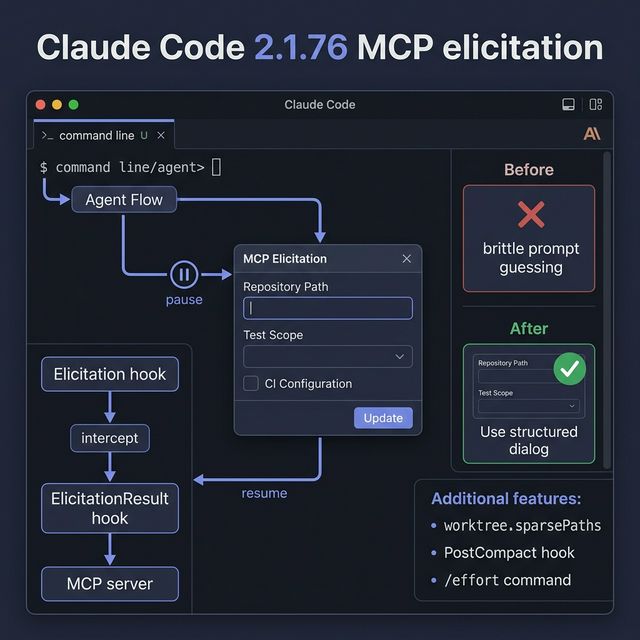
Claude Code 2.1.76: MCP Elicitation & Hooks That Make Agent Workflows More Interactive
Claude Code 2.1.76 adds MCP elicitation — MCP servers can now request structured input mid-task via an interactive dialog. Analysis of new features: Elicitation hooks, worktree.sparsePaths, PostCompact hook, /effort command, and how they make agent workflows less brittle and safer.
Release Notes vs Reality
The Claude Code 2.1.76 changelog lists 30+ improvements. This post doesn't walk through all of them — it focuses on what actually changes how you build agent workflows.
The most important feature in 2.1.76: MCP Elicitation.
What Is MCP Elicitation?
Before 2.1.76, if an MCP server (or tool-using agent) needed additional information mid-task, it had to:
- Stop and report an error ("insufficient information")
- Prompt-engineer a complex string to extract info
- Or finish with an incomplete/wrong result
Elicitation solves this: MCP servers can now pause a task and request structured input from the user or calling system, via an interactive dialog — either form fields or a browser URL.
From the official changelog:
"MCP servers can now request structured input mid-task via an interactive dialog (form fields or browser URL)"
How It Works (Conceptual)
Agent starts task → "Create a PR for feature X"

Agent realizes it needs more context:
  - Repo path?
  - Test scope (unit only, integration, full)?
  - CI config (fast / full pipeline)?

→ Agent PAUSES
→ MCP Elicitation dialog appears (structured form)
→ User/system fills in inputs
→ Agent RESUMES with full context
Before elicitation:
Prompt: "Deploy code to production, repo at /workspace/myapp, run integration tests only, use fast CI"
↑ Brittle. Parsing errors → wrong deployment scope. Human error-prone.
After elicitation:
{
  "repo_path": "/workspace/myapp",
  "test_scope": "integration",
  "ci_config": "fast"
}
Structured, validated, unambiguous.
Elicitation & ElicitationResult Hooks
The accompanying feature: Elicitation and ElicitationResult hooks — letting you intercept and override responses before they're sent back to the MCP server.
When hooks are useful:
-
Auto-fill context — Running in a CI/CD environment? Hooks can auto-populate fields like repo path or branch name from environment variables, instead of asking the user each time.
-
Validation layer — Before sending an elicitation response back, validate format or reject invalid values.
-
Audit trail — Log all elicitation inputs for compliance or debugging.
-
A/B testing workflows — Test two different input schemas for the same tool to see which reduces errors more.
Other Notable Changes in 2.1.76
worktree.sparsePaths — For Large Monorepos
When using claude --worktree in large monorepos, you can now specify only the directories needed via git sparse-checkout:
// settings.json
{
  "worktree": {
    "sparsePaths": ["src/api", "packages/shared", "tests/integration"]
  }
}
Why it matters: A monorepo with 50,000 files checks everything out each time an agent runs — slow and disk-heavy. Sparse checkout → only relevant directories → 10x faster in large repos.
PostCompact Hook
Fires after conversation compaction completes. Previously there was no reliable way to know when compaction was done. Now you can:
- Trigger post-compaction analysis
- Save compaction stats
- Reset conversation-level state after context is trimmed
/effort Command
Set the model's "effort level" on demand:
/effort low     → faster, cheaper (good for simple tasks)
/effort medium  → balanced (default)
/effort high    → maximum reasoning (for complex problems)
When useful: Routine code review → /effort low. Debugging an architectural issue → /effort high. Saves tokens and latency for tasks that don't need full reasoning depth.
Implementation Tips
Keep Elicitation Fields to a Minimum
Every elicitation dialog is friction. The rule:
- 3-4 fields maximum per dialog
- Only ask what can't be inferred from context
- Provide sensible defaults for optional fields
// ✅ Good — minimal, clear
{
  "title": "Configure deployment",
  "fields": [
    {"name": "environment", "type": "select", "options": ["staging", "production"], "default": "staging"},
    {"name": "run_tests", "type": "boolean", "default": true}
  ]
}

// ❌ Bad — too many fields
{
  "fields": [...20 configuration options...]
}
Use Standardized Schemas
Don't invent custom formats for each tool. Define shared types:
// Shared elicitation types
type DeploymentInput = {
  environment: "staging" | "production"
  branch: string
  run_tests: boolean
}

type PRInput = {
  repo_path: string
  base_branch: string
  test_scope: "unit" | "integration" | "full"
}
When teams share schemas, agents can interoperate and testing becomes much easier.
Guardrails for Unattended Workflows
If an agent workflow runs unattended (CI/CD, scheduled tasks), elicitation dialogs will block indefinitely if there's no response. You need:
- A timeout handler for elicitation requests
- Fallback defaults if timeout fires
- An alert if the workflow is blocked waiting for input
# Pattern: timeout + fallback
response = await wait_for_elicitation(timeout=30)
if response is None:
    # Use safe defaults, send alert
    response = SAFE_DEFAULTS
    await notify_team("Elicitation timed out, using defaults")
Pitfalls & Best Practices
| Pitfall | Better approach |
|---|---|
| Too many elicitation dialogs per task | Batch questions into 1 dialog at task start |
| Free-text fields instead of structured | Use select/checkbox/number inputs |
| Not validating elicitation responses | Add validation in the ElicitationResult hook |
| Blocking production workflows with no timeout | Implement timeout + fallback defaults |
| Different schemas for the same input type | Define shared input types across tools |
Notable Bug Fixes
From the 2.1.76 changelog — fixes that actually affect daily use:
- Auto-compaction infinite retry fixed — Circuit breaker after 3 attempts. Previously agents could get stuck in a compaction retry loop.
- Plan mode re-approval fixed — No more asking to re-approve a plan that was already accepted.
- ToolSearch schema loss fixed — Deferred tools no longer lose their input schemas after compaction (array/number params were being rejected with type errors).
- Background agent improvement — Killing a background agent now preserves partial results instead of losing everything.
Takeaway
MCP elicitation changes how agent workflows handle ambiguity: instead of guessing, guessing wrong, and failing — agents can pause and ask precisely. A small but meaningful step forward in agent workflow UX.
Action item: Identify one workflow that's currently failing due to input ambiguity. Add one elicitation step. Compare error rates before and after.
Source: Claude Code CHANGELOG.md — Anthropic, version 2.1.76