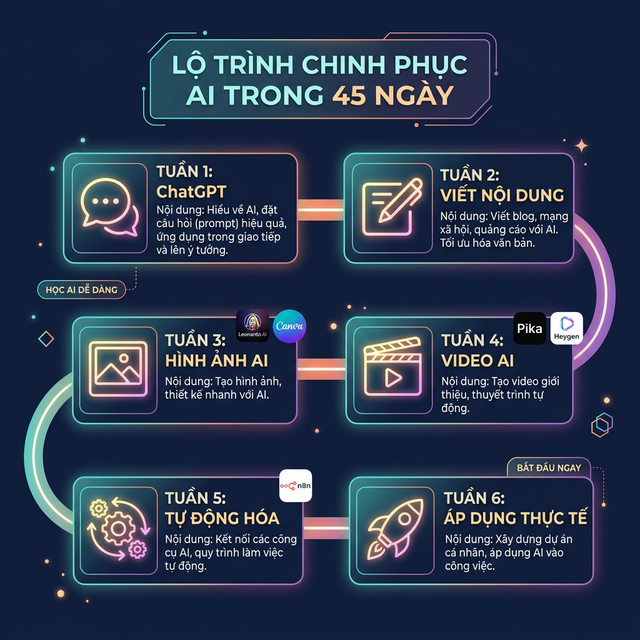
45-Day AI Learning Roadmap for the Non-Tech 30+ Crowd – Just 15 Minutes a Day
A practical 45-day AI roadmap for people over 30 with limited time and no technical background: from basic ChatGPT to content writing, AI image generation, video creation, and workflow automation — step by step, no overwhelm.
Every morning there are 7,749 new AI tools and technologies — and not knowing where to start is a feeling shared by everyone, including tech people.
After spending an afternoon filtering through everything, I put together a 45-day roadmap — just 15–30 minutes a day, anyone can learn and apply AI to their work. No rambling, no overwhelm — just follow the steps.
After 45 days, you'll know how to use AI for text tasks, create images and video content, and automate repetitive work.
6 weeks — 45 days — 15 minutes a day. Start here.
WEEK 1: Getting Started with ChatGPT – Your #1 Office Assistant
Days 1–7
📌 Day 1: What is ChatGPT – What can I use it for?
🎥 Video: "AI For Everyone – Andrew Ng (15 min)" → Search YouTube
→ Practice: Create an account at chat.openai.com → Ask ChatGPT 3 questions related to your work
✅ Result: You know how to start and apply ChatGPT to real tasks
📌 Day 2: How to Communicate Effectively with AI
📄 Course: "Google AI Essentials – Lessons 1 & 2" → Search Google
→ Practice: Write the same question 3 different ways and compare responses
✅ Result: You understand how to write clear prompts that get better answers
📌 Day 3: Write Emails & Announcements with AI
🎥 Video: "How to write better emails with ChatGPT" → Search YouTube
→ Practice: Use ChatGPT to write 1 email and 1 internal announcement
✅ Result: Faster writing, professional and polished output
📌 Day 4: Summarize & Translate Documents Instantly
→ Practice: Copy a text block (report, contract...) → Ask ChatGPT to summarize or translate
✅ Result: Cut document processing time down to 15% of original
📌 Day 5: AI Meeting Notes with Otter.ai
📄 Tool: Otter.ai – Search Google to sign up
→ Practice: Record a meeting → Use Otter to generate a transcript & summary
✅ Result: Clear meeting minutes without writing a single word
📌 Day 6: Plan Your Week with AI
🎥 Video: "How to use ChatGPT for Project Planning" → Search YouTube
→ Practice: Ask ChatGPT to create your work plan for this week
✅ Result: A clear, realistic schedule in minutes
📌 Day 7: Week 1 Review
→ Practice: List 3 tasks ChatGPT saved you time on. Compare your work speed before and after learning AI.
✅ Result: You realize ChatGPT can function as a genuine virtual assistant
WEEK 2: Write Content Fast – Clean – Creative with AI
Days 8–14
📌 Day 8: Write blog posts and announcements → 3x faster writing, clear and readable output
📌 Day 9: Brainstorm marketing ideas → 10 social media post ideas in minutes
📄 Course: "Creative Brainstorming with AI" → Search Coursera
📌 Day 10: Edit & upgrade old content → Copy an old post, ask ChatGPT to improve and optimize it
📌 Day 11: Write attention-grabbing headlines → 10 headline variations, increased click-through rate
📌 Day 12: Write social media posts → 3 Facebook post templates from a single idea
🎥 Video: "Social Media Content Creation with AI" → Search YouTube
📌 Day 13: Write advertising copy → Short, compelling content for a product or service
📌 Day 14: Week 2 Review → Collect prompts, headlines, and templates → Save to Notion or Google Docs as your personal library
✅ Week 2 Result: A ready-to-reuse content toolkit
WEEK 3: Create Professional AI Images – No Photoshop Required
Days 15–21
📌 Day 15: Getting Started with AI Image Generation
🎥 Video: "Introduction to AI Image Generation" → Search YouTube
→ Create a free account on Leonardo AI → Generate 3 test images on a topic you choose
📌 Day 16: Write Simple, Effective Image Prompts
→ Write 5 prompts for the same subject in different styles (cartoon, realistic, 3D...)
📌 Day 17: Create Posters & Banners with Canva AI
Tool: Canva Magic Design
→ Create a poster for an event or product in under 10 minutes
📌 Day 18: Build Your Personal Brand Identity with AI
→ Create a logo, avatar, and brand banner using Leonardo AI
📌 Days 19–20: Edit AI images + Create an image set for a campaign
Tools: Canva, Fotor, Ideogram
→ Use Leonardo AI + Canva together to create 5 images for recruiting or service content
📌 Day 21: Week 3 Review → Create an "AI Image Library" folder → Save prompts and generated images
✅ Week 3 Result: A personal library you can reuse anytime
WEEK 4: Create AI Video & Voice – Turn Text into Multimedia Content
Days 22–28
📌 Day 22: Getting Started with AI Video Tools
Tools: Pika Labs, Canva Magic Studio
→ Create a video from a content block → Has visuals, text, and background music in minutes
📌 Day 23: Convert Text to Presentation Video
Tool: Canva Magic Studio
→ Write an intro paragraph → Generate a professional presentation video without manual editing
📌 Day 24: Create Natural, Professional AI Voiceovers
Tools: ElevenLabs, Play.ht
→ Generate a high-quality voice file to add to your video
📌 Day 25: Add Subtitles & Edit Video Easily
Tool: Descript
→ Clear video with clean subtitles, more accessible to viewers
📌 Day 26: Create a Talking AI Avatar from a Script
Tool: Heygen
→ Enter content → Choose an avatar → Export a presentation video without recording yourself
📌 Day 27: Create a summary video from long documents → ChatGPT summarizes → Canva/Pika creates a 1–2 minute video
📌 Day 28: Week 4 Review → Create "AI Video" & "AI Voiceover" folders → Save files + scripts + prompts
✅ Week 4 Result: A personal library ready for reuse anytime
WEEK 5: Automate Repetitive Work – Do Less, Achieve More
Days 29–35
📌 Day 29: Getting Started with n8n – Free Automation Tool
🎥 Video: "What is n8n? Automation for Everyone" → Search YouTube
→ Create an n8n account → Build a workflow to auto-save emails into Google Sheets
📌 Day 30: Automate Browser Tasks with Bardeen
Tool: Bardeen (Chrome extension)
→ Create an automation to collect news from websites → Reduce manual clicking
📌 Day 31: Auto-Note & Summarize with Notion AI
→ Use Notion AI to summarize an article or meeting notes → Clean summary, zero manual work
📌 Days 32–33: Auto-save files to Google Drive + Auto-send weekly reports via n8n
📌 Day 34: Auto-collect industry data and competitor info with Bardeen
📌 Day 35: Week 5 Review → List all repetitive daily tasks → Set up at least 3 automated workflows
✅ Week 5 Result: Free up 20–30% of your day, focus on more important work
WEEK 6: Synthesis – Real-World Application – Connect the Skills
Days 36–45
📌 Day 36: Combine ChatGPT + Leonardo AI + Canva → Full content creation A-Z → Save 70% of production time
📌 Day 37: Build reports & slides → ChatGPT creates the outline → Canva & Notion build a beautiful presentation in 30 minutes
📌 Day 38: Set up your personal automation system → 3 workflows → free up 1–2 hours/day
📌 Day 39: Major Project – Personal AI Application
Pick a real project (service intro, training content, business report...):
- ✍️ Write content with ChatGPT
- 🖼️ Create images with Leonardo AI
- 🎬 Make a video with Canva
- ⚙️ Automate the workflow with n8n
✅ Result: A real deliverable applying everything you've learned
📌 Day 40: Build a template & workflow library → Save to Notion or Google Docs
📌 Day 41: Measure your results → Compare work time and quality before vs. after
📌 Day 42: Plan your long-term AI usage → 3–6 month roadmap
📌 Day 43: Share your results with colleagues → Write a summary post of your 45-day journey
📌 Days 44–45: Review the full roadmap → Redo missed days → Optimize your personal library
✅ End of the 45-Day Roadmap
Congratulations! You've built the foundation for applying AI to office work and content creation.
From here you can:
- ✅ Join AI discussions online and offline with real confidence
- ✅ Become "productively lazy" — always thinking about how to automate the next thing
- ✅ Create more results with AI (and occasionally deal with the consequences 😄)
PS: YouTube links for each day exist but had to be removed due to platform restrictions. Just search for the video titles listed in the guide — they're all there.