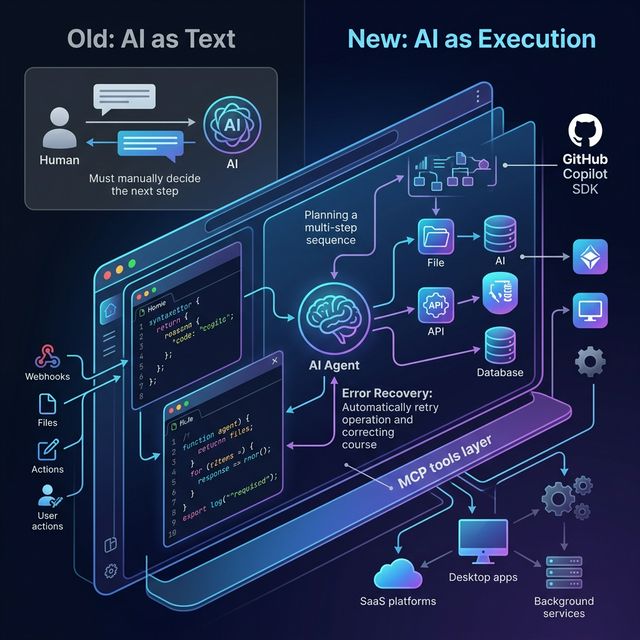
Execution Is the New Interface — Why AI Apps Are Moving Beyond Chat Windows
GitHub (March 2026) makes a critical argument: the era of 'AI as text' is over. AI is no longer just a chatbot answering questions — it's becoming an execution layer running inside applications. Analysis of 3 build patterns and practical implications for product developers.
AI Apps Are Moving Beyond Chat Windows
For years, AI in applications looked like this: user types a prompt → AI returns text → user decides the next step.
This is the "AI as text" model — and according to GitHub (March 2026), that era is ending.
Instead, AI is shifting to a new role: execution layer. Not just answering questions, but planning, calling tools, changing state, recovering from errors, and completing real work — all inside your application.
GitHub explains this shift through the GitHub Copilot SDK — a programmatic layer that lets AI execution run inside any application. But more important than the specific tool is the question GitHub's article raises: how do product teams need to change how they think about AI?
Why Text-Only AI Workflows Hit a Ceiling
Traditional scripts and glue code work for tasks that can be fully pre-defined. But the moment a workflow needs to:
- Handle complex context
- Change shape mid-run
- Recover from errors
- Make multi-step decisions
Scripts become brittle. You either hard-code edge cases (unsustainable) or build a homegrown orchestration layer (expensive and complex).
Prompts stuffed with business logic aren't much better: prompts become brittle substitutes for structured system integration. Over time, they're impossible to test, reason about, and evolve.
Conclusion: Text-in, text-out AI is just a thin layer on top of real integration problems — it doesn't solve them.
What Execution Means — and Why It's Different
What does "execution is the new interface" actually mean?
Old model: user → prompt → AI → text → user decides → next step (manual)
New model: event/trigger → agent receives intent → plans → calls tools → changes files/state → handles errors → completes work — all automatic, inside your application, within predefined constraints.
The core difference: AI doesn't just suggest the next step — it executes that step within a bounded context.
3 Build Patterns From GitHub's Framing
Pattern 1: Delegate Multi-Step Work to Agents
Instead of hard-coding every step into a script, pass intent and constraints to an agent:
Example: "Prepare this repository for release"
The agent will:
- Explore the repository autonomously
- Plan the necessary steps
- Modify files
- Run commands
- Adapt if something fails
You don't define every step. You define the goal and the boundaries.
Why this matters: As systems scale, fixed workflows break down. Agentic execution allows software to adapt while remaining constrained and observable — without rebuilding orchestration from scratch each time.
Pattern 2: Ground Execution in Structured Runtime Context
Instead of stuffing all context into prompts, give agents direct access to systems:
With the GitHub Copilot SDK approach:
- Define domain-specific tools or agent skills
- Expose tools via Model Context Protocol (MCP)
- The execution engine retrieves context at runtime
Example: an internal agent can query service ownership, pull historical decision records, check dependency graphs, reference internal APIs — all at runtime, not embedded in a prompt.
Why this matters: Reliable AI workflows depend on structured, permissioned context. MCP provides the plumbing that keeps agentic execution grounded in real tools and real data — without guesswork baked into prompts.
Pattern 3: Embed Execution Outside the IDE
Most AI tooling assumes meaningful work happens inside an IDE. But modern software ecosystems extend far beyond:
- Desktop applications
- Internal operational tools
- Background services
- SaaS platforms
- Event-driven systems
With the Copilot SDK approach, execution becomes an application-layer capability: the system listens for an event (file change, deployment trigger, user action) → invokes AI programmatically → the planning and execution loop runs inside your product.
This means: AI is no longer a "helper in a side window" — it becomes infrastructure, available wherever your software runs.
What Developers Should Build Next
With this framework, GitHub suggests concrete directions:
| App Type | Execution Capability |
|---|---|
| Internal support copilot | Not just answering questions, but updating tickets, assigning issues, sending notifications |
| Repository maintenance agent | Automated dependency updates, code quality checks, spec-driven changes |
| Deployment assistant | Plan release steps, modify configs, rollback on failure |
| Research briefing workflow | Query multiple sources, synthesize, format, distribute |
| SaaS feature | Execute tasks for users instead of just answering them |
Design Principles for App-Embedded Agents
When embedding execution into applications:
✅ Bounded permissions — agent can only access what it needs
✅ Explicit constraints — define clearly what the agent CANNOT do
✅ Observable logs — every decision and action is logged
✅ Structured tool interfaces — MCP, not natural language tools
✅ Human approval for high-risk actions — no auto-executing destructive operations
✅ Clean fallback paths — graceful failure, not silent crashes
Where Many Teams Will Get This Wrong
GitHub's framing also implicitly identifies anti-patterns:
"Chat with a button" instead of real execution: Wrapping a chat UI around an action button is not agentic execution. Real execution means the agent can take multiple steps, handle errors, and complete work.
Over-automating before defining guardrails: Speed of deployment should not outpace speed of defining constraints. Powerful agents + weak boundaries = unpredictable behavior.
Stuffing business logic into prompts: The most common anti-pattern. Logic in prompts is not testable, not versionable, not scalable.
Skipping observability: If you can't inspect what the agent is doing and why, you cannot debug or improve it.
Not separating planning from execution: Planning and execution should be separate concerns — making debugging, retrying, and auditing far easier.
How This Changes the AI Product Roadmap
If execution is the new interface, product teams need to think differently:
Old: AI is a feature in the product (chat tab, AI suggestions) New: AI is the workflow infrastructure of the product
Product teams need to think in terms of:
- Orchestration: What does AI do and in what order?
- Tools: What systems does AI have access to?
- Permissions: What is AI allowed to do, and what is it not?
- Event triggers: What activates AI execution?
- Execution safety: How do you prevent destructive actions?
Takeaway
The next generation of AI products won't just answer questions — they'll execute bounded work inside real systems.
"AI as text" was good enough for demos and MVPs. But for production-quality AI products, execution is the only interface that delivers real value.
Builders who understand this shift early can design products that are far more useful than competitors still focused on chat UX alone.
Source: The era of "AI as text" is over. Execution is the new interface. — GitHub Blog, March 2026