How to Build an AI Automation Workflow for Content and Marketing in 2026
Using individual AI tools in isolation won't help you scale. What actually scales is a workflow — a connected sequence of steps from trend scan to publish, automating what can be automated, keeping human review where it matters.
Most content teams use AI as a standalone tool: ask ChatGPT, copy the result, paste into a doc, edit by hand, publish. That's faster than not using AI — but it doesn't scale.
What actually scales is a workflow: a connected sequence of steps linked by triggers and automation, with AI handling what AI does well, and human review at the points that matter.
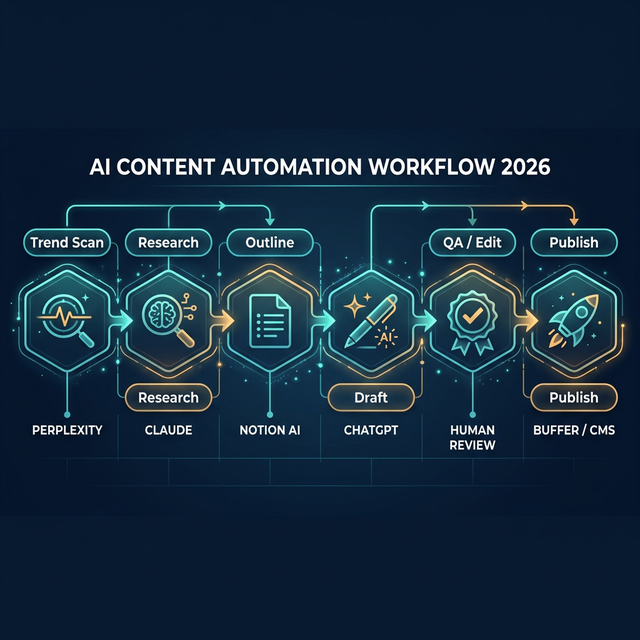
6 steps — Trend Scan → Research → Outline → Draft → QA → Publish — connected by AI and automation
Why Content Teams Need Workflows, Not Just AI Tools
Using individual tools creates breakpoints at every handoff: AI finishes writing → you manually copy to another tool → reformat → add images → schedule → publish by hand.
The bottleneck usually isn't the AI's quality — it's the transfer steps between person and tool. A workflow eliminates that by connecting steps into a continuous pipeline.
What Is an AI Automation Workflow?
An AI automation workflow is a connected sequence of steps:
Trigger → Fetch/Scan → AI Processing → Output → Review → Publish
Example of a typical content pipeline:
Every morning at 8am (trigger)
  → Scan trending topics (fetch)
  → Summarize top 5 topics (AI)
  → Create writing task (output)
  → Human selects topic (review)
  → Write draft (AI)
  → Edit & publish (human + CMS)
A Practical AI Content Workflow in 6 Steps
Step 1: Topic Discovery (Trend Scan)
Tools: Perplexity, Google Trends API, RSS aggregator
Automatically scan morning trends in your industry. Output: a list of 5–10 potential topics each day. No manual work required.
Step 2: Research
Tools: Claude (web search mode), Perplexity
For each selected topic, AI automatically: finds credible sources, summarizes key points, performs basic fact verification. Output: a 300–500 word research brief.
⚠️ Keep human review at this step — don't auto-use research that hasn't been verified.
Step 3: Outline Generation
Tools: Notion AI, Claude
From the research brief, AI generates a structured article outline: H1/H2/H3, keyword placement, internal link suggestions. Saved to Notion for content calendar and task management.
Step 4: Draft Creation
Tools: ChatGPT, Claude
AI writes a full draft from the outline + research brief. No writing from scratch. Output: a draft that needs editing, not immediate publishing.
Repurposing simultaneously:
- Voice memo → transcript → newsletter + social thread
- Long-form blog → short video script → LinkedIn post
Step 5: QA / Edit (Human-in-the-Loop)
Tools: Grammarly, Surfer SEO, human editor
A human editor reviews for: accuracy, brand voice, unique insights missing from the AI draft. AI checks SEO: keyword density, heading structure, readability, meta tags.
This step requires a human — do not skip.
Step 6: Publish & Distribution
Tools: Buffer, Hootsuite, CMS webhook, Zapier/Make
Auto-schedule and publish to CMS, social media, email. Content is automatically adapted to each platform's format requirements.
Common Tools in This Stack
| Layer | Tool examples |
|---|---|
| Trend & Research | Perplexity, Google Alerts, RSS |
| Outline & Planning | Notion AI, Claude |
| Writing | ChatGPT, Claude, Jasper |
| Visual | Canva AI, Midjourney, Adobe Firefly |
| Audio/Video | Descript, ElevenLabs |
| SEO | Surfer SEO, RankMath |
| Automation | Zapier, Make, n8n |
| Publishing | Buffer, Hootsuite, direct CMS API |
Common Mistakes When Building a Content Automation Workflow
- Over-automation: automating steps that require judgment → quality drops
- Not verifying sources: AI can hallucinate facts — no human check = reputation risk
- No scoring/prioritization: publishing every topic AI suggests → wasted effort, unfocused traffic
- Skipping human editorial review: fully AI-generated content without human touch → loses brand voice, feels generic
How to Start Small but Effectively
Week 1: Automate only Step 1 — daily trend scan delivered automatically by email each morning.
Weeks 2–3: Add Step 3 — AI auto-generates an outline from a topic you manually select.
Week 4+: Add Draft (Step 4) once you've calibrated your sense of AI output quality.
Don't auto-publish immediately — add a human review layer first, then gradually reduce review time as the workflow stabilizes.
Conclusion
An AI content automation workflow isn't "AI replacing human writers." It's a system that helps you:
- Never miss trending topics
- Eliminate manual research time
- Stop writing from a blank page
- Scale output without scaling headcount proportionally
Who should implement this: content teams of 1–5 people wanting to increase output without adding staff. Growth teams that need to publish consistently for SEO. Founders doing their own content.
First step to try today: set up a daily trend scan → deliver results to Notion or email. Simple, low risk, immediate value.