How Modern AI Agent Workflows Actually Work: Context, Actions, Verification, and Subagents
AI agents aren't magic — they follow a clear operating loop: gather context, take action, verify output, repeat. This article breaks down each step of the agent loop, the role of subagents, a copy-paste architecture, and common mistakes teams make when building agents.
The Problem With "AI Agents"
Most articles about AI agents sound impressive: "Agents autonomously complete everything!" But when you actually build an agent for production, you quickly realize: one-shot prompting doesn't solve real-world problems.
Real tasks typically require:
- Searching for information before acting
- Editing files, then checking if the edits are correct
- Retrying when something fails
- Narrowing scope when context is too broad
A good agent isn't a "smart prompt" — it's a disciplined loop.
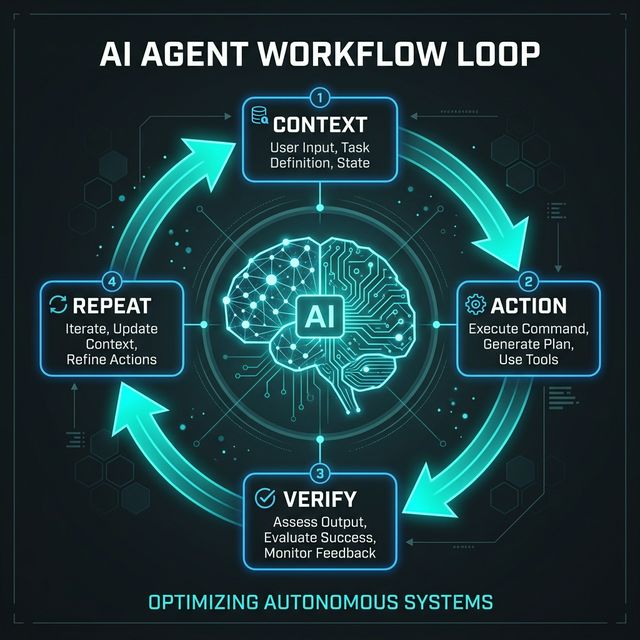
The Agent Loop: 4 Steps
┌──────────┐     ┌──────────┐     ┌──────────┐     ┌──────────┐
│ CONTEXT  │ ──→ │  ACTION  │ ──→ │  VERIFY  │ ──→ │  REPEAT  │
│ Gather   │     │ Execute  │     │  Check   │     │  Iterate │
└──────────┘     └──────────┘     └──────────┘     └────┬─────┘
     ▲                                                   │
     └───────────────────────────────────────────────────┘
Every reliable agent follows this loop — whether it's a coding agent, research agent, or customer support agent.
Step 1: Gather Context
An agent must understand what it's working on before it acts.
Common context sources:
- File system search — scan codebase, find relevant files
- Agentic search — search the web, read documentation
- Prior conversations — previous session history
- Logs, databases — runtime data
- Project structure — understand overall architecture
Context Engineering > Large Context Windows
Having a 200k token context window doesn't mean you should stuff 200k tokens in. Context engineering — selectively pulling only relevant information — matters more than window size.
❌ Wrong: "Here's the entire codebase (500 files), fix the bug"
✅ Right: Agent uses grep/find → finds 3 relevant files → reads only those 3
Step 2: Take Action
With sufficient context, the agent executes.
Action types:
| Type | Examples |
|---|---|
| Tool execution | Run bash commands, call APIs |
| File manipulation | Create, edit, delete files |
| Code generation | Write new code, refactor existing code |
| MCP calls | Connect to Slack, Notion, CRM |
| Data processing | Parse CSV, analyze logs, extract entities |
Tools Are the Primary Execution Surface
Agents don't just describe how to do things — they use tools to actually do them:
# Agent doesn't just say "you should run tests"
# Agent actually runs:
run_command("npm run test")
# Reads output:
read_output()
# Analyzes results:
analyze_test_results()
Step 3: Verify Output
This is the step most agent builders SKIP — and it's exactly why their agents are unreliable.
Verification methods:
| Method | When to use |
|---|---|
| Rules-based checking | Format, naming conventions, required fields |
| Linting | Code style, syntax errors |
| Schema validation | API responses, database records |
| Test execution | Unit tests, integration tests |
| Visual checks | UI components (screenshot comparison) |
| Human-in-the-loop | Critical decisions, risky operations |
Why Verification Matters
Agent reliability comes from feedback loops, not confidence scores. An agent that runs code, sees an error, fixes it, and re-runs the test is far more reliable than an agent that confidently outputs code without verification.
Step 4: Repeat and Compact
Re-run After Feedback
If verification finds issues → agent loops back to Step 1 or 2 with new context.
Memory Discipline
Long-running workflows need memory discipline:
- Compact/summarize context every few steps
- Keep only information relevant for the next step
- Discard stale context
Iteration 1: Context (100%) → Action → Verify → FAIL
Iteration 2: Context (60% compacted) + error info → Action → Verify → PASS ✅
Where Subagents Fit
What are subagents?
The main agent (orchestrator) delegates smaller tasks to child agents running in parallel or sequence.
Benefits:
| Benefit | Explanation |
|---|---|
| Parallelization | Multiple tasks run simultaneously → faster |
| Context isolation | Each subagent receives only the context it needs |
| Focused output | Subagents return concise results to the orchestrator |
Best Use Cases:
- Search — 3 subagents search 3 different sources in parallel
- Code review — subagents review security, performance, style separately
- Research — subagents read 5 articles in parallel, synthesize findings
- Comparison — subagents evaluate 3 options simultaneously
Risks:
- Orchestration overhead (system design complexity increases)
- Conflicting outputs between subagents
- Additional token/cost consumption
A Copy-Paste Agent Architecture
┌─────────────────────────────────────────────┐
│            ORCHESTRATOR AGENT               │
│  - Receives task from user                  │
│  - Breaks into subtasks                     │
│  - Coordinates subagents                    │
│  - Aggregates results                       │
└──────┬──────────┬──────────┬────────────────┘
       │          │          │
  ┌────▼────┐ ┌───▼───┐ ┌───▼───┐
  │ Search  │ │ Action│ │ Verify│
  │Subagent │ │Subagent│ │Subagent│
  └─────────┘ └───────┘ └───────┘
       │          │          │
  ┌────▼──────────▼──────────▼────┐
  │      TOOL LAYER               │
  │  grep, edit, run, MCP calls   │
  └───────────────────────────────┘
       │
  ┌────▼──────────────────────────┐
  │   HUMAN APPROVAL GATE        │
  │   (risky operations only)     │
  └───────────────────────────────┘
5 main layers:
- Orchestrator — brain, manages the flow
- Subagents — workers for bounded tasks
- Tool Layer — actual execution
- Verification Layer — lint, test, validate
- Human Gate — approval for risky operations
Common Mistakes Teams Make
| Mistake | Consequence |
|---|---|
| Treating agents like chatbots with tool access | Agent "talks" instead of "works" |
| Giving too many tools without structure | Agent confused, picks wrong tool |
| No verification layer | Wrong output with no one knowing |
| No context discipline | Context bloat → quality degrades |
| No failure handling | Agent stuck in infinite loop or crashes silently |
| No escalation path | Agent attempts tasks beyond its capability instead of asking a human |
Real-World Use Cases
| Agent Type | Workflow Loop |
|---|---|
| Coding Agent | Read codebase → Write code → Run tests → Fix failures → Commit |
| Research Agent | Search sources → Extract facts → Cross-verify → Compile report |
| Support Agent | Read ticket → Check KB → Draft response → Human review |
| Ops Agent | Monitor metrics → Detect anomaly → Run diagnostic → Alert team |
| Content Agent | Research topic → Draft article → Check SEO → Review accuracy → Publish |
Conclusion
Strong agents are workflow systems, not just better prompts. If you want reliable agents, design the loops, tools, verification, and boundaries first — the model is just one part of the system.
Try it now: Map one workflow in your business onto the 4-step loop. Identify exactly where context, actions, verification, and subagents belong.