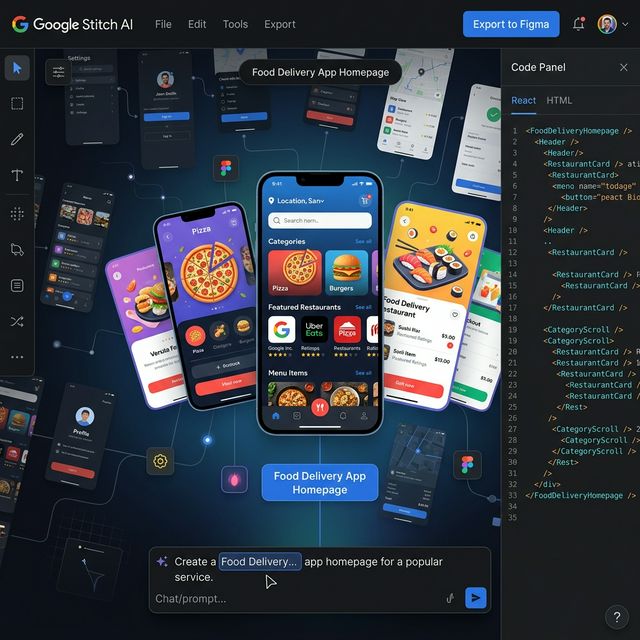
Google Stitch AI — UI Design Tool Powered by Voice, Prompts, and Gemini 2.5
Google Stitch is an AI-powered UI design tool from Google Labs — turning text prompts, sketch images, or voice commands into complete app interfaces with React/HTML code and direct Figma export. Launched at Google I/O 2025, major March 2026 update adds Vibe Designing and infinite canvas.
What Is Google Stitch AI?
Google Stitch is an AI-powered user interface (UI) design tool from Google Labs — launched at Google I/O on May 20, 2025. Stitch lets anyone create complete mobile and web app screens by describing what they want in text, uploading an image, or simply speaking to the AI.
Unlike traditional design tools (Figma, Adobe XD) that require manual drag-and-drop, Stitch works as a design agent: you describe what you want, and the AI creates the layout, colors, typography, and frontend code — all at once.
Google Stitch AI — infinite canvas, chat prompt, direct React/HTML and Figma export
Website: stitch.withgoogle.com
Core Features (Updated March 2026)
1. Text-to-UI — Describe It, Get a Screen
Enter any English prompt describing the app you want — Stitch generates a complete UI screen with fonts, colors, and layout automatically.
Example:
"Create a food delivery app homepage with categories,
featured restaurants, and a search bar. Dark theme,
modern card-based layout."
Result: Fully composed UI with components, responsive layout, and React code.
2. Image & Sketch to UI
Upload screenshots, wireframes, hand-drawn sketches, or whiteboard flows — Stitch reads and converts them into an editable digital UI design.
Real workflow:
- Sketch a layout by hand on paper
- Take a photo → upload to Stitch
- Stitch generates a polished digital UI
3. Voice Commands — Design by Speaking
Launched in the March 2026 update: speak directly into the microphone to:
- Generate new UI screens
- Adjust colors and layout
- Receive real-time design critique from AI
This is part of the "Vibe Designing" concept — articulate your vision through text or voice, and the AI understands and implements it.
4. Prototypes — Multi-Screen User Flows
Launched in December 2025: connect multiple screens into a complete user flow with interaction hotspots. You can:
- "Play out" an entire flow from onboarding to checkout
- Have AI automatically generate the next logical screen
- Simulate user journeys before writing any code
5. Production-Ready Code Export
Stitch generates code in two options:
- HTML/CSS — clean, semantic, ready to embed
- React — component-based, ready to integrate into your project
Plus: direct Figma export to continue refining within your existing design system.
6. AI-Native Infinite Canvas (New March 2026)
Completely redesigned canvas — no more fixed viewport constraints. You can:
- Drag and arrange screens, combine images + text + code
- Explore multiple design directions simultaneously
- Agent Manager: track progress and work on multiple design ideas at the same time
2 Operating Modes
| Mode | AI Model | Speed | Capabilities |
|---|---|---|---|
| Standard | Gemini 2.5 Flash | Fast | Text prompts, basic iteration |
| Experimental | Gemini 2.5 Pro | Slower | Image input, advanced design agent |
Gemini 2.5 Pro in Experimental mode is particularly strong with image-based prompts — upload a reference image and AI understands the design context at a much deeper level.
Comparison With Similar Tools
| Criteria | Google Stitch | v0.dev (Vercel) | Figma AI |
|---|---|---|---|
| Input | Text, image, voice, sketch | Text | Text inside Figma |
| Output | UI + React/HTML + Figma | React + shadcn/ui | Figma layers |
| Multi-screen flow | ✅ Prototypes | ❌ | ✅ |
| Voice commands | ✅ | ❌ | ❌ |
| Code quality | Production-ready | Production-ready | No code |
| Figma export | ✅ | ❌ | Native |
| AI model | Gemini 2.5 | GPT-4o | Inside Figma |
| Price | Free (Google Labs) | Free tier + Pro | Figma subscription |
Who Should Use Google Stitch?
Best suited for:
- Indie hackers and solo builders — validate UI ideas quickly before coding
- Founders — create high-fidelity prototypes to pitch investors without a designer
- Non-designer developers — build polished UIs without learning Figma
- UX Researchers — rapid prototyping multiple variants for concept A/B testing
Less suited for:
- Teams requiring strict design system governance (Figma + Tokens still better)
- Production apps needing pixel-perfect precision
- Full-stack development (Stitch handles frontend UI only)
How to Get Started
- Visit stitch.withgoogle.com
- Log in with your Google Account
- Click New Project → enter a prompt describing your app
- Choose mode: Standard (fast) or Experimental (more capable)
- Iterate through chat — request color changes, layout adjustments, new components
- Export → Figma or React/HTML
Tip: Start with the most detailed prompt you can write (platform, color scheme, vibe, target user) — Stitch produces significantly better results compared to short, vague prompts.
Strengths and Limitations
✅ Strengths:
- Completely free (Google Labs)
- Gemini 2.5 Pro understands design context extremely well
- Multi-screen Prototypes — rare at this price point (free)
- Voice commands + Vibe Designing is a genuinely differentiated UX
- Both Figma and React/HTML exports are clean and usable
⚠️ Limitations:
- Still experimental — may change or be discontinued
- No design system management (tokens, component library)
- Code export occasionally needs adjustment for complex layouts
- No real-time collaborative editing yet
Takeaway
Google Stitch is building toward "vibe designing" — articulate any idea through text, images, or voice, and AI translates it into UI + production-ready code. With Gemini 2.5 Pro and the new infinite canvas (March 2026), Stitch is one of the most capable AI design tools available right now.
If you need to prototype UI quickly, or want to design without a Figma background — try Stitch before paying for anything else.